There is a specific moment in every developer's workflow where a single mistake becomes permanent. It is not when you write the code. It is not when you save the file. It is the moment you run git commit. Once code enters your git history, removing it is painful — and if a secret or a security flaw ships to production, the damage compounds from there.
CodePulse intercepts that moment. Every git commit that Claude Code runs is caught by a hook, analyzed by an AI model in under two seconds, and presented to you in Telegram with findings — before the commit touches your repo. You review the results from your phone, then tap Commit, Skip, or ask for more details.
One prevented production bug per month is worth more than the cost of a premium subscription. That is the bet behind CodePulse Review.
How the Review Pipeline Works
When Claude Code executes git commit, a PreToolUse hook fires before the command runs. CodePulse intercepts it and kicks off a five-step pipeline that takes approximately one second to complete.
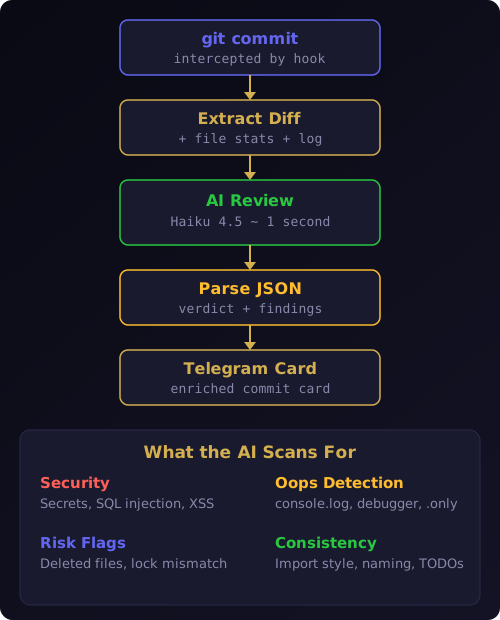
Here is what happens in that one second:
- Intercept — The hook catches
git commitand blocks execution until you approve - Extract context — CodePulse pulls the staged diff, file stats, recent commit history, and the function bodies surrounding each change
- AI analysis — The diff and context are sent to a fast AI model with a focused safety-scanning prompt
- Parse results — The model returns a structured JSON response with a verdict and up to three findings
- Enrich the card — Findings are merged into a rich Telegram commit card with context-aware buttons
The entire pipeline is designed around one principle: never block the developer. If the AI call times out, if the model returns garbage, if anything goes wrong — you still get a standard commit card with Commit and Skip buttons. Review failure never prevents you from shipping code.
What the AI Actually Looks For
The review is not a full architectural analysis. It is a focused safety scan — the equivalent of a senior developer glancing at your diff for three seconds before you push. The AI checks four categories.
Security
- Hardcoded API keys, tokens, passwords, or secrets in the diff
localStorageused for sensitive data- SQL injection patterns and unsanitized user input
- Shell command injection via unvalidated variables
Oops Detection
console.loganddebuggerstatements left in production code- Commented-out code blocks that should have been removed
TODOandFIXMEmarkers without linked issues.onlyin test files that accidentally skip the rest of the suite
Risk Flags
- Files deleted without replacement (was that intentional?)
- Large auto-generated files committed to the repo
- Lock file changes without corresponding
package.jsonchanges - Migration files that drop columns or tables
Pattern Consistency
- Import style mismatches within the diff
- Naming convention violations obvious from the changed code
- Disabled tests committed alongside feature code
The prompt explicitly tells the model: do not flag style preferences, naming opinions, or architectural choices. The review catches accidents and oversights, not taste disagreements.
The Four Card States
Every commit card arrives in one of four states, each with different buttons and visual treatment. This is how the same commit looks depending on what the AI finds.
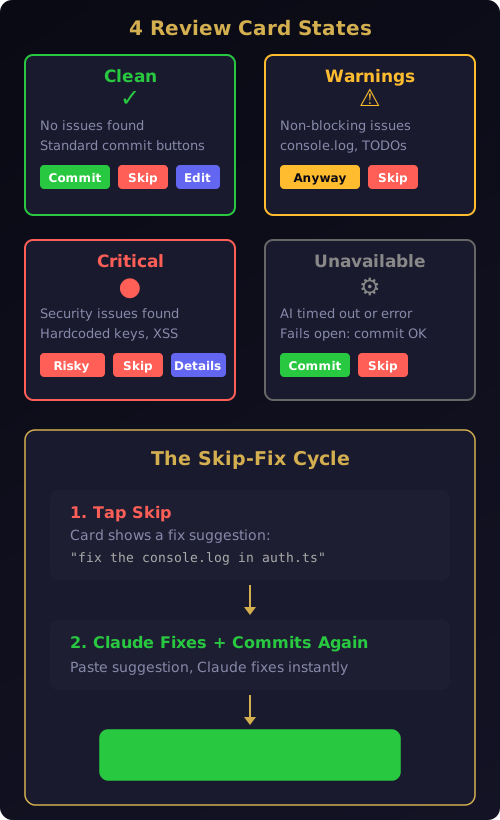
Clean — No Issues Found
The best outcome. The AI scanned your diff and found nothing concerning. The card shows a green checkmark next to "CodePulse Review: Clean" and standard Commit, Skip, and Edit Message buttons. No friction added to your workflow.
Warnings — Non-Blocking Issues
The AI found something worth mentioning but not dangerous. A leftover console.log, a TODO without an issue link, a commented-out code block. The card lists the findings inline and changes the Commit button to "Commit Anyway" — a subtle nudge that you are overriding the review, not ignoring it. A Details button expands the card to show file paths and line numbers.
Critical — Security Concern
The AI found something potentially dangerous: a hardcoded API key, unvalidated user input being rendered, or a raw SQL query with string concatenation. The card border turns red, findings are prominent, and the commit button reads "Commit (risky)." The commit is not blocked — that is a design choice. CodePulse is advisory, never authoritarian. But the friction is intentional. You have to consciously decide to ship risky code.
Unavailable — Review Failed
The AI call timed out, returned an error, or the service is temporarily down. You see a standard commit card with a small "Review: Unavailable" note. Your workflow is completely unaffected. This is the fail-open guarantee: review enhances your commit flow, but never gates it.
The Skip-Fix Cycle That Justifies the Subscription
Here is where the review becomes more than a warning system. When you tap Skip on a card with findings, the card does not just say "Commit Skipped." It generates a fix suggestion — a natural language instruction you can paste directly to Claude Code.
For example, if the review flagged a console.log in auth.ts:34 and a TODO without an issue link in middleware.ts:12, the skip card shows:
Tell Claude: "fix the console.log in auth.ts and add an issue link for the TODO in middleware.ts"
You walk back to your desk (or type it from Telegram via bidirectional communication), paste that instruction, and Claude fixes both issues in seconds. Claude runs git commit again. The new review comes back clean. You tap Commit.
That loop — review, skip, fix, re-review, commit — is the workflow that catches real bugs in production. One prevented incident per month pays for the subscription many times over.
Context-Aware Review: Not Just the Diff
Most automated code scanners look at the diff in isolation. CodePulse does not. Before sending the diff to the AI, the review engine extracts rich context that dramatically improves accuracy.
For each changed file, the engine:
- Reads the import block — so the AI knows what libraries and modules are available
- Extracts the full function body surrounding each change — not just the changed lines, but the complete function they live in
- Includes recent commit history — the last five commits give the AI context about the current work stream
- Loads project-specific rules — if you have defined custom review rules, they are injected directly into the prompt
This context extraction is what pushes review accuracy from pattern-matching territory into genuine code understanding. When the AI sees that a function already validates input through a middleware layer, it does not flag the same input as "unvalidated" three lines later.
For large files (over 500 lines), the engine switches to a windowed strategy — extracting 30 lines above and below each change instead of entire function bodies. This keeps the token payload under control while preserving meaningful context. Files above 15,000 estimated tokens are skipped entirely with a clean verdict, preventing wasted API calls on oversized diffs.
Custom Review Rules Per Project
Different projects have different standards. A game engine might legitimately use eval() while a banking app should never see it. CodePulse lets you define project-specific rules in a simple YAML file.
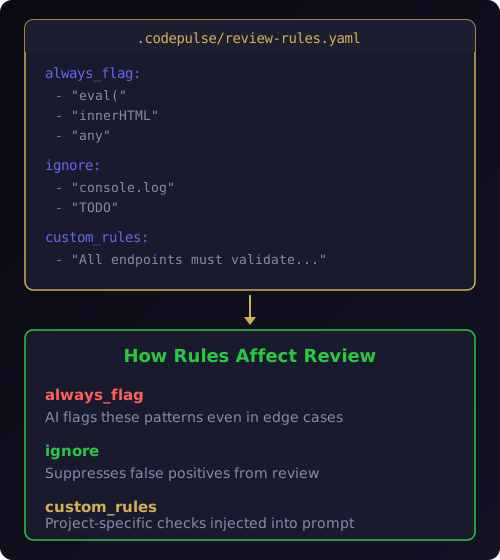
Create a .codepulse/review-rules.yaml file in your project root:
# Patterns to always flag in this project
always_flag:
  - "eval("
  - "innerHTML"
  - "any"

# Patterns to ignore (suppress false positives)
ignore:
  - "console.log"
  - "TODO"

# Project-specific rules (injected into AI prompt)
custom_rules:
  - "All API endpoints must validate req.user.orgId"
  - "Database queries must use the query builder, never raw SQL"

# File patterns to skip review entirely
skip_files:
  - "*.generated.ts"
  - "*.min.js"
  - "migrations/*.sql"
The always_flag and ignore lists tune the AI's sensitivity. The custom_rules section is injected directly into the review prompt as free text — these are project-specific instructions the AI follows alongside its built-in checklist. And skip_files filters out auto-generated code before it ever reaches the AI, saving tokens and avoiding false positives on files you did not write.
If the YAML file is missing, the review uses sensible defaults. If the file has a syntax error, the review proceeds with defaults and logs a warning. The rules system never blocks your workflow.
Three Ways to Use Review
CodePulse Review works at three tiers to fit your setup and budget.
-
Free tier — No AI review. You still get the commit gate with Commit, Skip, and Edit Message buttons, but without the AI analysis. The approval flow works exactly the same — you just make decisions based on the file list and diff stats.
-
Bring Your Own Key (BYOK) — Add your own
ANTHROPIC_API_KEYto the CodePulse.envfile. The review runs locally on your machine, calling the Anthropic API directly. You pay your own API cost — roughly $0.002 per review, or about 500 reviews per dollar. -
Premium — CodePulse handles everything. Your diffs are sent through a secure cloud relay to the AI model. No API key needed, no setup, no token management. Included in your premium subscription alongside Genius Supervisor, voice input, and commit gate.
The Prompt: Narrow, Deterministic, Honest
The review prompt is carefully constrained. The AI is instructed to only flag issues it is more than 85% confident about, to return a maximum of three findings (the three most severe if more exist), and to respond "clean" if nothing notable is found.
The temperature is set to zero for deterministic output. The response format is strict JSON — verdict plus an array of findings, each with severity, message, file path, and line number. This structured output eliminates the rambling, uncertain commentary that makes most AI code review tools unreliable.
The prompt explicitly excludes: style preferences, naming opinions, architectural choices, type checking (that is the compiler's job), formatting (that is the linter's job), and test correctness (that is CI's job). The review occupies a narrow, high-value lane that no other tool in your pipeline covers — catching the human mistakes that slip past automation.
Getting Started
If you are already using CodePulse, the commit review activates automatically when you add an API key (BYOK) or upgrade to Premium. No additional configuration needed.
If you are new to CodePulse, the Windows installer sets up everything — hooks, environment variables, and Telegram connection — in under two minutes. The commit gate is part of the free tier, and you can upgrade to unlock AI review at any time.
Every commit is a decision point. CodePulse makes sure you have the right information at that moment — on your phone, in one second, before the code becomes permanent.
Ready to catch bugs before they ship? Download CodePulse and start reviewing commits from Telegram.