CodePulse is a Windows-first product. Our users run it on Windows. Our installer is an MSI signed for Windows. Our release pipeline tags Windows binaries. For most of CodePulse's lifetime, "does this work on Linux?" was a question we didn't need to answer. The answer turned out to matter anyway, because the bash code we wrote for the Windows installers, the hook helpers, the release validation scripts, the support shell-outs — was bash. And bash on Windows, via Git Bash, is not bash on Linux. We ran our own scripts on a real Linux runner for the first time. Half of them broke. This is the story of why, what we found, and the CI workflow that catches it from now on.
How we got here
The first bash script in CodePulse was a small post-install helper for the hook installer in v1. It did three things: detect the user's Claude Code config directory, write a hook entry into a JSON file, and report success. The script ran in PowerShell on most Windows machines via the bash that ships with Git for Windows. Git Bash. We wrote the script, tested it on a developer machine, watched it run end-to-end during a real install, and shipped it.
Over the next year, the bash footprint grew. We added scripts for:
- Probing the Claude Code installation paths across versions
- Validating the install state after an MSI run (folder ownership, registry keys, hook file presence)
- Generating release notes from git log diffs
- Checking that signed binaries match their manifests
- Running smoke tests against a built binary as part of CI
- Helper scripts for support engineers to gather diagnostic bundles
Each one was written, tested locally, and shipped. Each one was tested in Git Bash — the bash environment our developers had open. None of them were ever run against actual Linux. That fact didn't seem to matter. Our users didn't run Linux. Our CI runners ran Windows for the binary builds and macOS for the codesigning. The scripts worked.
Then we started building the Real-life mode roadmap, and Real-life mode opened the door to running CodePulse against MCP toolkits — including ones that expose tools to manipulate developer infrastructure. A user might run a CodePulse session that helps them debug a Linux deploy, hand-roll a sed command, paste it into our mcp__shell invocation. The bash that flows back through CodePulse needed to behave the same way bash does on Linux. We needed a Linux environment in CI that could validate these flows. The same CI lane could finally validate our own scripts against the same kernel they'd been claiming to support all along.
Setting up the runner
We added a Linux job to our GitHub Actions workflow. ubuntu-latest, install Bun, check out the repo, run the bash scripts in tools/ with bash -e. The first run failed in 90 seconds. The second run failed in 110 seconds — different script, different error. By the end of the day we had eight scripts on the broken list and a long file of "WTF is this" notes.
The errors fell into clean categories. Looking at them now they're predictable. Living through them was the embarrassing part.
What broke, and why
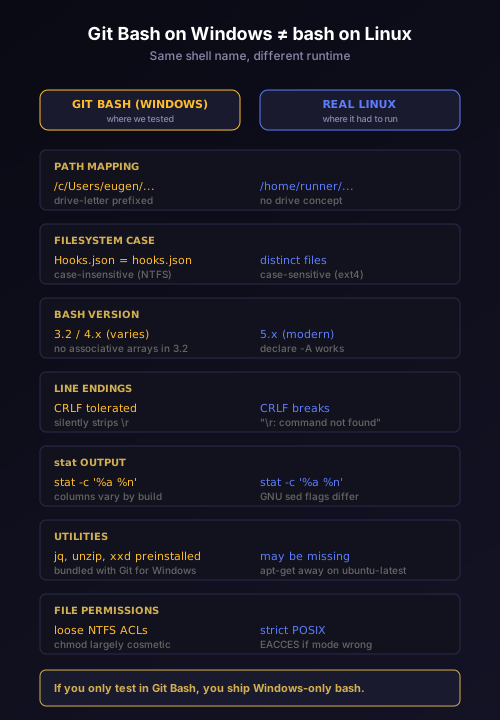
Path separator assumptions. Several scripts had hard-coded /c/Users/... or /d/Github/... paths. Git Bash maps Windows drive letters into a Unix-style root with /c/, /d/, etc. Linux has no such mapping. The scripts that looked like they were doing portable Unix path manipulation were actually doing Git Bash-specific path remapping. On Linux, the paths simply didn't exist; the scripts errored with "no such file or directory."
Case-insensitive filesystem assumptions. Windows NTFS treats Hooks.json and hooks.json as the same file. Linux ext4 does not. Several scripts had naming inconsistencies — one created Hooks.json, another read hooks.json — that worked on Windows because both names resolved to the same file. On Linux, the second script failed to find the file the first script had created.
Tool version drift. Git Bash ships an older sed, an older awk, and a much older bash (3.2 in some installs, 4.x at best). Linux runners ship modern equivalents — sed with extended regex defaults different from BSD-style, bash 5.x with associative arrays the older bash doesn't support. A script using declare -A worked on the developer's Linux laptop but failed on the runner's older bash simulation; another script using sed -i worked on Linux but used a different syntax than what GNU sed expected for the default flags.
Line ending handling. Some scripts had been edited on Windows and saved with CRLF line endings. Git Bash quietly tolerates this; Linux does not. A script with CRLF endings produced "\r: command not found" errors in obscure places — typically in error-handling branches that only fired during failure. The scripts looked fine when they worked. They fell apart when something else went wrong.
Stat output format. Several scripts called stat and parsed its output. stat -c '%a %n' file works on Linux. stat on macOS uses -f. Git Bash's stat has its own variant. A script that worked on Git Bash because the developer was on Windows broke on Linux because Linux's stat returned a different column order. The script wasn't checking for the column order — it was assuming.
Missing utilities. A handful of scripts called utilities that exist on Windows-via-Git-Bash but not on a fresh Ubuntu runner. unzip was assumed but had to be installed. jq was assumed but isn't in the default Ubuntu image. xxd was used to convert hex to bytes but isn't in ubuntu-latest by default. Each one was a apt-get install away — but the script didn't check, didn't install, didn't fall back.
Permission semantics. A couple of scripts wrote files and then expected to read them back from another script in the same job. On Linux, the second script ran as a user without write permission to the first script's output directory, because we'd created the directory with overly restrictive chmod 700. On Windows, NTFS permissions are loose enough that nothing complained. On Linux, the second script saw EACCES.
Fixing each class
We worked through them in order of frequency.
The path-separator class got the most surgery. Every hard-coded /c/... or /d/... was replaced with ${HOME} or ${PWD} or a discovered directory from which / command -v. Every script that called Windows-specific tools was wrapped in a shell guard: case "$(uname -s)" in to detect Linux, macOS, MINGW, MSYS, CYGWIN. Behavior diverged inside each case branch.
The case-sensitivity class meant renaming files to a canonical lowercase. We did a pass through the repo, normalized names, updated every reference. This also fixed a class of subtle bugs on macOS for the few users running CodePulse experiments there — macOS HFS+/APFS is case-insensitive by default but case-preserving, which means renaming Hooks.json to hooks.json "works" but doesn't always show up in ls. Linux is the strictest filesystem, so designing for Linux fixed both.
The tool-version class got set -euo pipefail plus version pins. Every script now declares which tools it requires and, in CI, we install pinned versions of bash, sed, awk, jq to a known location and put it on PATH. This means scripts running in CI run against the same toolchain regardless of which runner OS they're on, eliminating an entire category of "works on my machine."
The line-ending class got a .gitattributes rule normalizing all *.sh to LF. Anyone who edits the file on Windows now gets LF on commit even if their editor saved CRLF. We also added a pre-commit check that fails if any tracked *.sh has CRLF endings, so this can't reappear.
The stat-format class got a small lib/stat-portable.sh helper that wraps stat and returns a normalized output regardless of host OS. Scripts that need stat values import the helper.
The missing-utilities class got an assert_tool shell function that scripts call early to declare their dependencies. The function exits with a clear error if a required tool is absent. CI installs the standard set as a one-time provisioning step.
The permission class was a rule change: any directory created by a CodePulse script that's expected to be read by other scripts in the same workflow gets chmod 755, not 700. Scripts that need actual privacy use a tempdir.
The CI workflow that catches it now
The workflow we ended up with is straightforward. A new GitHub Actions job called tests-sh-linux.yml runs on every push to dev and on every PR. It does the following:
- Checks out the repo on
ubuntu-latest - Installs the pinned toolchain (jq, gnu-sed, modern bash)
- Runs every
*.shintools/andtests/sh/withbash -euo pipefail - Runs a small smoke test that exercises the common code paths (path discovery, file-mode assertions, JSON manipulation)
- Fails the build on any non-zero exit
The job runs in about three minutes. It's now part of the PR-required-checks list, so a script change that breaks Linux behavior cannot be merged.
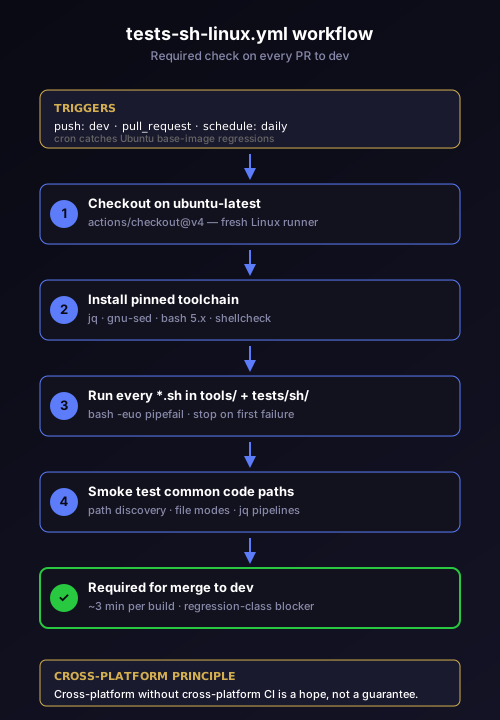
We also added a daily cron run of the same workflow against the latest ubuntu image, so an Ubuntu base-image change that drops a tool we depend on shows up before a developer gets bitten.
What this taught us about "cross-platform"
We'd been calling our scripts cross-platform for years. The label was technically accurate — they ran in Git Bash, on macOS, and (now) on Linux. The label was practically misleading because we were testing only the first surface. Cross-platform without cross-platform CI is a hope, not a guarantee.
The fix wasn't to drop bash. Bash is fine. The fix was to treat each platform we claim to support as a tested platform, with its own CI lane and its own validation set. The cost of adding a Linux lane was a single GitHub Actions YAML file and three minutes per build. The benefit was discovering eight broken scripts before a Linux user did.
We've started applying the same principle elsewhere. The release validation scripts now run against a fresh macOS runner as well as Windows, because some of them had macOS-specific bugs hiding behind the same "we never test it" gap. The hook installer now has its own end-to-end test against a fresh Claude Code install on each OS, because the hook resolver chain we built for cross-platform parity needs the cross-platform test surface to be honest about what it's checking.
What this didn't fix
Adding a Linux CI lane didn't make CodePulse a Linux product. We still ship a Windows MSI. Our users still run on Windows. The Real-life mode work is still primarily Windows-targeted. What the CI lane did fix was the integrity of our scripts — the foundation that the Windows product relies on. If a developer adds a script tomorrow that assumes /c/Users/..., CI catches it. If a developer renames a file with inconsistent casing, CI catches it. If a developer uses a bash 4 feature in a script that needs to support older shells, CI catches it.
That foundation matters because CodePulse's release pipeline runs through these scripts. Our installers run them. Our support engineers run them. Our future Linux Server build — if and when we ship it — will run them. Every time we'd skipped Linux validation, we'd been accumulating risk against a future where one of these scripts has to actually work on Linux. The CI lane stopped the accumulation and gave us a path to drain the existing debt.
The lesson, plainly
If your scripts claim to be portable, prove it on every platform you claim. The cost of one extra CI lane is a few minutes per build. The cost of discovering bash-on-Linux bugs in production is much higher — depending on the bug, anywhere from a confused user to a broken release. We waited too long to add this lane. The lane took an afternoon to build. The lessons it surfaced will pay off for as long as CodePulse ships shell.
If you're reading this and you have shell scripts that have only ever been validated against Git Bash — or only against macOS, or only against your developer laptop — the next CI job worth adding is one that runs them on a fresh runner of every OS your users could plausibly hit. Even if your users don't run that OS, your scripts probably will, sooner than you think.
Want to see what cross-platform discipline looks like in production? Download CodePulse on Windows and watch the install run scripts that are now validated on Linux every PR. The features page has the full Code-mode and Real-life-mode rundown. Premium plans on the pricing page include AI commit review and a deeper view into the workflow guarantees behind every release.