You are walking your dog when a recruiter emails. You want to reply, schedule a quick call, and drop a calendar invite — without reaching for a laptop, without switching between five apps on your phone, without leaving the chat thread you actually use all day. CodePulse Real-life Mode lets you do that from Telegram. One message: "draft a reply, propose tomorrow 3pm, send a calendar invite." Claude handles the Gmail draft, the calendar event, and the meeting link. You approve each card with a tap. You never break stride.
This is the story of how CodePulse — originally a tool for driving Claude Code from your phone — grew a second mode that does the rest of your work. Why we built it, how the architecture stays out of its own way, and what it means for the way you spend your day.
The original CodePulse: code, and only code
CodePulse v1 had a single purpose: let you supervise your AI coding agent from anywhere. You start a Claude Code CLI session on your dev machine; CodePulse forwards every tool call (Bash, Edit, Read) to Telegram as an approval card; you tap Allow or Deny from your phone. The bot watches over the agent so you don't have to babysit it.
That works beautifully when you're heads-down in a feature branch. The problem is that real work isn't only code. You also have an inbox to read, a calendar to manage, a Linear board to update, documents to find on Drive, conversations on Slack. Your AI assistant could help with all of those, too. Claude Desktop already speaks the Model Context Protocol and connects to most of those services. But Claude Desktop runs locally on your laptop. If you're not at your laptop, those tools sit idle.
The gap is the gap between the device where the AI runs and the device that's actually in your hand. Phones don't run Claude Desktop. Phones run Telegram, and Telegram is already where your team chats, where your AI commit reviews land, where your CodePulse approval cards arrive. The natural extension was obvious: let Claude run remotely against your full MCP toolkit, and let Telegram drive it.
We call that extension Real-life Mode. It shipped between v2.3.125 and v2.3.130 over six releases. By the end of that range, every tool Claude Desktop can reach — Gmail, Calendar, Drive, Linear, Slack, every MCP server you have configured — became reachable from a Telegram message.
A typical Real-life session
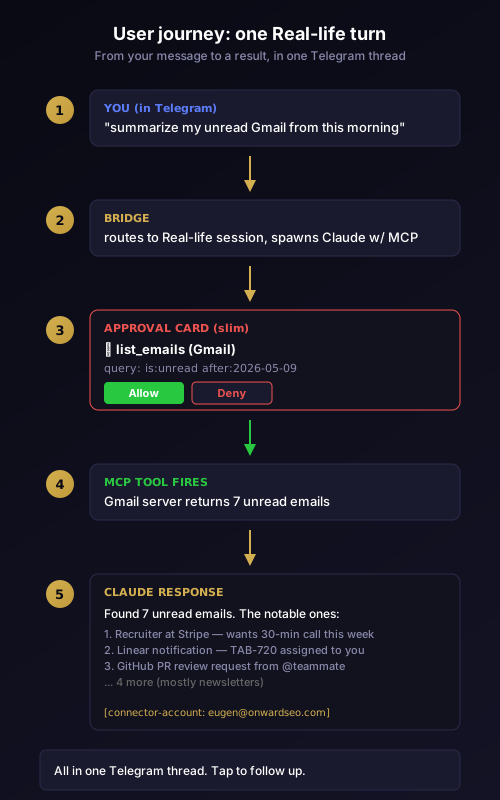
The interaction model is conversational. You send a message in plain English. The bot picks Real-life Mode, spawns a Claude session configured with your MCP toolkit, and Claude figures out which tools to use.
You: summarize my unread Gmail from this morning

Bot: 📨 list_emails (Gmail)
     query: is:unread after:2026-05-09
     [Allow] [Deny]

You: [taps Allow]

Bot: Found 7 unread emails. The notable ones:
     1. Recruiter at Stripe — wants a 30-min call this week
     2. Linear notification — TAB-720 assigned to you
     3. GitHub PR review request from @teammate
     ... 4 more (mostly newsletters)
That's the read side. Approvals are explicit, results are returned in the same chat thread, and you can chain follow-ups in plain English: "draft a reply to Stripe accepting Wednesday 3pm" or "update TAB-720 with my latest comment". The bot routes each request through the appropriate MCP tool, surfaces an approval card for any write operation, and returns the result.
For the write side — send_email, create_event, create_issue — the approval card is mandatory. You see exactly what's about to be sent, where, and to whom. Tap Allow to proceed. Tap Deny to abort. There is no "trust me, it'll be fine" path. Real-life Mode is built around the principle that AI agents should never act on your behalf without your explicit consent for every irreversible action.
How it works under the hood
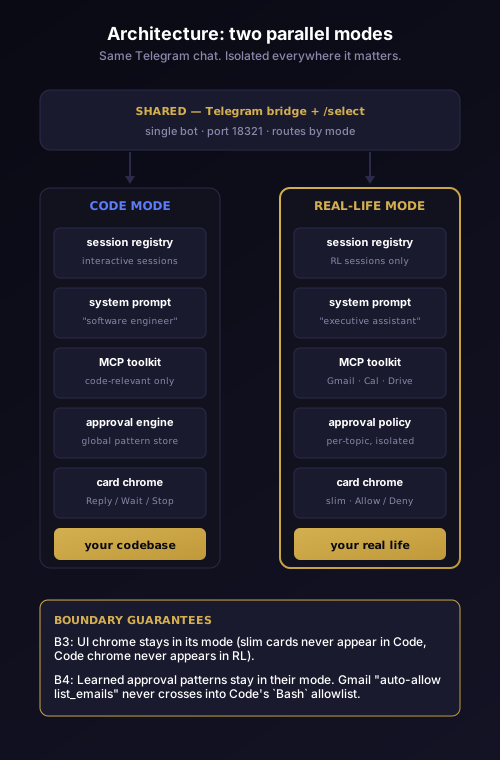
Real-life Mode is not "Code mode with a flag flipped." It is a parallel session topology, isolated from Code mode at every layer that matters.
When you tap [Real-life] in the /select picker, CodePulse spawns a Claude CLI session with three things that differ from Code mode:
- A different system prompt. Code mode's prompt is tuned for "you are a software engineer working on this repo." Real-life mode's prompt is tuned for "you are an executive assistant with access to the following MCP servers." The model receives no Code-mode chrome at all.
- A different MCP toolkit. Real-life sessions inherit your existing CLI MCP server config (
mcp-config.json), which typically includes Gmail, Calendar, Drive, Linear, Slack, and any third-party connectors you've added. Code mode sessions only see code-relevant servers. - A different approval policy. Real-life uses a read/write classifier with per-topic policy so that learning what "auto-allow Gmail list_emails for this topic" means doesn't leak into the rules governing your
Bashapprovals in Code mode.
The two session types share nothing except the bridge process itself, and even that boundary was tightened in a major refactor that extracted a dedicated CLI bridge for Real-life. The reason for that level of isolation is subtle but important: when you switch from Code mode to Real-life mode mid-conversation, the chrome, the learned patterns, the response cards — everything — switches cleanly. Nothing from the previous mode bleeds into the next.
What you can actually do with it
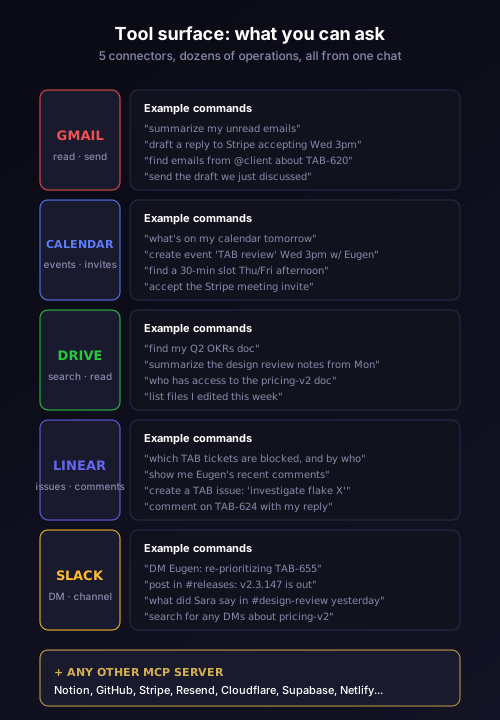
The MCP ecosystem is the surface area. CodePulse doesn't implement Gmail or Calendar — it routes your Telegram messages to whichever MCP server already provides those tools. Most users start with five connectors that cover the bulk of daily work outside of code:
- Gmail — list, read, draft, send. Search by sender, label, or date.
- Google Calendar — list events for a day or week, create events with attendees and meet links, accept or decline invitations, find free slots across multiple participants.
- Google Drive — search by content or filename, read documents, fetch sharing permissions, get metadata.
- Linear — list issues, read comments, save comments, save issues, create attachments, fetch project status.
- Slack — list channels, read channel history, post messages, search across DMs and channels.
You can also add anything else with an MCP server. Notion, GitHub, Stripe, Resend, Cloudflare, Supabase, Netlify — all of them have official MCP servers. Configure them in your MCP toolkit config once; from then on, Real-life Mode reaches them.
The interaction patterns that work best are not "do one thing" — they are "do this thing in the context of that thing." A few real examples that became part of our daily workflow within a week of shipping Real-life:
You: which Linear tickets in TAB are blocked, and who's blocking them?

Bot: list_issues (Linear)
     filter: status=Blocked, team=TAB
     [Allow] [Deny]

You: [Allow]

Bot: 4 blocked tickets:
     - TAB-624: blocked by Eugen (waiting on design review)
     - TAB-631: blocked by external API
     - TAB-655: blocked by TAB-624
     - TAB-712: blocked by waiting on customer reply
You: what was Eugen's last reply on TAB-624?

Bot: list_comments (Linear)
     issue: TAB-624
     [Allow] [Deny]

You: [Allow]

Bot: Last comment by Eugen, 2 hours ago:
     "Design review feedback inbound. ETA Friday."
You: ok, draft a message to Eugen on Slack saying we'll re-prioritize TAB-655 once 624 unblocks

Bot: post_message (Slack)
     channel: #eugen-dm
     text: "We'll re-prioritize TAB-655 once 624 unblocks. No
     rush, just letting you know it's not lost."
     [Allow] [Deny]
Three messages, three approval taps, four MCP servers crossed (Linear list, Linear comments, Slack DM lookup, Slack post). All from Telegram. All while the laptop is closed.
Approvals you can actually live with
The friction point in any AI-assistant tool is approval fatigue. Get prompted on every read and you'll start tapping Allow without reading. Get prompted on too few writes and you risk an agent doing something unrecoverable. CodePulse's read/write classifier is calibrated for this exact tradeoff.
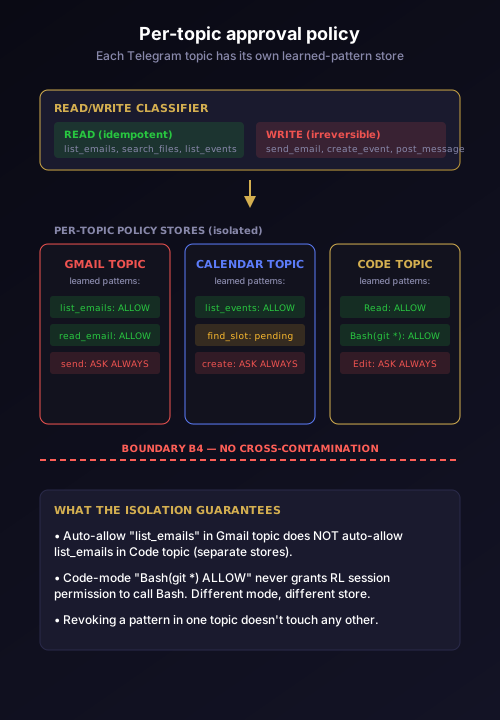
Read tools that are idempotent and side-effect-free — list_emails, list_events, search_files, list_issues — auto-approve after the first manual approval per topic. The bot toasts the approval ("Auto-approved: list_emails") so you can see it happening, and you can revoke the auto-approval per pattern at any time. Write tools — send_email, create_event, save_issue, post_message — always ask. There is no auto-approve path for the irreversible operations.
The approval cards themselves are designed to be glanceable on a phone. Instead of file paths and line numbers (the Code mode chrome that doesn't make sense for Gmail), the Real-life cards show the action verb and target as the headline ("send_email to [email protected]"), with the most important detail (subject line, event title, channel name) on a single supporting line. Tap Allow with one thumb. Tap Deny if anything looks off.
The approval state itself is per-topic — meaning your Gmail decisions live in the Gmail Telegram topic, your Calendar decisions live in Calendar topic, your code-review decisions stay in the code repo's topic. None of those decision histories cross-contaminate. We learned that the hard way during Phase 6: an early Real-life build leaked Code-mode approval patterns into Real-life cards (and vice versa), which made approvals feel arbitrary and the learning model unreliable. The Boundary B4 isolation guarantee makes that leak structurally impossible now.
What's coming, and what we deliberately chose not to ship yet
Real-life Mode shipped at v2.3.130. The roadmap from there is a series of waves, each adding one major capability without compromising the isolation invariants:
Wave 1.5 — voice in Real-life. Today voice messages route to a Code-mode planner, which doesn't understand Real-life semantics. Wave 1.5 routes voice transcription directly to the Real-life workflow. Send a voice message saying "what's on my calendar tomorrow" and Claude treats it the same as if you had typed it. Already partially shipped in v2.3.139–v2.3.141 with the voice-in-RL fix; the wake-word and voice-approval pieces are next.
Wave 2 — edit-via-reply. Right now if you want to change a draft, you tap Deny on the approval card and re-prompt with the change. Wave 2 lets you reply to the approval card with the edit ("change the meeting to 3:30 instead of 3") and CodePulse re-renders the card with your edit applied. Soft-send window with a Cancel button means you can always undo within a few seconds even after Allow.
Wave 3 — confidence scores + batch approvals + pre-flight tool count. When Claude is about to call 7 MCP tools to answer one question, you should see "this will use 7 tools" before it starts, with a confidence score per tool. You should also be able to batch-approve all of them with one tap if they're all read-only, instead of tapping Allow seven times.
Wave 4 — TTS readback. Claude reads its responses aloud through your phone speaker. Useful for hands-free contexts (driving, walking the dog, cooking).
What we deliberately chose not to ship: an "auto-mode" that runs Real-life agents without per-write approval. Other tools in this space ship that mode and call it a feature. We won't, because the cost of an unsupervised AI agent sending a wrong email or creating a wrong calendar event vastly exceeds the convenience of skipping the approval tap. CodePulse Real-life is opinionated about that. Every write requires you.
Why this matters
Three things that are simultaneously true today:
- Most knowledge work happens through services that have MCP servers. Gmail, Calendar, Drive, Linear, Slack, GitHub, Stripe, Notion — they all have first-party or community MCP servers shipping right now.
- Most knowledge workers spend more of their day on Telegram (or some equivalent always-on chat surface) than they do at their laptop. Phones are where mid-day work happens.
- The current state of the art for "AI assistant on my phone" is either ChatGPT (powerful model, no MCP, no approval workflow) or Claude Desktop (powerful model, full MCP, runs only on your laptop).
CodePulse Real-life sits in the gap between those two. You get Claude — the same model that runs Claude Desktop — driving your full MCP toolkit. You get a Telegram-native interface that runs anywhere your phone goes. You get explicit approval for every write, with structural guarantees that the agent can't make a decision you didn't authorize. You get a single inbox where AI commit reviews, code approvals, Gmail drafts, calendar events, and Linear updates all converge.
That last point is the one we keep hearing back from early users. Not "I love that I can Gmail from Telegram" — that's a feature. The thing they actually mention is that they stopped having seven tabs open. They stopped switching contexts. They stopped checking laptop and phone separately. Their assistant lives in one chat thread.
Try it
The Real-life Mode infrastructure ships in CodePulse v2.3.130 and later. Configuring it takes about ten minutes if you already have an MCP toolkit set up; about thirty if you're starting from scratch (most of which is going through Google's OAuth flows for the first time per service). The full setup walkthrough is in the docs, and the /setup Telegram command will walk you through it interactively.
Once it's set up, you tap /select in your CodePulse Telegram chat and the keyboard shows three buttons: [Code], [Real-life], [Exit]. Tap Real-life. Send your first message — "what's on my calendar this afternoon" is a good starter. The first MCP tool call asks for explicit approval; subsequent reads of the same kind auto-approve under the per-topic policy.
If you want to dig into the architecture before adopting, the hook resolver story explains how CodePulse stays alive across hours of Telegram activity, and the terminal-to-Telegram piece covers the bidirectional CLI protocol that makes both modes work without a separate server.
Ready to try Real-life Mode? Download CodePulse and set up your MCP toolkit through the /setup wizard. The free tier includes Real-life Mode with the full read/write classifier and per-topic policy. Upgrade to Premium for AI commit review, voice input, and the rest of the platform.