Claude Code is brilliant at writing software. It is not brilliant at knowing which questions are worth interrupting you for.
"Should I run the tests?" Yes. "Should I format the code?" Yes. "Should I add TypeScript types?" Yes. These are not decisions. They are rituals — obvious answers that every developer gives the same way, every time. And yet Claude Code stops working, sends a blocking prompt, and waits. Your phone buzzes. You pull it out, glance at the question, tap the obvious answer, and put it back. Multiply that by fifteen times per session and you are no longer managing an AI agent. You are babysitting one.
CodePulse's Genius Supervisor eliminates this. It sits between Claude Code and your phone as an AI-powered secretary — intercepting every question, classifying its importance, and answering the routine ones automatically. Only the questions that genuinely require your judgment reach Telegram. Everything else is handled for you, with a full audit trail and an Override button if the secretary gets it wrong.
This is the feature that turns CodePulse from a remote control into an intelligent assistant manager.
The Problem: Not All Questions Are Equal
When Claude Code finishes responding, its Stop hook fires. This happens every time Claude completes a response — not just when it asks a question. A significant portion of Stop events are purely informational:
- "All 12 tests pass."
- "I've applied the changes to auth.ts and user.ts."
- "The refactor is complete. Here's a summary of what changed."
These messages do not need your attention. They are status updates. But mixed in with the status updates are real questions:
- "Should I use Redis or PostgreSQL for sessions?"
- "I found three approaches for the auth system. Which one do you prefer?"
- "Ready to deploy to production?"
Without intelligent classification, every Stop event becomes a blocking Telegram card. Your phone buzzes on every "Done!" and Claude freezes waiting for a tap. That is not remote control — that is remote torture.
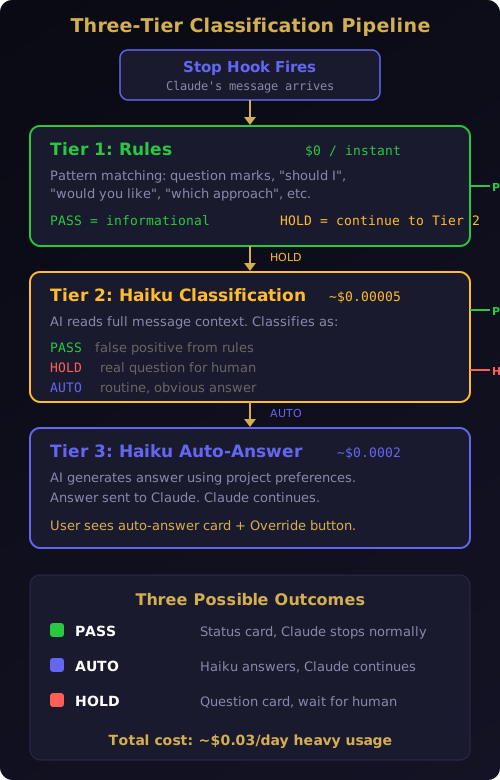
The Genius Supervisor solves this with a three-tier classification pipeline. Each tier adds intelligence while the previous tier provides a cost-free safety net.
Three Tiers of Intelligence
The classification pipeline processes every Stop event through three layers. Each layer is more sophisticated (and more expensive) than the last, but the pipeline short-circuits at the earliest possible point. Most messages never reach Tier 2.
Tier 1: Rules — Free, Instant, Always On
The first tier is a pure rules-based classifier. Zero API cost. Zero latency. It handles over 80% of cases correctly by applying simple pattern matching.
The classifier checks two categories. First, it looks for signals that Claude is asking a question or requesting a decision:
- Messages ending with a question mark
- Phrases like "should I", "would you like", "which approach", "do you prefer", "please confirm"
- Choice presentation patterns like "Option 1:", "Approach A:"
If any of these patterns match, the message is classified as hold — it needs human attention. If none match, the message is classified as pass — it is informational, and Claude can stop normally.
The default is pass. This is a deliberate design choice. A false hold (blocking on "Done!") is worse than a false pass (missing a question). It is better to occasionally miss an ambiguous question — the user can always re-engage — than to spam the phone with every completion message. Precision over recall.
The rules tier catches the obvious cases. "All tests pass." is clearly informational. "Should I fix BUG-2 first or commit as-is?" is clearly a question. But the rules are intentionally simple, and they produce false positives. "I'm waiting for the build to complete" contains "waiting for" and triggers a hold, even though Claude is not asking anything. This is where Tier 2 steps in.
Tier 2: Haiku Classification — AI Refinement
When Tier 1 classifies a message as hold, the pipeline sends it to Claude Haiku for a second opinion. Haiku reads the message and classifies it into one of three categories:
- PASS — Informational. The rules were wrong. This is a false positive.
- HOLD — Real question. This needs a human decision.
- AUTO — Routine question with an obvious answer. The AI secretary can handle this.
The classification prompt is tightly constrained. Haiku is told to classify, not to answer. The response is exactly one word. The API call uses a 10-token max output limit — just enough for "PASS", "HOLD", or "AUTO". Each call costs approximately $0.00005 and completes in under 200 milliseconds.
This is where Haiku corrects the rules tier's mistakes. "I'm waiting for the build to complete" — Tier 1 flagged this as hold because of "waiting for." Haiku reads the full sentence, understands it is a status update, and reclassifies it as PASS. The message becomes a silent notification card instead of a blocking question.
More importantly, Tier 2 identifies the messages that fall into a new category the rules tier cannot recognize: routine questions with obvious answers. "Should I run the tests?" is a question — Tier 1 is right to flag it. But it is not a question that requires human judgment. The answer is always yes. Haiku classifies it as AUTO.
Tier 3: Haiku Auto-Answer — The AI Secretary
When Tier 2 classifies a message as AUTO, the pipeline asks Haiku to generate an answer on behalf of the developer. This is the core of the Genius Supervisor — an AI model answering another AI model's questions, guided by your project preferences.
The auto-answer prompt is loaded with context:
- The original question from Claude Code
- Your project preferences (from a configuration file)
- Common developer patterns (always run tests, always lint, always add types)
Haiku generates a brief, direct answer — maximum two sentences. That answer is returned to Claude Code as a blocking response with the answer text as the reason. Claude reads the answer and continues working as if you had answered yourself.
On your phone, you see a status card showing what Claude asked and what Haiku answered. The card includes an Override button — more on that below. But you do not need to tap anything. Claude is already working.
The entire Tier 3 call costs approximately $0.0002. For a heavy-use session with 30 Stop events, roughly 10 reach Tier 2 and 5 reach Tier 3. The daily cost is about $0.03. For a team of 30 developers, that is approximately $18 per month — for an AI secretary that handles hundreds of routine decisions per day.
The Full Pipeline in Action
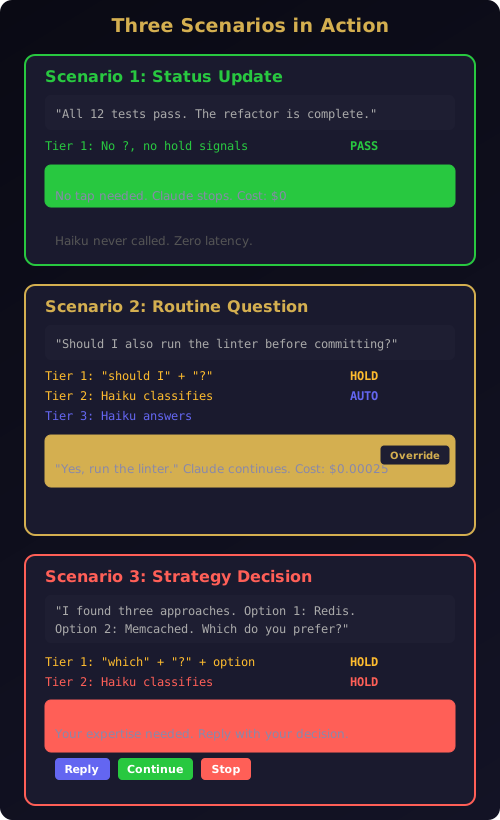
Here is what happens in real time when Claude finishes a response:
Scenario 1: Status update
Claude says: "All 12 tests pass. The refactor is complete."
Tier 1 rules check — no question mark, no hold signals. Classification: PASS. A green status card appears in Telegram. Claude stops normally. No Haiku calls. Cost: $0.
Scenario 2: Routine question
Claude says: "Should I also run the linter before committing?"
Tier 1 rules check — contains "should I" and ends with "?". Classification: HOLD. Pipeline continues to Tier 2. Haiku reads the message and classifies: AUTO. Pipeline continues to Tier 3. Haiku generates: "Yes, run the linter before committing." The answer is sent back to Claude. Claude runs the linter and continues working.
On Telegram, you see: "Haiku auto-answered: Should I also run the linter? → Yes, run the linter before committing." No tap required. Total cost: $0.00025.
Scenario 3: Strategy decision
Claude says: "I found three approaches for the database schema. Option 1: normalized with joins. Option 2: denormalized for read speed. Option 3: hybrid with materialized views. Which approach do you prefer?"
Tier 1 rules check — contains "which approach", ends with "?", and matches option presentation pattern. Classification: HOLD. Pipeline continues to Tier 2. Haiku reads the message and classifies: HOLD. This is a real architectural decision. No auto-answer.
A question card appears in Telegram with the full message. You read the options, tap Reply, and type "Option 3, but skip materialized views for now — use simple caching." Claude receives your answer and continues. This is the kind of question that should reach your phone.
Context-Aware Buttons: The Template Engine
The intelligence layer extends beyond Stop events into the approval flow. When Claude requests permission to use a tool, the buttons you see are not generic. They adapt to what Claude is trying to do.
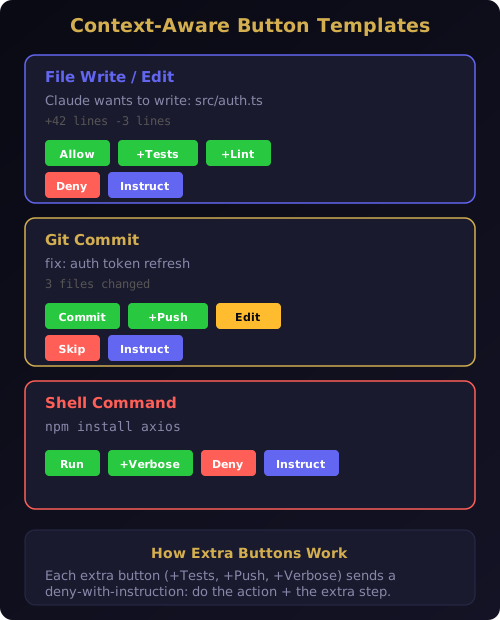
When Claude wants to write a file, you see:
Allow | Allow+Tests | Allow+Lint | Deny | Instruct
When Claude wants to commit code, you see:
Commit | Commit+Push | Edit Message | Skip | Instruct
When Claude wants to run a shell command, you see:
Run | Run+Verbose | Deny | Instruct
The buttons change because the Template Engine matches every tool request against a set of rules. File operations get testing and linting shortcuts. Git commits get push and edit options. Shell commands get verbose mode. Each extra button works through the same mechanism: it returns a deny-with-instruction response that tells Claude to do the original action plus an additional step.
Tap "Allow+Tests" on a file write, and Claude writes the file, then runs the test suite — all from a single button tap. Tap "Commit+Push" on a commit card, and Claude commits and pushes to origin in one action. These compound actions save you multiple round trips and keep your phone interactions minimal.
The template rules evaluate in priority order. Specific matches (like git commit) take precedence over generic matches (like any Bash command). If no rule matches, the card falls back to standard Allow, Deny, and Instruct buttons. The system is additive — new template rules can be added without modifying existing ones.
The Override Button: Your Safety Net
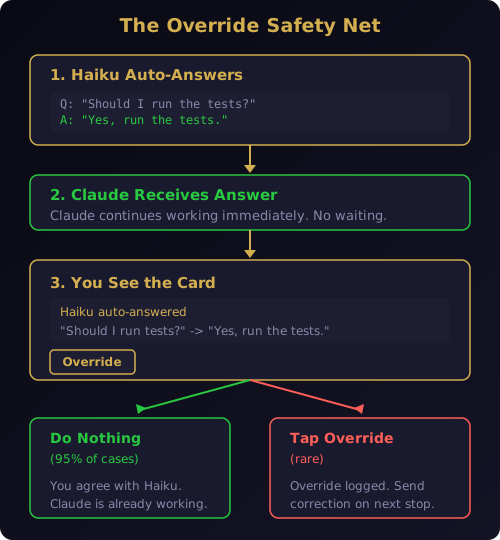
Every auto-answered question shows an Override button in the Telegram card. This is the safety mechanism that makes the entire system trustworthy.
When Haiku auto-answers a question, Claude has already received the answer and continued working. The Override button does not undo the answer — it logs your disagreement and ensures you are aware of what happened. In practice, override rates are extremely low because the auto-answer targets only routine, obvious questions.
The Override flow works like this:
- Haiku auto-answers "Should I run the tests?" with "Yes, run the tests."
- You see the auto-answer card on Telegram
- If you agree (the common case), you do nothing — Claude is already working
- If you disagree, tap Override — the card updates to acknowledge your override
- On the next Stop event, you can send a correction instruction
This is intentionally lightweight. The Genius Supervisor is designed to handle the 80% of questions that have obvious answers. For the 20% that require judgment, the full question card flow with Reply, Continue, and Stop buttons remains exactly as before. The two systems work together — auto-answer handles volume, human judgment handles nuance.
Project Preferences: Teaching the Secretary Your Style
Haiku's auto-answers are guided by a project preferences file that you control. Create a .codepulse/preferences.txt in your project root:
- Always run tests after code changes
- Always run linter after edits
- Prefer TypeScript strict mode
- Never push directly to main
- Fix critical bugs before new features
- Use conventional commits format
- Run npm audit after installing packages
These preferences are injected directly into Haiku's auto-answer prompt. When Claude asks "Should I push to main?", Haiku reads your preference "Never push directly to main" and answers accordingly — "No, create a pull request instead."
If the preferences file does not exist, sensible defaults apply. The defaults cover the universally obvious answers: yes to tests, yes to linting, yes to type checking, yes to documentation. Project-specific nuances — like your branching strategy or your preferred commit format — come from your preferences file. Like all CodePulse configuration, this file lives in your project directory and follows the local-first architecture — nothing leaves your machine.
Graceful Degradation: It Works Without an API Key
The entire Haiku intelligence layer is optional. If you do not have an ANTHROPIC_API_KEY configured, the Genius Supervisor degrades gracefully:
- Tier 1 rules still work (free, no API needed)
- Tier 2 and Tier 3 are silently skipped
- All questions go directly to Telegram as question cards
- No errors, no warnings, no broken features
This means CodePulse works fully without any Anthropic API key. The Genius Supervisor is a premium enhancement that reduces interruptions — not a requirement for basic operation. You can start with the free tier and add the API key when you want the intelligence layer.
For teams using the Bring Your Own Key model, the cost is negligible. For Premium subscribers, the Genius Supervisor is included — no API key management needed.
Intent Router: The Brain Behind Natural Language
The Genius Supervisor's intelligence extends beyond question classification. The same AI routing architecture powers CodePulse's natural language understanding for Telegram commands.
When you send a message like "what happened overnight?" or "can we ship?" from Telegram, the Intent Router — powered by Claude Haiku with tool-use classification — maps your messy human input to a finite set of actions. It handles typos, abbreviations, non-native English, and casual incomplete sentences.
The router uses Claude's tool-use API with temperature: 0 for deterministic routing. It never refuses or asks for clarification — it always picks the closest match. Six actions cover the full spectrum of project management queries: morning briefings, risk checks, activity replays, file searches, project status, and help.
This same routing intelligence is what makes the stop message classifier work. The system understands developer intent — whether you are asking Claude a question, giving a status update, or making a decision — and acts accordingly.
The Economics of Intelligence
Here is what the three-tier system costs in practice:
- Tier 1 (rules): $0 per call, handles ~20 stop events per session
- Tier 2 (Haiku classify): ~$0.00005 per call, handles ~10 events that rules flag as hold
- Tier 3 (Haiku auto-answer): ~$0.0002 per call, handles ~5 events classified as auto
A heavy-use day costs approximately three cents. A month of daily use costs under a dollar. For a team of 30 developers using the system daily, the total AI cost is roughly $18 per month — less than a single developer's coffee budget.
Compare that to the alternative: 30 developers, each interrupted 15 times per session by routine questions, spending 10 seconds per interruption. That is 75 minutes of lost focus per developer per day. The Genius Supervisor pays for itself before lunch.
Why This Changes How You Use Claude Code
Without the Genius Supervisor, remote AI agent management is a triage exercise. You watch your phone, evaluate every question, and tap responses constantly. The value of running Claude Code remotely is diminished by the overhead of managing it.
With the Genius Supervisor, you check your phone when it actually matters. Routine operations flow automatically. Strategy decisions arrive with full context. The Override button ensures you are never locked out of control. And the Template Engine means that when you do need to act, the right buttons are already there — no typing, no context switching, just a single tap.
This is not about removing the human from the loop. It is about removing the human from the boring part of the loop. The Genius Supervisor handles the mechanical decisions so you can focus on the ones that require your expertise.
Ready to stop babysitting your AI agent? Download CodePulse and let the Genius Supervisor handle the routine questions. The zero-config installer gets you running in under two minutes. The free tier includes the full approval pipeline — upgrade to Premium to unlock the three-tier intelligence layer, AI commit review, and voice input.