When you step away from your desk, CodePulse keeps you connected to Claude Code through Telegram. You can approve permissions, review commits, and send instructions — all from your phone. But there is a friction point that affects every remote interaction: typing on a phone keyboard.
Sending a technical instruction like "refactor the authentication middleware to use refresh token rotation with a 15-minute expiry" takes roughly 45 seconds on a phone keyboard. That same sentence takes about 5 seconds to speak. The difference compounds throughout the day. If you send ten instructions during a commute, that is seven and a half minutes of typing reduced to less than a minute of speaking.
The problem is worse for technical content. Code snippets, file paths, function names, and terminal commands are designed for full-size keyboards with auto-complete support. Typing src/middleware/auth.ts on a phone means switching keyboard modes, hunting for the slash key, and fighting autocorrect that wants to capitalize every word. Speaking it is instant.
Voice input in CodePulse solves this by turning Telegram voice messages into text instructions for Claude Code. Record a voice message, and it arrives at Claude as a typed instruction — transcribed by OpenAI's Whisper model with enough accuracy to handle technical terminology.
How the voice transcription pipeline works
The pipeline has four stages. You record a voice message in Telegram. CodePulse receives the audio file through the Telegram Bot API. OpenAI's Whisper model transcribes the audio to text. The text enters the Smart Classifier and gets routed exactly like a typed message.
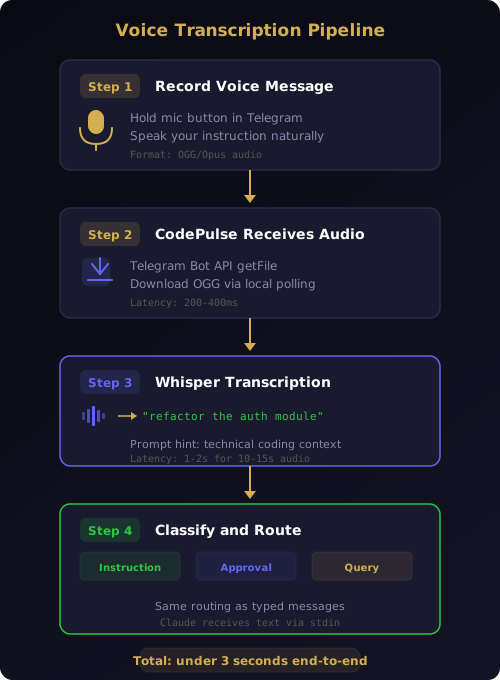
When your Telegram bot receives a voice message, CodePulse downloads the audio file using the getFile API. Telegram stores voice messages as OGG files encoded with the Opus codec — a format Whisper handles natively without conversion. The file is sent to OpenAI's Whisper API endpoint with a prompt hint that includes technical context: "Developer giving instructions to an AI coding agent. Technical terms, file paths, and programming concepts are expected."
That prompt hint matters. Without it, Whisper might transcribe "refactor the auth module" as "refactor the off module." The hint biases the model toward technical vocabulary without constraining it — you can still dictate plain English instructions and they will transcribe correctly.
The transcription returns in 1-2 seconds for a typical 10-15 second voice message. CodePulse displays the transcribed text in Telegram as a confirmation message so you can see exactly what Claude will receive. Then the text enters the same classification pipeline that handles typed messages: approval responses go to the approval engine, direct instructions go to Claude Code, session queries trigger status reports.
From Claude Code's perspective, there is no difference between a typed instruction and a voice instruction. Both arrive as text through the bidirectional protocol. Claude never knows — and never needs to know — whether you typed or spoke.
What happens when a voice message exceeds 60 seconds
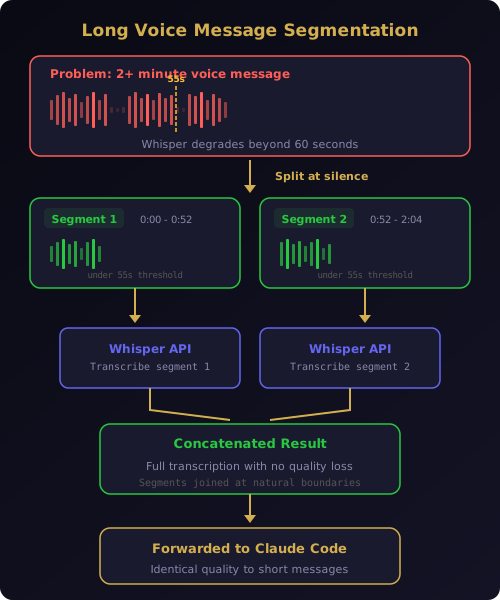
Telegram allows voice messages up to 30 minutes long. Whisper processes audio reliably up to about 60 seconds. Beyond that, transcription quality degrades — words get dropped, sentences merge, and technical terms become garbled.
In an early version of voice input, long messages simply failed. The Whisper API returned partial or corrupted transcriptions, and CodePulse forwarded the broken text to Claude without warning. Users would dictate a detailed three-minute instruction and Claude would receive an incoherent fragment. The failure was silent — no error message, no indication that something went wrong.
The fix, shipped in v2.1.0, splits long audio into segments before transcription. CodePulse detects when a voice message exceeds 55 seconds (leaving a buffer before the 60-second threshold) and splits the OGG audio at silence boundaries. Each segment is transcribed independently, and the results are concatenated into a single coherent instruction.
Silence detection prevents splitting mid-word or mid-sentence. The algorithm looks for gaps of 300 milliseconds or more in the audio waveform and prefers to split at these natural pause points. If no silence gap exists within a reasonable window, it falls back to a hard split at the 55-second mark with a small overlap to avoid cutting words in half.
The result: a two-minute voice message produces the same quality transcription as four separate 30-second messages, but without requiring you to manually chunk your thoughts.
Five scenarios where voice outperforms typing
Voice input is not a gimmick or a convenience feature. There are specific situations where it is objectively the better input method for remote agent control.
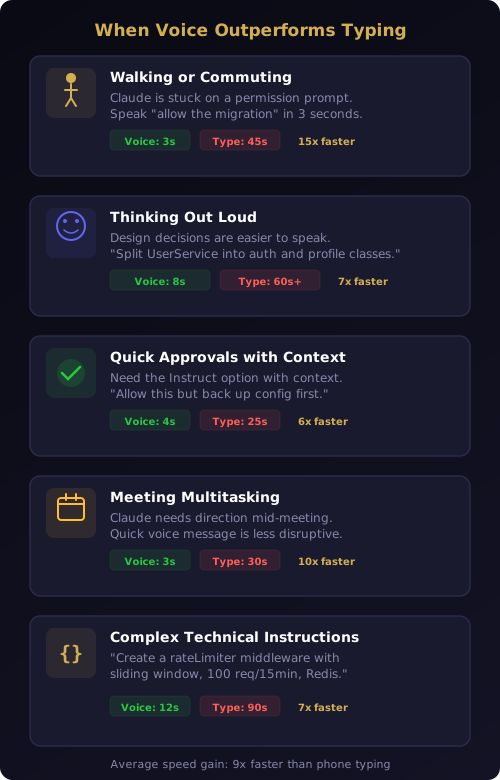
Walking or commuting. You are on your way to a meeting and Claude is stuck on a permission prompt. Typing "yes, allow the database migration but skip the seed data" while walking is slow and error-prone. Speaking it takes three seconds.
Thinking out loud. Some design decisions are easier to articulate than to write. "I want you to split the UserService into two classes — one for authentication and one for profile management. The auth class should own the JWT logic and the profile class should handle avatar uploads and display name changes." Speaking this is natural. Typing it on a phone is painful.
Quick approvals with context. The approval pipeline gives you Allow and Deny buttons, but sometimes you need the Instruct option with additional context. "Allow this but make sure to back up the config file first" is faster spoken than typed.
Meeting multitasking. You are in a meeting that does not require your full attention, and Claude needs direction. A quick voice message under the table is less disruptive than pulling out your phone and typing for 30 seconds. Nobody notices a three-second voice message.
Complex technical instructions. "Create a new middleware function called rateLimiter that uses a sliding window algorithm with a 100-request limit per 15-minute window, stored in Redis with key prefix ratelimit colon user colon." Try typing that on a phone keyboard. Now try saying it.
Voice works with every CodePulse command type
Voice input is not limited to direct instructions. After transcription, the text passes through the same Smart Classifier that handles all Telegram messages. This means voice works with every interaction type CodePulse supports.
Direct instructions are the most common use case. "Add error handling to the payment endpoint," "Run the test suite," "Create a new React component for the settings page." These are transcribed and forwarded to Claude Code as user prompts through the bidirectional communication channel.
Approval responses work too. If you have an approval card waiting, you can say "yes" or "allow it" or "deny that command" and the classifier routes your response to the approval engine. You can also add instructions: "Allow the file write but change the output path to dist slash production."
Session queries trigger status reports. "What is Claude doing right now?" or "How far along is the refactoring task?" are recognized as queries and answered by the Genius Supervisor's Haiku auto-answer tier without interrupting Claude's active work.
Project preferences can be set by voice. "From now on, always auto-approve npm test commands" or "Never allow force push operations." The Smart Classifier detects preference-setting intent and routes the instruction to the approval engine's pattern learning system.
The classification accuracy is identical for voice and text input because the classifier only sees text — it never knows the original medium. If a typed message would be classified correctly, the same words spoken and transcribed will be classified the same way.
Whisper handles technical terminology better than you expect
The biggest concern developers have with voice input is accuracy. Code-related speech is full of terms that trip up general-purpose speech recognition: camelCase function names, file paths with slashes and dots, framework-specific jargon, acronyms like JWT and CORS.
Whisper's architecture handles this surprisingly well. It was trained on 680,000 hours of multilingual audio, including technical content like conference talks, tutorials, and podcasts. Terms like "API endpoint," "middleware," "React component," and "TypeScript interface" are well-represented in its training data.
The prompt hint that CodePulse provides further improves accuracy for domain-specific terms. By telling Whisper to expect developer instructions with technical terms, the model's probability distribution shifts toward code-related vocabulary. "Babel config" stays "Babel config" instead of becoming "babble config." "Nginx" stays "Nginx" instead of "engine X."
There are limits. Variable names with unusual spellings, internal project-specific terms, and highly technical abbreviations may be transcribed phonetically rather than exactly. If your function is called xfrm_pkt_handler, speaking it will likely produce "transform packet handler" or something similar. For these cases, the transcription confirmation message in Telegram lets you catch errors before the text reaches Claude. You can correct it by sending a follow-up typed message.
In practice, about 95% of voice instructions are transcribed accurately enough for Claude to understand the intent, even if the exact wording differs slightly from what you would have typed. Claude is good at interpreting natural language, so "add error handling to the auth module" and "add error handling to the off module" both produce the same result — Claude infers the correct intent from context.
Why voice input is a Premium feature
Voice input is part of the Premium plan alongside Commit Gate with AI Review and the Genius Supervisor. The reason is straightforward: every voice message incurs a Whisper API call that costs money.
OpenAI charges $0.006 per minute for Whisper transcription. A typical voice message of 10-15 seconds costs about $0.001 — less than a tenth of a cent. But the cost adds up across many users. If CodePulse included voice input in the free tier, every free user sending voice messages would generate ongoing API costs with no revenue to offset them.
The free tier includes the full Telegram bridge, the approval pipeline with pattern learning, The Pulse live activity feed, bidirectional text messaging, and Morning Briefing. For developers who prefer typing or are always at their desk, the free tier is complete. Voice input adds value specifically for developers who frequently work away from their keyboard and want the fastest possible interaction with their AI agent.
If you use Bring Your Own Key (BYOK) mode with your own OpenAI API key, transcription costs appear on your OpenAI bill rather than being covered by the Premium subscription. This gives power users full control over their spending and removes any per-message cost ceiling.
From voice message to executed instruction in under three seconds
The end-to-end latency for a voice instruction is remarkably tight. You finish speaking and release the record button. Telegram uploads the audio in under 500 milliseconds on a typical mobile connection. CodePulse downloads the file from Telegram's servers in 200-400 milliseconds. Whisper transcribes a 10-second message in 1-1.5 seconds. The classifier processes the text in under 50 milliseconds. The instruction reaches Claude Code through stdin within 100 milliseconds.
Total: roughly 2.5 seconds from when you stop speaking to when Claude starts working on your instruction. That is faster than most developers can type the same instruction, even on a desktop keyboard.
The confirmation message appears in Telegram within this window, so you see what Claude received almost immediately. If the transcription is wrong, you can send a correction before Claude has finished processing the original instruction — the correction arrives as a follow-up message in the same conversation context.
This latency profile makes voice input viable for time-sensitive interactions. When Claude is waiting for an approval decision and you are away from your desk, a two-second voice message gets the agent unblocked faster than switching apps, finding the keyboard, and typing a response. The same local-first architecture that keeps all your data on your machine also keeps the pipeline fast — no cloud relay adds latency between your voice and Claude's next action.
Ready to control Claude Code with your voice? Download CodePulse and start sending voice instructions from Telegram. The free tier includes the full Telegram bridge with the approval pipeline — upgrade to Premium to unlock voice input, the Genius Supervisor, and AI commit review.