Setting up Telegram credentials for a developer tool should take thirty seconds. By the time someone runs a new AI development tool for the first time they have already installed the software, configured Claude Code, and read the documentation. Two credential fields should not be the slowest step.
For every other Telegram-integrated tool we examined while designing this feature, they are. The tooling to eliminate manual credential entry has been stable and publicly available for years. The engineering effort to use it just requires making the decision. This is how we made ours.
Why Every Other AI Dev Tool Still Makes You Copy-Paste
Before writing a single line of pairing code, we audited the setup flow of every competing tool that integrates Telegram. The finding was consistent: all of them delegate credential transfer entirely to the user. You get two text fields, a link to the BotFather documentation, and a setup guide that explains how to open @userinfobot to retrieve your numeric User ID.
None of them solve the transfer problem. They document it.
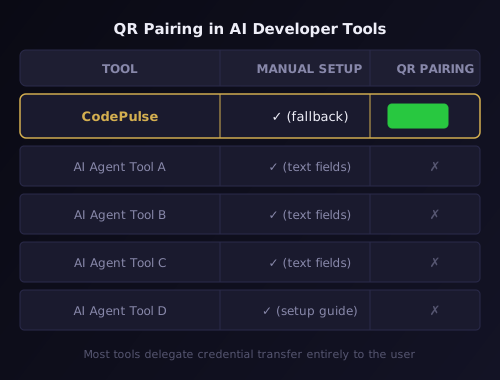
The reason is not technical — the tooling exists and is freely available. The reason is prioritization. The setup guide is cheaper to write than the infrastructure to replace it. The user accepts the friction as the cost of using the tool.
We disagree with that trade-off. The Telegram connection is the foundation of CodePulse's entire remote control model. The approval pipeline runs through it. The Genius Supervisor runs through it. AI commit review delivers results through it. A broken setup step for the Telegram bridge means none of those features exist for users who give up during onboarding. Fixing the setup step is not optional — it is load-bearing.
The solution we built is a WhatsApp-Web-style QR pairing flow. Scan a code, paste your bot token on your phone, tap a deep link — both fields auto-fill on your desktop. Under 30 seconds. No manual typing. Here is how it works under the hood.
The Two-Credential Problem: Why One Transport Cannot Solve Both
The core design constraint is that two credentials need to travel from the phone to the desktop, and they cannot share the same delivery mechanism.
The bot token is a 46-character secret. Embedding it in a QR code is immediately ruled out — QR codes are visual broadcasts that anyone in the same room can scan. Telegram's deep link system is also ruled out: its payload is limited to 64 characters, and a bot token exceeds that limit regardless of encoding. The only viable option is a channel the user controls: the local network.
The Telegram User ID is a 9-to-10 digit integer that Telegram does not surface in its interface. It could theoretically be embedded in a QR code after being looked up manually — but that reproduces the exact failure mode we are trying to eliminate. The correct approach is programmatic: once the bot token is known, calling getUpdates after the user sends /start returns message.from.id directly. No manual lookup. No opportunity for the wrong value to be entered.
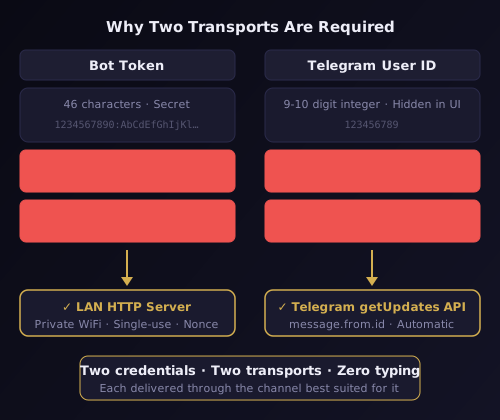
The result is a two-phase architecture. Phase 1 delivers the bot token via a temporary HTTP server on the local network. Phase 2 delivers the User ID through Telegram's own infrastructure as a side effect of the /start command. Neither credential requires the user to read, copy, or type a value on the desktop.
This is the same architectural approach behind the local-first design that runs through all of CodePulse: keep sensitive data flows on your machine and your network, and use external infrastructure only when it is the natural authority for the data.
Building the Ephemeral LAN Server in Rust
Phase 1 lives in launcher/src-tauri/src/pairing.rs — CodePulse's Rust backend compiled by Tauri. The LAN server is built on five crates chosen for specific reasons:
| Crate | Version | Purpose |
|---|---|---|
axum | 0.8 | HTTP server: serves the pairing form, receives the token POST |
tower-http | 0.6 | CORS headers — phone browser is a different origin than the server |
local-ip-address | 0.6 | Detects the machine's LAN IP address |
rand | 0.9 | Generates the 256-bit cryptographic nonce |
fast_qr | 0.13 (svg feature) | Produces an SVG QR code string from the LAN URL |
The server binds to 0.0.0.0:0 — the OS assigns a random available port. This avoids port conflicts with other services running on the machine and makes the server unpredictable to network scanners. The actual bound port is extracted after binding and embedded in the QR URL.
LAN IP detection from local-ip-address passes through a filter that rejects loopback addresses (127.0.0.0/8), link-local addresses (169.254.0.0/16), and Docker bridge networks (172.17.0.0/16). Developer workstations routinely have container runtimes, VPN adapters, and multiple physical NICs — without filtering, the detected IP is often unreachable from a phone. The first address that survives the filter becomes the server host.
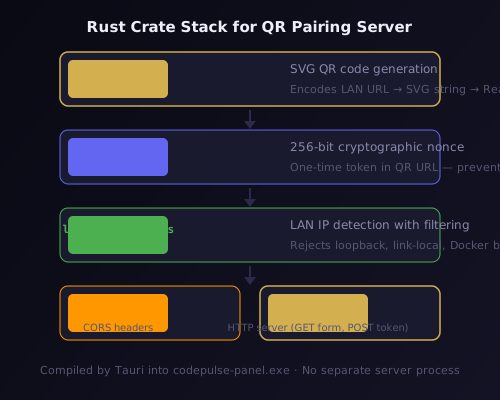
Security is provided by a 256-bit nonce generated via rand. It appears as a query parameter: http://192.168.x.x:PORT/pair?s=NONCE. GET requests without the nonce return 403. POST requests without the correct nonce in the body return 403. The server accepts exactly one valid POST, then shuts itself down by dropping the server handle. A second POST to the same address receives a connection refused.
Plain HTTP is used intentionally rather than HTTPS. Self-signed certificates on mobile browsers trigger security warnings that block the page from loading entirely. Since the server is local-network only, single-use, and typically live for under 20 seconds, plain HTTP over WPA2/WPA3 is the correct engineering tradeoff. The server does not carry any persistent state beyond the single received token.
The fast_qr SVG output is returned directly from the start_pairing Tauri command to the React frontend, which injects it with dangerouslySetInnerHTML inside a 200×200 container with a 2-pixel gold border.
The deleteWebhook Problem and Service Conflict Handling
Phase 2 begins the moment a valid token POST arrives. The immediate instinct is to start getUpdates polling — but doing so without preparation causes silent failures for a significant percentage of users.
Telegram enforces a constraint that is easy to miss in the API documentation: only one update consumer is allowed per bot token at any time. If a webhook is registered from any prior setup, getUpdates returns a 409 Conflict error. If another process is already long-polling the same token, requests silently time out. Neither failure produces a clear error message in the pairing UI.
CodePulse handles both cases before polling starts.
First, deleteWebhook is called unconditionally. It is idempotent — succeeds whether a webhook exists or not — and takes under 200ms. This clears any prior webhook regardless of where it was registered: a previous CodePulse installation, another Telegram bot tool, or a manual API call.
Second, the CodePulse background service is checked. If the service is already running and polling the same token, getUpdates will conflict. The pairing flow calls the service health endpoint at http://127.0.0.1:18321/health and, if the service is active, sends a shutdown request via POST /shutdown. After pairing completes, start_service() restarts the service with the new configuration. If the service was not running, nothing changes. If either the stop or restart fails, the error is surfaced to the frontend via the pair-error Tauri event.
With both conflicts resolved, getMe resolves the bot's username. This is required for the deep link — t.me/BOTUSERNAME?start=SESSIONID — which is the mechanism Telegram uses to route the /start message back to the correct bot.
The SESSION_ID Design and getUpdates Validation Loop
The SESSION_ID embedded in the deep link is a 12-character base64url string. The design constraints are:
- Telegram deep link payload limit: 64 characters maximum, using only
A-Za-z0-9_- - Security: Must be unguessable so a random
/startmessage cannot hijack a pairing session - Uniqueness: Must be unique enough that two simultaneous pairing sessions never collide
Twelve base64url characters encode 72 bits of entropy. That exceeds what is needed — UUID4 uses 122 bits for global uniqueness across billions of records, but pairing sessions are per-machine and per-minute. Seventy-two bits is more than sufficient while staying well within the 64-character limit.
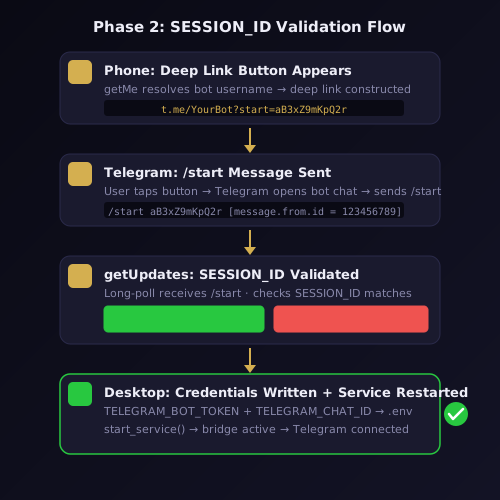
The getUpdates long-poll loop runs with a 30-second timeout per request and allowed_updates=["message"] to filter non-message events. For each message received, the loop checks: does the text match /start SESSIONID exactly, and does the SESSION_ID match the one generated for this session. Any message that fails either check is ignored — polling continues. A mismatched SESSION_ID could indicate a stale message from a previous pairing attempt or an unrelated /start from a different user.
When a matching /start arrives, message.from.id — a 64-bit integer — is the Telegram User ID. The .env write sequence runs:
- Read current
.envviaenv::read() - Set
TELEGRAM_BOT_TOKENto the received token - Set
TELEGRAM_CHAT_IDto the numeric User ID - Set
TELEGRAM_ALLOWED_USERSto a single-element array containing the User ID - Write via
env::write(entries)— merge-safe, existing keys not overwritten - Restart the service via
start_service()
The service restart activates the full Telegram bridge immediately. No further configuration is required after pairing completes.
The Tauri IPC Event Bus: Bridging Rust and React
The pairing flow spans two runtimes — Rust backend and React frontend — connected by Tauri's IPC layer. Three commands and five events form the complete interface.
Commands (React calls via invoke()):
| Command | Returns | Purpose |
|---|---|---|
start_pairing | { qr_svg, lan_url } | Starts LAN server, generates QR |
cancel_pairing | void | Shuts down server, stops polling, restarts service |
get_pairing_status | { state, bot_name?, user_id? } | Recovers UI state after tab switch |
Events (Rust emits via app.emit(), React receives via listen()):
| Event | Payload | Triggered when |
|---|---|---|
pair-token-received | { token_masked } | Phase 1 complete — bot token stored |
pair-deep-link-ready | { bot_username, deep_link } | Bot username resolved via getMe |
pair-user-id-received | { user_id } | Phase 2 complete — User ID captured |
pair-timeout | { phase } | 2-minute timeout expired in either phase |
pair-error | { message } | Any failure: network, API, service conflict |
The PairingCard React component registers listen() handlers for all five events on mount and calls unlisten() on unmount. The three UI states — waiting for scan, token received with active deep link, fully paired — are driven entirely by these events. There is no polling from the React side. No shared state beyond what the events carry.
The component is embedded in two locations: the Telegram section of Configuration.tsx for returning users who need to re-pair after a token rotation, and Step 1 of FirstRunWizard.tsx for new installations. The wizard includes a "Skip for now" option that writes SETUP_COMPLETE=1 to .env and closes the wizard without completing pairing. Users can return to the getting started flow and pair from Settings at any time — no reinstall required.
Production Hardening: Firewall Rules, Android Fallback, and 11 Edge Cases
The happy path implementation took one sprint. Hardening it for production took a second sprint and a 11-scenario edge case matrix.
Windows Firewall is the most common silent failure point. When the LAN server starts, Windows prompts the user to allow an incoming connection — a dialog most users instinctively dismiss, which blocks phone connections entirely. The NSIS installer adds a firewall rule scoped to profile=private (home and work networks) targeting the codepulse-panel.exe binary. Public WiFi profiles are explicitly excluded. The rule is removed during uninstall. The zero-config installer handles this automatically — users who install via the standard path never see the firewall prompt.
Android QR scanning varies by manufacturer. Not all Android 9+ devices enable native camera QR scanning by default. The PairingCard displays a copyable LAN URL below the QR code at all times — a monospace pill that copies the URL to the clipboard on tap. Android users who cannot scan the QR code directly can open the URL in their browser manually without any additional tools.
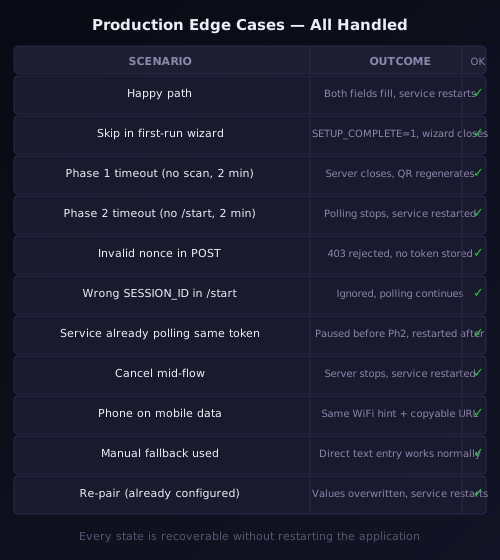
The complete edge case matrix, verified end-to-end before release:
| Scenario | Outcome |
|---|---|
| Happy path | Both fields auto-fill, service restarts |
| Skip in first-run wizard | SETUP_COMPLETE=1 written, wizard closes |
| Phase 1 timeout (no scan within 2 min) | LAN server closes, QR regenerates with fresh nonce |
Phase 2 timeout (no /start within 2 min) | Polling stops, service restarted |
| Invalid nonce in POST | 403 rejected, no token stored |
Wrong SESSION_ID in /start | Message ignored, polling continues |
| Service already polling same token | Service paused before Phase 2, restarted after |
| Cancel mid-flow | Server shut down, polling stopped, service restarted |
| Phone on mobile data | LAN URL unreachable, "Same WiFi" hint shown permanently |
| Manual fallback used | User types credentials directly into text fields |
| Re-pair (already configured) | Existing token and User ID overwritten, service restarts |
Every state is recoverable without restarting the application. Every failure shows a Retry option that regenerates a fresh nonce and restarts the flow from scratch. This is the same design principle behind the Claude Code hooks system: errors must be surfaced and recoverable, never silently swallowed.
The result of all of it: from downloading CodePulse to receiving the first Telegram notification takes under three minutes on a standard installation. Most AI development tools that integrate Telegram have not shipped a pairing flow like this. We treat it as table stakes.
Want to see it in action? Download CodePulse and connect your Telegram bot in under 30 seconds — no guides, no @userinfobot, no typing. The free tier includes the full Telegram bridge and approval pipeline. Upgrade to Premium to unlock the Genius Supervisor, AI commit review, and voice input.