You start Claude Code on a multi-file refactor, walk to the kitchen for coffee, and return three minutes later to find it has rewritten your database schema, created four new migration files, and opened a pull request you never reviewed. Or the opposite: Claude paused at a permission prompt ninety seconds after you left, has been waiting ever since, and nothing moved.
Both scenarios share the same root cause. Claude Code runs in a terminal on your machine, and your phone has no window into that terminal. The developer community converged on one answer: bridge Claude Code to Telegram. Two distinctly different tools now exist to do this — and they solve the problem with fundamentally different philosophies.
Two Tools, Two Philosophies
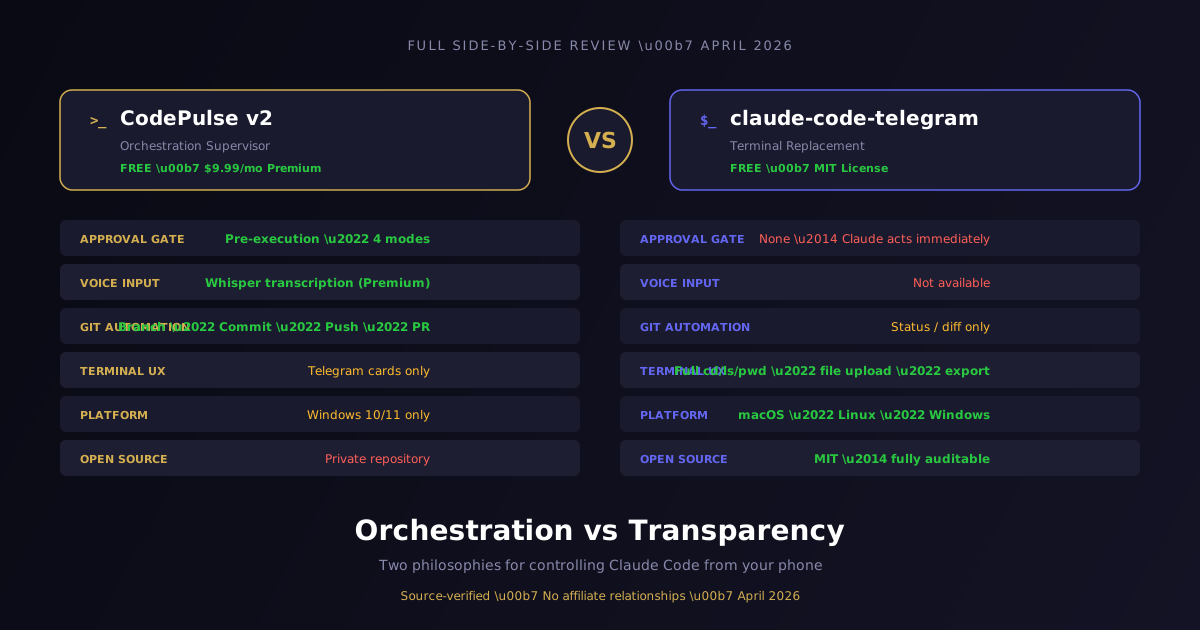
CodePulse v2 is a self-hosted Telegram bot that acts as an autonomous development supervisor. Every message passes through a three-layer architecture before Claude is ever involved. The Orchestrator — Layer 2 — is explicitly described in the codebase as "the key value." Most requests are resolved entirely within the Orchestrator without calling Claude at all.
claude-code-telegram is a transparent proxy between Telegram and Claude Code. There is no orchestration layer — every user message that is not a local slash command goes directly to Claude. The intelligence is Claude's, not the tool's. This is a different philosophy, not an inferior one — it trades oversight for simplicity and full tool access.
| CodePulse v2 | claude-code-telegram | |
|---|---|---|
| Author | 4brainiacs (Eugen) | RichardAtCT |
| License | Freemium — Private | MIT — Free |
| Price | Free (50 msg/day) / Premium ($9.99/mo) | Free forever |
| Runtime | Bun 1.1+ / Windows | Python 3.11+ / Cross-platform |
| Design intent | Orchestration and supervised execution | Terminal replacement via Telegram |
| When Claude acts | Only after human approval (default) | Immediately on every prompt |
| Open source | No — private repository | Yes — MIT license |
The Architecture That Separates Them
The most important difference between these tools is not any single feature — it is where the intelligence lives in the stack.
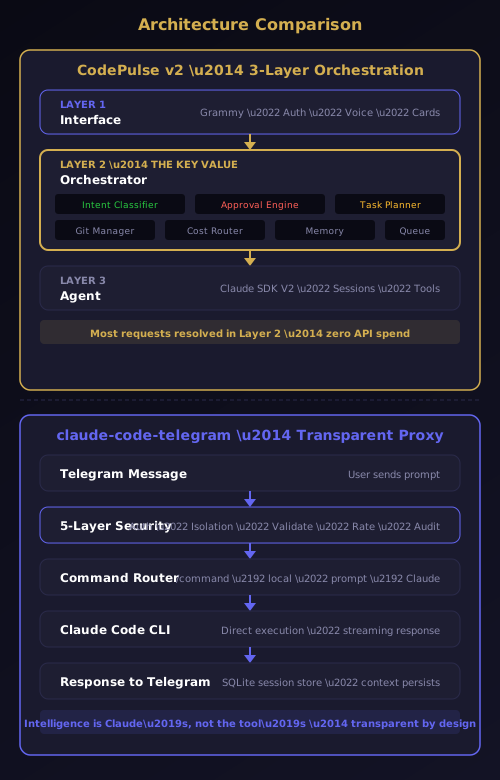
CodePulse runs a three-layer architecture where Layer 2 — the Orchestrator — handles intent classification, approval gating, task planning, git management, cost tracking, project memory, and notification routing. A message like "git commit and push with a clean message" triggers the git_action intent, routes directly to GitManager.quickCommit(), and returns in milliseconds with zero API spend. The 7-intent local classifier resolves most common requests without Claude.
claude-code-telegram runs a transparent proxy model. Your Telegram message passes through a 5-layer security middleware (auth, directory isolation, input validation, rate limiting, audit logging), then routes directly to Claude Code CLI or the Anthropic API. Every prompt reaches Claude. Every response comes from Claude. The tool adds security boundaries, not intelligence.
The practical impact is measurable. When you send "what changed overnight" to CodePulse, the intent classifier routes it to the Replay handler, which reads git log locally and formats a narrative — zero tokens, instant response. The same message in claude-code-telegram goes to Claude, consumes tokens, and takes several seconds to process. For status queries, git operations, project switching, and cost checks, the Orchestrator handles everything locally.
Both architectures are valid. The choice depends on whether you want the tool to make decisions on your behalf or to get out of the way and let Claude work.
The Approval Engine: Where the Difference Lives
The single most significant feature gap between these tools is the approval pipeline. CodePulse intercepts every tool call before it executes. claude-code-telegram does not.
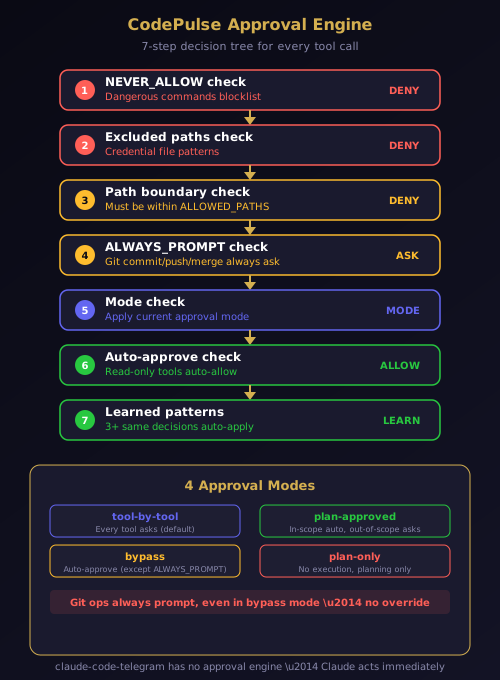
CodePulse's approval-engine.ts runs a 7-step decision tree on every tool invocation:
- NEVER_ALLOW — dangerous commands blocklist (always deny, no override)
- Excluded paths — credential file patterns (always deny)
- Path boundary — must be within
ALLOWED_PATHSorCLAUDE_WORKING_DIR - ALWAYS_PROMPT — git commit, push, merge, and rebase always ask, even in bypass mode
- Mode check — applies the current approval mode
- Auto-approve — read-only tools like
Read,Grep,Globauto-allow - Learned patterns — after 3 consecutive identical decisions for the same tool and target, CodePulse auto-applies the learned decision
The engine operates in four modes: tool-by-tool (every tool asks), plan-approved (in-scope tools auto-approve), bypass (auto-approve everything except ALWAYS_PROMPT), and plan-only (no execution, planning only). This is a Premium feature with genuine safety implications — the adaptive learning reduces interruption without sacrificing control.
claude-code-telegram has no equivalent. Claude acts immediately on every prompt. The tool provides directory sandboxing via APPROVED_DIRECTORY and input validation against injection attacks, but there is no mechanism to block a specific tool call before it executes.
For personal projects where you trust Claude's judgment, this is fine. For production codebases, shared repositories, or regulated environments, the distinction is everything.
The Claude Code hooks system provides the underlying mechanism that makes CodePulse's approval engine possible. CodePulse registers PreToolUse hooks that fire before every tool execution, giving the Orchestrator the opportunity to evaluate, block, or modify each action. Without hooks, building a pre-execution gate would require forking Claude Code itself.
Side-by-Side: Core Capabilities
Telegram UX
| Capability | CodePulse | claude-code-telegram |
|---|---|---|
| Natural language chat | Yes | Yes |
| Voice input | Yes (Whisper, Premium) | No |
| Plan card before execution | Yes (Premium) | No |
| Task Complete card | Yes (6 variants) | No |
| Terminal navigation (cd/ls/pwd) | No | Yes |
| File and archive upload | No | Yes |
| Session export (MD/HTML/JSON) | No | Yes |
CodePulse excels at structured interaction — plan cards, result cards, and Follow-up buttons that resume Claude sessions. claude-code-telegram excels at terminal replacement — you navigate directories, upload files, check git state, and export sessions directly from Telegram.
Intelligence and Automation
| Capability | CodePulse | claude-code-telegram |
|---|---|---|
| Local 7-intent classifier | Yes (0 tokens) | No |
| Plan generation (extractive) | Yes (Premium) | No |
| Project memory auto-discovery | Yes (Premium, 10+ languages) | No |
| Git automation (commit/push/PR) | Yes (Premium) | No |
| Cost hard stop ($5/session) | Yes (configurable) | No |
| Sub-agent support (Task tool) | No | Yes |
| GitHub webhook integration | No | Yes |
| Cron scheduler | No | Yes |
CodePulse's Genius Supervisor and extractive plan generation handle the orchestration work. claude-code-telegram provides raw Claude access including sub-agents, webhooks, and scheduling — features that matter for autonomous workflows where you want Claude to act without intermediate approval.
Security
Both tools take security seriously, with different models. CodePulse uses pre-execution blocking — dangerous commands are denied before they run. claude-code-telegram uses boundary enforcement — it defines a sandbox and lets Claude operate freely within it.
| Security Layer | CodePulse | claude-code-telegram |
|---|---|---|
| User allowlist | Yes | Yes |
| Directory boundary | Yes (ALLOWED_PATHS) | Yes (APPROVED_DIRECTORY) |
| Credential file protection | Yes (EXCLUDED_PATH_PATTERNS) | Yes (.env/.ssh/id_rsa blocked) |
| Rate limiter | Yes (token bucket) | Yes (token bucket) |
| Audit log | Yes (SQLite) | Yes (SQLite) |
| Dangerous command blocklist | Yes (always deny) | Classic mode only |
| Source auditable | No (private repo) | Yes (MIT) |
Pricing: Free Tier vs Free Forever
CodePulse's free tier is genuinely functional — 50 messages per day, tool-by-tool approval mode, the full 7-intent classifier, dangerous command blocking, path enforcement, and emergency stop. You get the entire oversight infrastructure at zero cost.
Premium at $9.99/month adds the 10 gated features: voice input, plan-based 1-tap execution, structured result cards, unlimited projects, git workflow automation, project memory, adaptive approval learning, 3-tier notification intelligence, proactive intelligence (Replay and Cost Intel), and AI commit review.
claude-code-telegram is MIT-licensed, entirely free, forever. Every feature available to every user. Your only costs are Claude access (Pro at $20/month or API) and the machine running the Python process. There are no tiers, no gating, no license validation.
The realistic monthly cost comparison: CodePulse free tier requires only Claude Pro ($20/month). CodePulse Premium adds $9.99 for the full orchestration layer ($29.99 total). claude-code-telegram requires only Claude Pro ($20/month). Both tools run on your own machine with no infrastructure costs — no Docker, no cloud servers, no VPS.
The Fundamental Trade-off
These tools answer the same question differently: "What does control over an AI agent mean?"
CodePulse answers: control means being able to prevent an action before it happens. The approval engine intercepts every tool call before execution. You can block a destructive command, review a plan before it runs, and teach the system which patterns to auto-approve.
claude-code-telegram answers: control means having a secure, auditable sandbox in which Claude operates freely. The 5-layer security model defines the boundaries. Within those boundaries, Claude acts immediately without interruption.
If the answer to "what are you protecting against?" is an unreviewed AI action on a production codebase, CodePulse is the only tool that can prevent it. If the answer is losing access to your codebase when you are away from your desk, claude-code-telegram solves that completely and for free.
Editorial Scorecard
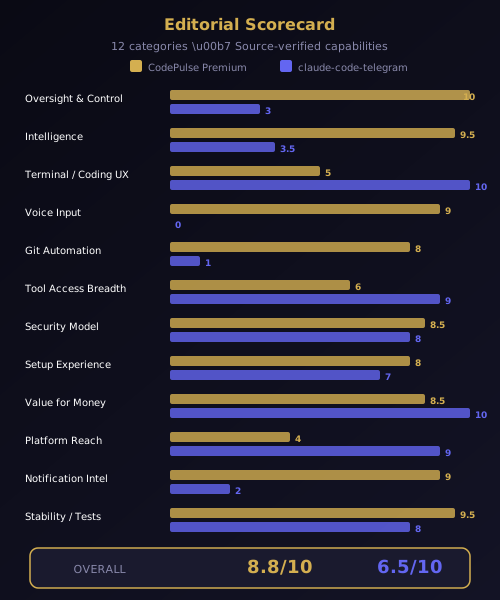
| Category | CodePulse Premium | claude-code-telegram |
|---|---|---|
| Oversight and Control | 10/10 | 3/10 |
| Intelligence and Automation | 9.5/10 | 3.5/10 |
| Terminal / Coding UX | 5/10 | 10/10 |
| Voice Input | 9/10 | 0/10 |
| Git Automation | 8/10 | 1/10 |
| Tool Access Breadth | 6/10 | 9/10 |
| Security Model | 8.5/10 | 8/10 |
| Value for Money | 8.5/10 | 10/10 |
| Platform Reach | 4/10 | 9/10 |
| Notification Intelligence | 9/10 | 2/10 |
| Overall | 8.8/10 | 6.5/10 |
Scores are editorial assessments based on source-verified capabilities. Each tool is scored for its intended use case. CodePulse leads in oversight and automation. claude-code-telegram leads in terminal UX, platform reach, and value.
Who Should Use What
Use CodePulse if you are running Claude Code on production code, client repositories, or shared codebases where an unreviewed AI action would cause real damage. The approval pipeline, voice input, project memory, and git automation make it the most feature-complete orchestration layer available. The $9.99/month Premium tier is well-priced against the Claude Pro subscription you already have. Download CodePulse and run the zero-config installer to get started in under ten minutes.
Use claude-code-telegram if you want Telegram to replace your terminal, free forever, on any platform. If you develop remotely, from your phone, or you want full git visibility and session export without any overhead — this is the most capable free option. The security sandbox is solid, the MIT license means you can fork and extend it, and the growing community (257 stars in week one) suggests strong long-term maintenance.
Use both if you work across Windows and macOS machines and want orchestrated oversight on your primary development machine with a lightweight terminal proxy on secondary devices.
Neither tool is objectively better — they solve different problems. The question is not "which has more features" but "what kind of relationship do you want with your AI coding agent?" If you want a supervisor that prevents mistakes before they happen, CodePulse is purpose-built for that. If you want a transparent window into Claude's full capability set, claude-code-telegram delivers exactly that.
Ready to supervise your AI agent instead of just observing it? Download CodePulse and get the full approval pipeline on the free tier. Upgrade to Premium to unlock voice input, plan-based execution, AI commit review, and adaptive learning that stops interrupting you for patterns it has already learned.