You are walking out of a coffee shop and remember you owe John a heads-up that you will be five minutes late to the standup. You open Telegram, type "email John I'll be 5 min late to the 3pm standup," and tap Send on the preview card the bot shows you. The email leaves your Sent folder before you reach the corner. No app-switching. No "let me draft this and send it from Gmail later." Real email, from your account, with you in the loop for every send.
That is the new capability shipping in CodePulse v2.3.151 and up, and it is the missing half of Real-life Mode. Until this release, the most an AI could do with your inbox from Telegram was save a draft. Drafts are not emails. Today they are.
Drafts were the half-step
If you have wired up the official Gmail integration inside Claude, you already know the pattern: Claude can read your inbox, search threads, and write drafts. What Claude cannot do is send. That is by design — the Anthropic-managed integration intentionally stops at drafts so that a model error or prompt injection cannot launch mail under your name. It is the right default for a hosted integration.
The cost of that default is that "send John a quick note" is not actually a thing you can do from your phone. You can only ask the AI to compose, then context-switch to Gmail, find the draft, and tap Send yourself. For the kind of fast, low-stakes mail that fills a workday — "I am running late," "looping in Sarah," "approved, please proceed" — the manual second step is the whole reason you would not bother.
We sat with that gap for a while. Saving drafts is useful. But the why-we-built-CodePulse thesis has always been that AI assistants should remove steps, not add a careful one. So we built the missing step.
Why we did not piggyback on the existing connector
The obvious idea is to ask the existing Gmail connector to send. The connector cannot. The OAuth grant it holds was explicitly negotiated to exclude gmail.send, and that grant lives on Anthropic's servers — not yours. Even if Anthropic flipped the switch tomorrow, the consent screen you originally approved did not authorize sending, so a fresh consent would be required from every user.
That is a long way of saying: CodePulse needs its own, separate OAuth grant from you. Specifically scoped to gmail.send and nothing else. Stored on your machine, never on ours.
So that is what we built — a one-tap connect flow that adds the narrow permission, alongside a small local MCP server that does the actual sending. The connector keeps doing what it does well (read, draft) and CodePulse adds the send capability on top, with local-first architecture for the credentials.
The narrowest permission Google offers
When you complete the consent flow, Google shows you exactly one permission request: Send email on your behalf. That maps to https://www.googleapis.com/auth/gmail.send — the narrowest scope in the Gmail API. Tap Allow and you grant one capability. Nothing else.
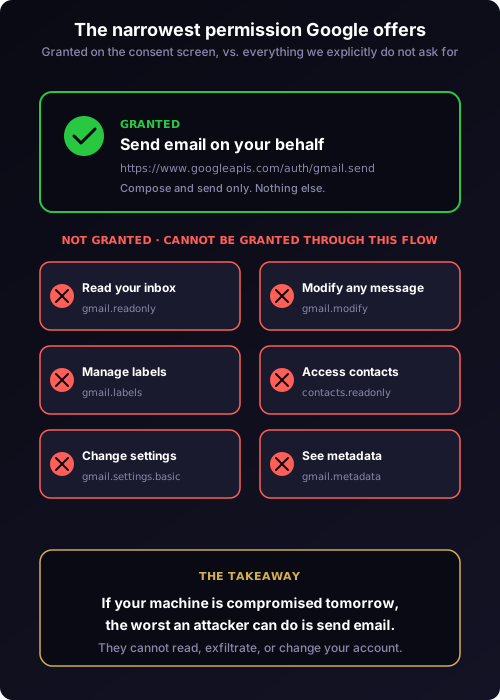
What the scope does not include is more interesting than what it does. It does not grant the ability to read any individual message, modify, delete, archive, or label a thread, access your contacts, change your signature or settings, or even see metadata about your inbox. If your machine were compromised tomorrow, the worst a malicious actor could do with the stolen token is send email — bounded by Gmail's daily send caps. They could not exfiltrate historical mail, mine your contacts, or quietly read traffic.
There is also one CodePulse-side guarantee on top of Google's. Every send goes through the approval pipeline at the HIGH_BLAST tier — the always-ASK tier that cannot be bypassed by learned auto-approve patterns. The card shows you From, To, Cc, Bcc, Subject, and the full body. Send leaves only when you tap Send. We will get to why that is non-negotiable later.
One tap to connect, conversation to send
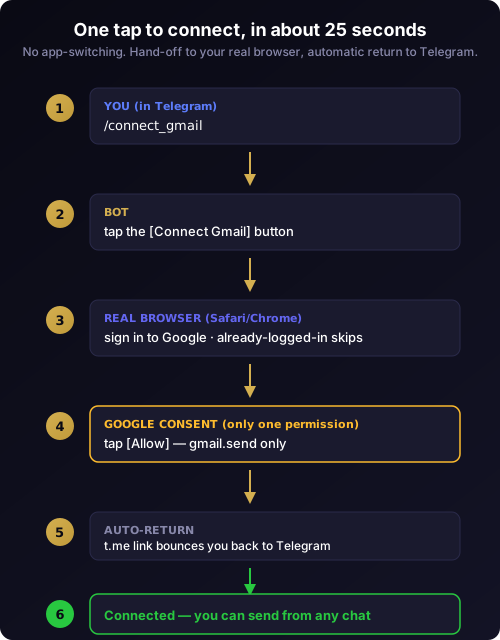
The first time you run it, the connect flow takes about twenty-five seconds. You type /connect_gmail in your CodePulse chat. The bot replies with a card explaining what you are about to authorize. You tap Connect Gmail. Your real browser opens — not a WebView, your actual Safari or Chrome — and Google shows the single-permission consent screen. You tap Allow. The success page bounces you back to Telegram automatically through the t.me universal link, and the bot confirms with your address: Connected: [email protected].
From then on, sending is conversational. You can say "email Sarah confirming Tuesday works" or "reply to my last email from John saying thanks." You can specify Cc and Bcc inline. You can ask the AI to write the body in a particular tone. Each send produces an approval card in Telegram with all the fields visible. The card looks and feels like the rest of the Real-life card layouts — subject and recipients kept short so the body gets the maximum readable space.
If you connect more than one Gmail (a personal address and a work address, say) the bot tracks them as separate accounts and lets you name the sender in your message. "Send from work@ to John …" picks the right one. Otherwise it defaults to the most recently connected account. The full setup walkthrough lives in the new connect Gmail docs page, with troubleshooting for the corner cases.
Always-ASK, every time, by design
The send approval card cannot be auto-approved. There is no "trust me, send all my emails" mode. There never will be. That is enforced server-side in CodePulse and double-enforced by the per-tool approval policy — the same per-topic isolation that keeps Real-life pattern learning from leaking into Code-mode Bash approvals also keeps any learned email pattern from collapsing the always-ASK rule.
The reason is simple. Of all the things an AI can do on your behalf, sending email is irreversible at a different scale. A wrong Bash command can be rolled back. A wrong commit can be reverted. A wrong email is in someone's inbox with your name on it, and there is no Edit. The cost of a single false positive — one auto-approved send to the wrong recipient with the wrong subject — is much higher than the cost of one extra tap per send.
If you want fewer taps, the answer is fewer emails, not a looser policy.
What we built under the hood
The architecture is deliberately boring. Boring is good when credentials are involved.
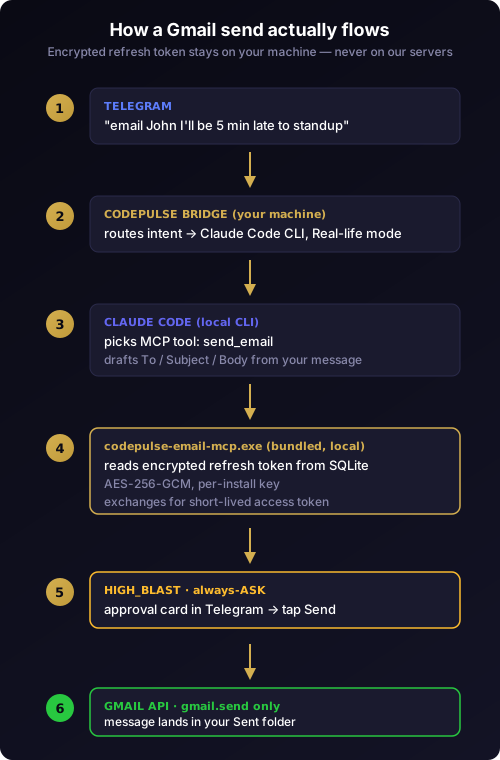
There are three pieces worth knowing about. First, the bundled MCP server — codepulse-email-mcp.exe, a small Bun-compiled binary that ships inside the installer. It runs locally, holds no network state, and is the only process that can read your refresh token. Second, the local credential store — a SQLite database with the refresh token encrypted using AES-256-GCM and a per-install key generated on first run. Different installs have different keys; the encrypted blob is useless if exfiltrated without the matching key. Third, a tiny Cloudflare Worker that exists solely as a one-tap OAuth bridge to handle the redirect dance during connect — it sees nothing about your message content, only the OAuth pairing that lets us return you to Telegram cleanly.
Your credentials never travel through our servers. The CodePulse Worker is a hand-off helper. The Gmail send call is made by the local MCP from your machine, against Google directly, using a short-lived access token derived from your locally stored refresh token. If we shut down our infrastructure tomorrow, your already-connected installs would keep sending email until your refresh token naturally expires.
Beta reality: 100 testers, 7-day tokens, and Workspace edge cases
We are launching this in Phase 1 beta. That means two things you should know up front.
Until our CASA Tier 2 verification clears with Google, the OAuth client runs in Test User mode. Up to 100 specific Gmail addresses can connect during the beta. If you tap Allow and Google shows you a "CodePulse is being tested" warning, your address has not yet been added to our approved testers list — email us at [email protected] with the Gmail you want to use and we will add you within a few hours. The list cap is a Google quota, not a CodePulse choice. After verification (Phase 2, target Q3 2026), the cap is removed and anyone with a Gmail can connect without prior approval.
The second beta-only constraint is that refresh tokens currently expire after seven days. You will see a re-authentication prompt in Telegram roughly weekly until verification clears. Tap /connect_gmail again, complete the consent flow, and you are back online — no data is lost and no resends are needed. After verification, refresh tokens become indefinite and the weekly prompt goes away.
CASA verification is not free for us. The full security review costs in the four-figure range per year, every year, for as long as we ship this capability. It is the cost of doing this honestly: a real first-party OAuth client, real security audits, real liability boundaries. We mention this not for sympathy but for transparency — when a free tool offers to send your email, you should ask who is paying for the security review, and we want the answer to be "the people who built it, not you."
Workspace users — anyone on a @yourcompany.com Gmail rather than @gmail.com — have one extra consideration. Your IT admin can restrict third-party OAuth at the organization level, in which case the consent flow will fail with an access-blocked message. Personal Gmail accounts are unaffected. If you hit this, either ask your admin to allow CodePulse in the Workspace API controls or use a personal Gmail address.
Where this goes next
Gmail send is the first integration in a longer roadmap that closes the read/draft/send loop across the productivity tools you already live in. Outlook send is Phase 3 — same one-tap connect flow, same always-ASK approval card, different OAuth provider. An App Password fallback is on the Phase 4 board for users on Workspace tenants where third-party OAuth is locked down at the admin level. Linux and macOS builds with the same bundled MCP land alongside the existing Windows installer once the cross-platform credential store has been validated.
Beyond mail, the same MCP pattern applies to any send-only capability: Slack, Linear comments, Calendar invites with the explicit-consent layer. We are intentionally not building all of those at once — narrow, well-audited, always-ASK is more valuable than wide and loose.
If you are already running CodePulse, type /connect_gmail in your bot chat and follow the prompts. The full step-by-step walkthrough is the connect Gmail docs page. New to CodePulse? The zero-config installer gets you from download to first message in under two minutes on Windows. The whole point of an AI assistant in your pocket is to remove steps, not to add a careful one — sending Gmail from Telegram, with one approval per send and an encrypted local token, is what removing the last step looks like.
Ready to send your first email from Telegram? Download CodePulse and tap /connect_gmail once. The free tier includes Real-life Mode and the full HIGH_BLAST approval pipeline. Upgrade to Premium for AI commit review, voice input, and the rest of the platform.