It is 7:12 on a Tuesday. Your phone is still on the nightstand, screen down, and you have not opened a laptop. You pick it up, open the same Telegram chat where your code reviews land, and type one line: summarize my unread inbox. By the time you are upright, you have a three-line answer — seven new emails, two that actually need you, five that do not.
You reply to one of them, approve the send with a tap, and put the phone back down. A morning's worth of triage, done before coffee, from a chat thread, without touching a keyboard.
That is Real-Life mode, and it is the part of CodePulse that has nothing to do with code. CodePulse started as a way to watch an AI coding agent from your phone. Real-Life mode is what happens when you point that same remote control at the rest of your day — your inbox, your calendar, your CRM, your project board. This is the story of how it works, what it will and will not do on your behalf, and why the tap that approves each action is the most important feature in it.
The assistant that only knew how to code
CodePulse version one had a single job: let you supervise an AI coding agent from anywhere. You start a Claude Code session on your dev machine, CodePulse forwards every tool call to Telegram as an approval card, and you tap Allow or Deny from your phone. The seven-step approval pipeline even learns your patterns, so the routine permissions stop interrupting you.
That works beautifully when you are heads-down in a feature branch. The trouble is that real work is not only code. You also have an inbox to read, a calendar to defend, a Linear board to update, and a contract sitting in Drive. Your AI assistant could help with every one of those — but only if it can reach them.
Claude already speaks the Model Context Protocol, and through it connects to most of those services. The catch is that those connectors live on your laptop. When you are away from the laptop, the tools sit idle, and the device that is actually in your hand runs Telegram. Real-Life mode closes that gap. It lets Claude run remotely against your full connector toolkit and lets a Telegram message drive it. The inbox-to-deploy story walks through the full product tour; this article is about what a single ordinary day with it feels like.
Your inbox, read and summarized before coffee
Start where the morning starts: the inbox. You do not write a search query or open a dashboard. You type a sentence.
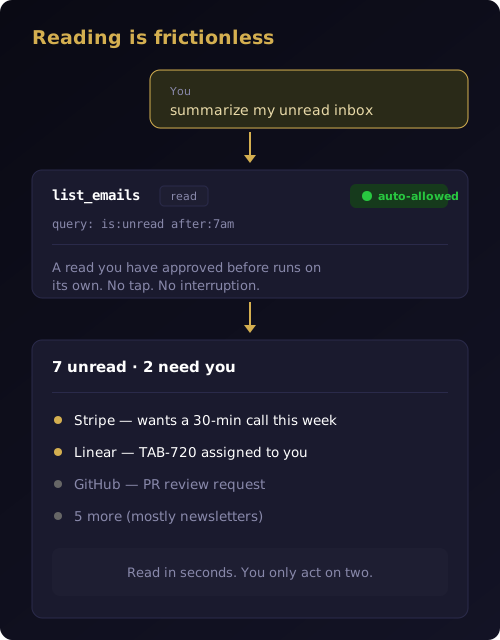
Reading and summarizing your mail is the Gmail connector's job, and Real-Life mode hands the request straight to it. Claude lists your unread messages, reads the ones that matter, and writes you a summary in plain language — who emailed, what they want, and what can wait. You can keep going in the same breath: "what did Sarah say about the launch date" or "show me anything from a client this week."
You: summarize my unread inbox

Bot: 📨 list_emails (Gmail) · read · auto-allowed
     7 unread, 2 need you:
     • Stripe — wants a 30-min call this week
     • Linear — TAB-720 assigned to you
     … 5 more (mostly newsletters)
The summary is the point, not the list. You did not load seven emails into your head to work out which two matter — Claude did that and handed you the verdict. On a normal morning that is the difference between thirty seconds and twenty minutes, and it lands before you have even decided whether today is a coffee day or a tea day.
Notice what did not happen there. The read ran without stopping to ask. That is deliberate, and it is the difference between a tool you actually use every morning and one you abandon after a week of permission fatigue. Reads are safe and repetitive, so Real-Life mode treats them as background. The moment Claude wants to change something, the rules flip entirely.
The one tap between Claude and your outbox
Sending is not reading. A reply leaves your account, lands in someone else's, and cannot be unsent. So every write — send_email, create_event, create_issue — stops and shows you exactly what is about to happen.
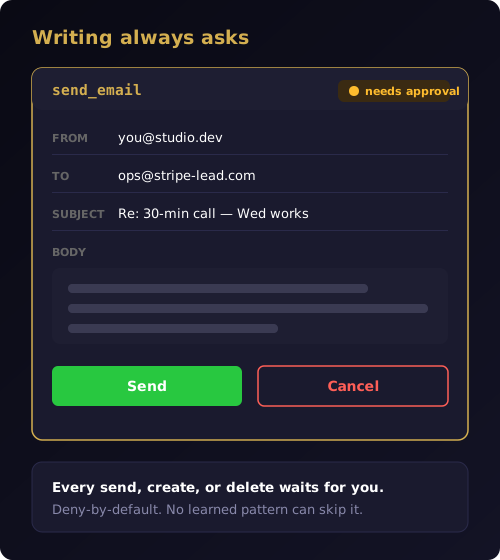
The card puts the full message in front of you: the sending account, the recipients, the subject, and the body. You tap Send to dispatch it or Cancel to abort. There is no "trust me, it will be fine" path and no auto-send mode. The always-ask policy for writes is enforced on the server, and no learned shortcut can route around it.
CodePulse handles the actual sending through a send-only Gmail connection you grant once. It uses gmail.send, the narrowest permission Google offers — enough to send a message on your behalf, and nothing else. It cannot open your inbox, search your history, or change a setting; the reading half stays with the connector, on its own separate permission. The approval card itself was redesigned for this from the ground up, because a conversational approval card for "send this email" should not look like a code diff with line numbers.
This is the principle the whole mode is built on: an AI agent should never take an irreversible action on your behalf without your explicit consent, every time, for every action.
The questions it learns to stop asking
If every action asked, Real-Life mode would be exhausting. If nothing asked, it would be dangerous. The resolution is to treat reads and writes as different species.
A read that you have approved a few times in the same shape — listing today's unread mail, checking this week's calendar — starts running on its own. Connector reads from Claude's own hosted integrations auto-allow on the very first call, because attaching the connector through the three-button picker was itself the act of trust. Writes never earn that privilege. A send_email on your thousandth approval still shows the card.
This is the same pattern-learning idea behind the code-side approval pipeline, with one crucial twist: the policies are kept apart. What Real-Life mode learns about "auto-allow Gmail reads in this chat" lives in its own store and never bleeds into the rules that govern a Bash command in Code mode. We had to make that boundary structural rather than a matter of discipline — the full reasoning is in keeping AI workflows isolated. The payoff is simple to feel: the friction drops week over week, while the actions that can actually hurt you keep asking, forever.
Concretely, on day one, checking your calendar and listing your unread mail might each prompt once. By Friday those reads are silent, and the only cards left are the ones that send, schedule, or delete something. The interface goes quiet exactly where it is safe to, and stays loud exactly where it should.
One chat for Calendar, Stripe, and Linear
Email is the doorway, not the room. The real surface area is whatever you have connected in Claude. Calendar, Drive, Stripe, Linear, Slack — if a connector provides the tool, Real-Life mode can route a Telegram message to it.
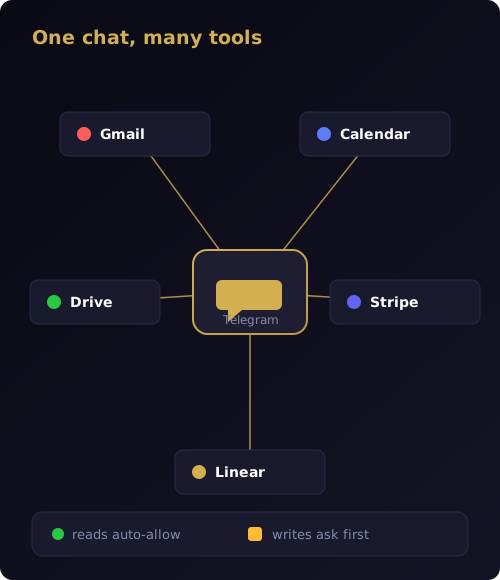
So the Tuesday continues. The Stripe email wanted a call, so you keep typing, and the requests chain together naturally.
You: reply to Stripe, accept Wednesday 3pm,
     add a calendar invite, and flag TAB-720 for review

Bot: ✅ send_email → review card
     ✅ create_event → review card
     ✅ update_issue → review card
CodePulse does not reimplement Gmail or Calendar or Stripe. It is the router and the remote control — your message goes to whichever connector already provides that capability, the result comes back in the same thread, and any write stops at a card on the way out. You turn the whole thing on by tapping Real-Life in the /select picker; the bot attaches your toolkit and lists exactly what is connected, so there is no guessing about what Claude can reach.
Most people start with a handful of connectors that cover the day outside of code:
- Gmail — read, search, summarize, draft, and send.
- Calendar — check the week, create events with attendees, find a free slot.
- Stripe — look up a customer, a payment, or a subscription status.
- Linear — read your assigned issues and post updates from the thread.
By late morning the pattern is automatic. A meeting runs long, so from the hallway you type "move my 2pm to Thursday and tell the attendees why." Claude proposes the calendar change and a short note to each guest; you read both cards, tap twice, and walk into the next room. The errand that used to mean four apps and a laptop is now four sentences and a thumb.
Why it can read your inbox but never touch your repo
Here is the question a careful person asks next. If this thing can send email from my account, what stops it from rummaging through my files?
The answer is that Real-Life mode runs in a deliberately small box. Its sessions execute in a dedicated, CodePulse-managed workspace — a neutral sandbox, never your code repositories and never your personal folders. The toolset is restricted to your connectors and the web; the Bash, Read, and Edit tools that Code mode uses to work on your repo are simply not on the menu in Real-Life mode. It can act on the services you connected, and nowhere else.
The isolation goes further than the filesystem. Approvals are scoped per user and per chat, so one person's "auto-allow my reads" never silently approves another person's. And the credentials themselves stay put: when you grant Gmail send, the token is encrypted and written to your own machine, and CodePulse's servers never receive it. That is the same local-first architecture the rest of the product is built on — your data stays on hardware you control, and the only thing crossing the network is the action you explicitly approved.
So the mode is powerful in one direction and inert in every other. It reaches outward to your apps, with your consent, and it cannot reach inward to your code, your files, or anyone else's account.
What Real-Life mode costs, and what it needs
Real-Life mode is a Premium feature. The free tier already gives you the complete code-side toolkit — the approval pipeline, the live activity feed, and remote control of Claude Code — and that remains free forever. Real-Life mode is the upgrade for the half of your day that is not code, and it is gated accordingly: the AI turns that drive it require a Premium plan.
A few honest specifics. You bring the connectors: Real-Life mode attaches the MCP toolkit you have already set up in Claude, so it is as capable as the connectors you have added. During this first phase it runs on Windows, and Gmail send is in a limited verification beta while Google completes its review. None of that is hidden in the fine print, because a tool you let into your inbox has to earn trust by being precise about what it does.
Which brings the Tuesday back to where it started. The seven-line inbox, the Wednesday call, the calendar invite, the Linear flag — all of it handled from the nightstand, each real action paused for a single tap, none of it requiring you to be at a desk. That is the quiet promise of Real-Life mode: your day, minus the busywork, with you still firmly in the loop.
Ready to run your real life from the same chat you ship code in? Download CodePulse and turn on Real-Life mode with one tap. The free tier includes the full code-side approval pipeline — upgrade to Premium to unlock Real-Life mode, AI commit review, and voice input.