The Help panel had a button labelled "Uninstall CodePulse." Users clicked it. Nothing happened. No dialog appeared, no progress bar advanced, no error toast surfaced. The launcher window stayed exactly where it was, and the user — who had decided to remove our software — was now confused about whether they had successfully removed it. They hadn't. The button had returned an error every single time, and the frontend had silently swallowed it with a comment that read /* app is exiting */. The app was not exiting. The app was sitting there. We shipped the bug at v2.0.4 and it ran in production for over a month before someone reported it.
This is the post-mortem on a one-line Windows UAC mistake that hides inside the most obvious-looking Rust code, and the supporting cast of fixes that landed alongside it in CodePulse v2.3.114.
What the button did, and what we thought it would do
The Tauri command on the Rust side looked exactly like the textbook example:
#[tauri::command]
async fn run_uninstaller(app: tauri::AppHandle) -> Result<(), String> {
    let uninstaller = app
        .path()
        .resolve("uninstall.exe", BaseDirectory::Resource)
        .map_err(|e| format!("Cannot resolve path: {}", e))?;

    std::process::Command::new(&uninstaller)
        .creation_flags(CREATE_NO_WINDOW)
        .spawn()
        .map_err(|e| format!("Failed to launch uninstaller: {}", e))?;

    app.exit(0);
    Ok(())
}
Resolve the path to the uninstaller binary. Spawn it. Exit the launcher so the uninstaller's progress UI takes over. The frontend invoked the command, awaited the promise, and assumed the launcher would shut down moments later as the UAC dialog appeared. None of that happened. The promise rejected. The frontend's catch block discarded the error with a comment optimistically describing what should have been the next state. The user was left with a button that produced no observable effect.
The bug surfaced when a user emailed us asking how to uninstall — not because the support page was unclear, but because the button they had been clicking did nothing. Their machine had three versions of CodePulse installed simultaneously, layered on top of each other through the auto-updater, because the uninstall path had never worked on any of them.
The CreateProcess vs ShellExecute split
Windows has two distinct APIs for launching child processes, and the choice between them is the entire bug.
CreateProcess is the lower-level call. It creates a process directly from an executable image, inherits the parent's security token by default, and does not negotiate elevation with the operating system. If the child's manifest declares requestedExecutionLevel level="requireAdministrator" and the parent is running unelevated, CreateProcess returns ERROR_ELEVATION_REQUIRED (740) and the child never starts.
ShellExecute (and its modern relative ShellExecuteEx) is the higher-level call. It defers the launch to the Windows Shell, which knows about UAC, file associations, the runas verb, and the elevation prompt. When you pass verb = "runas", the shell pops the UAC dialog, asks the user to consent, and elevates the child if they say yes.
std::process::Command::spawn in Rust — and its equivalent in nearly every language's standard library — is a thin wrapper around CreateProcess. The standard library is intentionally low-level. It does what you asked for: spawn this binary with these arguments. It does not negotiate UAC because UAC is a Windows Shell concern, not a kernel concern.
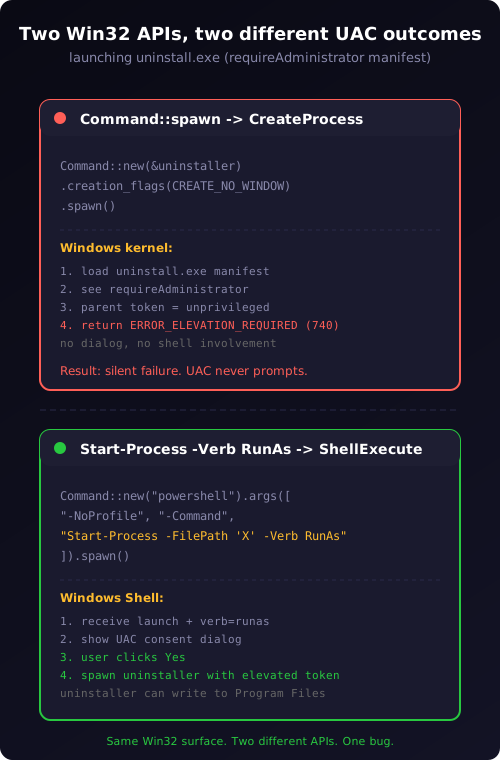
Our uninstaller was an NSIS-built .exe that carries <requestedExecutionLevel level="requireAdministrator"/> in its manifest. NSIS adds that automatically when the .nsi script declares RequestExecutionLevel admin — which it must, because uninstalling a system-installed application requires writing to Program Files and HKLM, both of which are protected. The uninstaller was correctly built. The launcher was correctly unprivileged (a userspace UI app should not run as admin). The only mistake was using the API that does not bridge the elevation gap.
The fix is a single PowerShell wrapper
There is a Win32 API called ShellExecuteExW that lets you trigger UAC elevation directly. There is also a windows-sys Rust crate that exposes it. We did not use either. The simplest, dependency-free fix is to shell out to PowerShell's Start-Process -Verb RunAs, which is itself a thin wrapper around the same Shell API and has the right semantics out of the box:
let uninstaller_path = uninstaller.display().to_string();
std::process::Command::new("powershell")
    .args([
        "-NoProfile",
        "-Command",
        &format!(
            "Start-Process -FilePath '{}' -Verb RunAs",
            uninstaller_path.replace("'", "''")
        ),
    ])
    .creation_flags(CREATE_NO_WINDOW)
    .spawn()
    .map_err(|e| format!("Failed to launch uninstaller: {}", e))?;
Two details matter. The -Verb RunAs argument is what triggers UAC. The single-quoted PowerShell string is what makes the path safe against $ interpolation and backtick escapes — install paths can contain neither under normal Windows conventions, but defensive escaping is cheap and the consequence of getting it wrong is arbitrary command execution. The ' doubling is PowerShell's standard escape for a literal single quote inside a single-quoted string, which guards against the unlikely-but-possible case where an install path contains an apostrophe.
We also added a one-second delay before app.exit(0) so the UAC dialog has time to render before the parent window closes. If the launcher exits the instant spawn returns, the UAC prompt's parent-window handle becomes invalid and Windows occasionally renders the dialog behind the desktop instead of in front of the active window. A one-second delay is invisible to the user but reliable enough for the dialog to claim the foreground. If the user cancels UAC, the uninstaller never runs and the launcher has already exited — that is acceptable UX because the user can re-launch the panel and try again.
The silent-error trap on the frontend
The Rust fix is the headline finding, but the reason the bug survived a month in production is the frontend code that consumed the failure. The HelpPanel button looked like this:
<button onClick={async () => {
  try {
    await invoke<void>('run_uninstaller');
  } catch {
    /* app is exiting */
  }
}}>
  Uninstall CodePulse
</button>
The catch block was written by an author who expected the invoke to succeed and the launcher to exit before the promise's catch handler could run. That expectation was reasonable for the happy path. It was hostile in the failure case. The promise rejected with a usable error message — "Failed to launch uninstaller: The requested operation requires elevation. (os error 740)" — and the catch block threw it away.
The fix on this side is a refactor of the error contract:
const [uninstalling, setUninstalling] = useState(false);
const [error, setError] = useState<string | null>(null);

const handleUninstall = async () => {
  if (!confirm("This will uninstall CodePulse. User data is preserved. Continue?")) return;
  setUninstalling(true);
  setError(null);
  try {
    await invoke<void>('run_uninstaller');
    // launcher should exit shortly; if it doesn't within 5s, surface a fallback
    setTimeout(() => setError("Uninstaller did not start. Check Help → Logs."), 5000);
  } catch (e) {
    setError(`Could not launch uninstaller: ${e}`);
    setUninstalling(false);
  }
};
Three concrete changes from the original. A confirm dialog so accidental clicks don't trigger UAC. An error banner so the user sees what went wrong if elevation fails. A 5-second fallback timer so a stuck UAC dialog doesn't leave the user staring at a "launching" spinner forever. None of these are clever. All of them are the kind of UX defaults that are easy to skip when the happy path looks like "the launcher exits and the uninstaller takes over."
The deeper lesson is structural. Any catch block whose comment describes what should have happened next is a bug. The comment is a tell — the author had a model of the world in their head, the model said "this can't fail because X happens," and they wrote the model into a comment instead of writing a test that proved X. Search your codebase for catch blocks with comments like /* app exits */, /* user already navigated away */, /* request will retry */. Each one is a place where an unhandled failure mode is being silently absorbed.
The bonus bug — Stop Service that took 160 seconds
While we were in this code path we found and fixed a much worse performance bug that had been masked by the same lifecycle code. Our Stop Service path called is_pid_alive(pid) to confirm the service had exited before reporting success. The check was implemented as a PowerShell Get-Process -Id $pid call. On any machine with AMSI (Antimalware Scan Interface) hooks active — which is most Windows 10/11 installs with Defender enabled — powershell.exe -NoProfile cold start takes between 17 and 25 seconds, because PowerShell loads the .NET runtime, loads the AMSI provider, and loads every COM type in $PSHOME before it can run a single command.
A previous "improvement" had introduced a polling loop that called is_pid_alive up to eight times to handle slow service shutdowns. Eight times 17–25 seconds is 136–200 seconds. The Tokio timeout we had set on the whole stop sequence was 10 seconds. The timeout always fired. The frontend always saw the failure. The "Force Kill" button always appeared. Users assumed our service was unstable; really, our diagnostic was 200× slower than the operation it was supposed to verify.
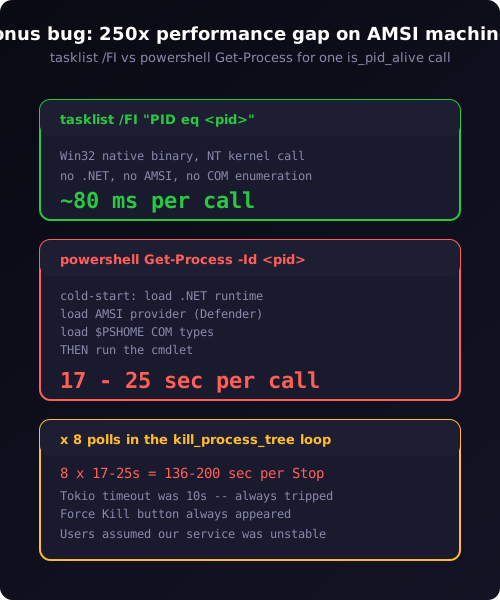
The fix was to revert to tasklist /FI "PID eq <pid>", which uses the same NT kernel API as PowerShell's Get-Process but runs in about 80 milliseconds because it does not load .NET, does not invoke AMSI, and does not enumerate COM types. We also eliminated the polling loop entirely — the new sequence is POST /shutdown to the service, fixed sleep(2s) for graceful shutdown, then unconditional taskkill /F /T /PID <pid> (idempotent on a dead process). The Tokio timeout became 60 seconds, which now genuinely means "something is wrong" rather than "PowerShell is starting up."
The general moral here is the same as the uninstall fix at a smaller scale: be precise about which Windows API you are paying for. The Win32 process APIs (tasklist.exe, taskkill.exe, the underlying OpenProcess / TerminateProcess calls) are fast and reliable. PowerShell wrappers around the same APIs are convenient but carry a 20-second tax on AMSI-scanned machines. The choice between tasklist and Get-Process looks like a stylistic preference; it is in fact a 250× performance difference.
Why this hits Tauri and Electron equally
Nothing about this bug is specific to Tauri or even to Rust. Any cross-platform desktop framework that wraps Command::spawn style APIs hits the same trap on Windows. Electron's child_process.spawn is CreateProcess. Flutter's Process.start is CreateProcess. .NET's Process.Start does default to UseShellExecute = true (which silently elevates), but that default flipped to false in .NET Core, breaking many migrating apps in exactly this way.
The defensive habit, regardless of framework, is to ask one question before every Windows process launch: does the child process have a UAC manifest, and does the parent have permission to satisfy it? If you are the parent and the child is yours, you can audit both. If you are launching a system tool — regedit.exe, mmc.exe, cmd.exe /k — you cannot, and you should default to ShellExecute to be safe. The cost of ShellExecute when no elevation is needed is one extra IPC hop. The cost of CreateProcess when elevation is needed is silent failure.
A second-order habit: when your launcher exits as a side effect of the spawned process, never trust that "the parent will be gone before the user notices." Either delay the exit until the spawn has reported success (you can confirm via the Win32 process API if needed), or make the exit conditional on the spawn returning Ok — never both unconditionally. The pattern of "fire and forget plus suicide" is wrong for any operation that requires user interaction in between.
Lessons we are carrying forward
A handful of habits crystallised from the saga.
Treat every Windows process launch as either ShellExecute or CreateProcess explicitly. Do not use whichever API the language's standard library happens to wrap. The two have different security semantics. Pick on purpose.
Frontend catch blocks describe failure modes, not happy-path expectations. If the comment in your catch reads like a continuation of the try block, you have an unhandled error. Fix the comment by adding the actual handler.
Reproduce the user's environment before declaring a fix complete. AMSI-scanned PowerShell is the user environment for >90% of Windows 10/11 endpoints today. Our internal benchmarks ran on machines without aggressive AV scanning. If we had measured is_pid_alive on a stock Windows 11 install we would have caught the 20-second cold-start cost before shipping the polling loop.
Audit any UAC-related code paths against the auto-updater — the same elevation-gap class of bug applies to every silent-install flow. Our auto-updater calls the same NSIS installer with /S (silent install). It uses the same elevation surface. We re-audited it after this incident; it correctly delegates to the Tauri updater plugin, which uses ShellExecute internally on Windows. The pattern is robust if the framework's plugin handles it, and dangerous if you do it yourself.
The wider point about the hooks ecosystem and the approval pipeline holds equally well here: the most expensive bugs are the ones where every component is locally correct and the integration silently absorbs the failure. The Rust code worked. The frontend code worked. The NSIS uninstaller worked. The composition didn't. Bug-finding effort should bias toward the seams, not the boxes.
If you ship a Windows desktop application — Tauri, Electron, Flutter, .NET, or any combination — the safest one-line audit is to grep your codebase for Command::spawn, child_process.spawn, or Process.Start and confirm each call site either does not need elevation or explicitly elevates via ShellExecute. The cost is five minutes. The cost of not doing it is a button that silently does nothing for every user, every time, for a month.
Ready to ship a Windows app where the uninstall button actually uninstalls? Download CodePulse — the v2.3.114 fix is live and the auto-updater will pull it on next launch. The free tier includes the zero-config installer and the Telegram bridge. Upgrade to Premium to unlock AI commit review, the Genius Supervisor, and voice input.