You installed CodePulse. Downloaded the installer, ran the wizard, configured Telegram. But here is what you might not realize -- that was the last time you will ever do it.
Every developer tool you use follows the same update ritual. A notification appears. You dismiss it. Days pass. Another notification. You finally visit the website, download the installer, close the running service, click through the wizard, restart everything, and hope your hooks and settings survived. Ten minutes of friction for what should be a background operation.
That friction kills adoption. Not in a dramatic way -- in the slow, quiet way that makes people stay on old versions for months. They know an update exists. They just never get around to installing it. And the longer they wait, the more painful the eventual upgrade becomes.
CodePulse v2.1.7 is the version that solves this permanently. It ships with a built-in auto-updater that checks, downloads, verifies, and installs updates silently. Every version after v2.1.7 arrives on your machine automatically. The zero-config installer you ran was the last one you will ever see.
The cost of manual updates in developer tools
Software updates are table stakes. Every modern operating system, browser, and mobile app updates automatically. Yet most developer tools still rely on manual downloads and installers -- or worse, a git pull followed by a rebuild.
The reason is understandable. Developer tools are complex. They touch configuration files, environment variables, PATH entries, and system hooks. An automatic update that breaks any of those is worse than no update at all.
That complexity is exactly why we built CodePulse with a single-variable architecture. The entire configuration lives in one .env file. Hooks are idempotent scripts that the installer registers once. The service is a standalone compiled binary with zero runtime dependencies. This architecture was not accidental -- it was designed from day one to make updates trivial.
When the binary is self-contained and the configuration lives outside it, replacing the binary is a clean operation. No migration scripts, no config merges, no post-install fixups. Drop the new binary in, restart the service, and everything works exactly as it did before -- with whatever improvements the new version carries.
How the auto-updater works
The auto-updater lives in the CodePulse launcher -- the Tauri v2 desktop application that manages the system tray icon and settings panel. When you right-click the tray icon, you see a "Check for Updates" menu item. One click starts the process.
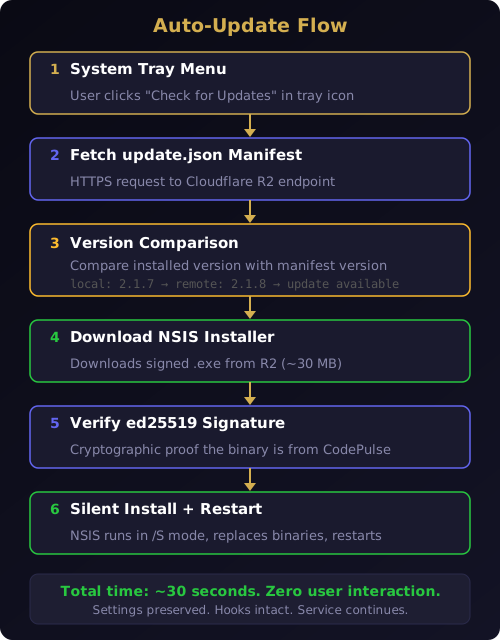
Here is the complete sequence, from click to completion.
Checking the manifest
The updater sends an HTTPS request to a Cloudflare Workers endpoint that serves update.json -- a manifest file containing the latest version number, download URL, release notes, and cryptographic signature. The manifest is cached at the edge, so the request resolves in milliseconds from anywhere in the world.
The manifest structure is minimal:
{
  "version": "2.1.8",
  "url": "https://releases.codepulse.at/v2.1.8/CodePulse-Setup.exe",
  "signature": "dGhpcyBpcyBhIGJhc2U2NCBlZDI1NTE5IHNpZ25hdHVyZQ==",
  "notes": "Bug fixes, performance improvements"
}
If the remote version is newer than the installed version, the updater proceeds. If you are already on the latest version, a brief notification confirms it and the flow ends. No dialogs, no nagging, no "check again later" popups.
Downloading and verifying
The updater downloads the NSIS installer from Cloudflare R2 -- the same installer that new users download from the download page. The file is approximately 30 MB and downloads at CDN speed. A progress indicator appears in the tray notification area.
Before running anything, the updater verifies the installer's ed25519 signature against a public key embedded in the launcher binary. If the signature does not match, the update is rejected and a warning appears. The installer never executes.
Silent installation
Once verified, the updater launches the NSIS installer in silent mode (/S flag). The installer detects the existing installation, stops the running service, replaces the binaries, and restarts the service. Your .env configuration, hook registrations, and Telegram bot connection are untouched -- they live outside the binary directory and survive every update.
The entire process takes about 30 seconds. You click "Check for Updates" once, and the next time you look, the tray tooltip shows the new version number.
There is no restart prompt. No "please close all applications" dialog. The installer handles the service lifecycle automatically -- stop, replace, restart. Your active Telegram bridge session reconnects within seconds of the restart. If Claude Code is mid-session, the hooks continue working because they call the service over HTTP and the service is back online before the next tool invocation fires.
Why ed25519 signing matters for security
Automatic updates are a double-edged sword. The same mechanism that delivers legitimate updates can deliver malware if the update channel is compromised. This is not theoretical -- supply chain attacks through compromised update servers have hit major software products.
CodePulse uses ed25519 signatures to prevent this. Ed25519 is a modern elliptic-curve signature scheme that provides three guarantees.
Authenticity. The signature proves the update was created by someone holding the CodePulse private key. The private key never leaves our build environment -- it is stored as a GitHub Actions secret, inaccessible even to the repository maintainers through the web interface.
Integrity. The signature covers the entire installer binary. If a single byte changes -- whether through network corruption, CDN tampering, or a man-in-the-middle attack -- the signature verification fails and the update is rejected.
Non-repudiation. The signature is deterministic and verifiable by anyone holding the public key, which is embedded in every copy of the CodePulse launcher. There is no trusted third party, no certificate authority, no revocation infrastructure to maintain. The math either checks out or it does not.
This is the same signing scheme that Tauri v2 uses natively in its updater plugin. We did not invent a custom solution -- we adopted the framework's built-in security model, which has been audited and is used by thousands of Tauri applications. If you have ever followed the safe download guide for the initial install, the same level of trust applies to every automatic update that follows.
The one-command release pipeline behind the scenes
From the user's perspective, updates appear silently in the tray menu. From the engineering side, shipping a release used to involve a dozen manual steps spread across three tools. Version 2.1.7 collapsed all of that into a single command.
release.ps1 -Version "2.1.8"
That one command executes the entire release pipeline.
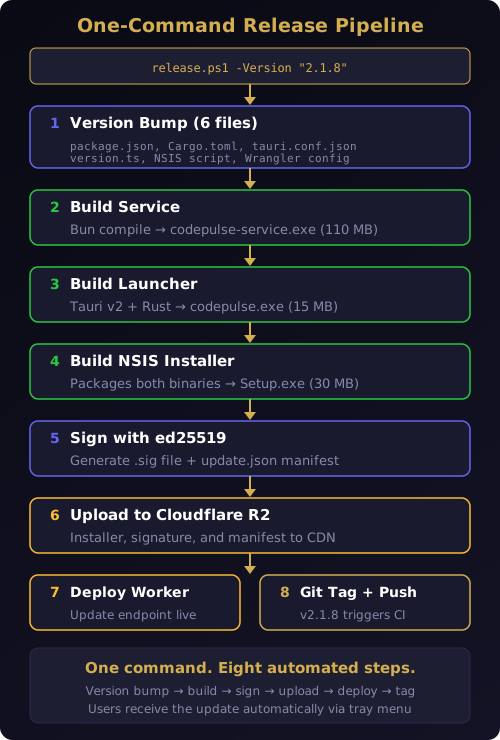
Version bump across six files
A CodePulse release touches six version files across three languages:
package.json-- the Bun service versionCargo.toml-- the Rust launcher versiontauri.conf.json-- the Tauri updater versionversion.ts-- the runtime version constantinstaller.nsi-- the NSIS installer versionwrangler.toml-- the Cloudflare Worker version
The release script updates all six atomically. No manual find-and-replace, no risk of a version mismatch between the service and the launcher. Every component reports the same version number because they are all updated in the same operation.
Version mismatches are a class of bug that is trivial to prevent and painful to debug. When the tray icon reports v2.1.8 but the service binary is still v2.1.7, diagnostic logs become misleading and support conversations go in circles. A single script that bumps everything at once eliminates this category of issue entirely.
Selective builds
Not every release changes every component. A bug fix in the approval pipeline touches only the service code. A tray icon fix touches only the launcher. Rebuilding all three binaries for a single-component change wastes time and bandwidth.
The release script detects what changed since the last git tag and only rebuilds affected components. If only service code changed, it builds the service (110 MB compiled binary), packages it with the existing launcher into a new NSIS installer, and skips the Rust compilation entirely. This cuts build time from twelve minutes to four.
The three components and their sizes:
- Service -- the Bun-compiled approval server, hook processor, and Telegram bridge (110 MB)
- Launcher -- the Tauri v2 desktop app with tray icon, settings panel, and auto-updater (15 MB)
- Installer -- the NSIS package containing both binaries plus install/uninstall logic (30 MB)
Sign, upload, deploy
After building, the script signs the installer with ed25519, generates the update.json manifest, uploads everything to Cloudflare R2, deploys the Cloudflare Worker that serves the manifest, and creates a git tag. The entire pipeline -- from version bump to a live update endpoint -- runs without a single manual step.
Before v2.1.7, each of these stages was a separate manual operation. Version numbers were updated by hand across files. Builds were triggered from the command line one at a time. Signing required opening a separate tool. Uploading to R2 meant running wrangler r2 object put commands. The tag was often forgotten. Each step introduced an opportunity for human error -- a missed version file, an unsigned binary, a manifest pointing to the wrong URL. The release script eliminated all of them.
Cloud builds with GitHub Actions
The local release script is convenient for development, but production releases should not depend on a specific developer's machine. A release that only works on one laptop is a bus-factor risk.
CodePulse v2.1.7 introduced a GitHub Actions workflow that runs the same release pipeline in the cloud. The trigger is simple: push a version tag.
git tag v2.1.8
git push origin v2.1.8
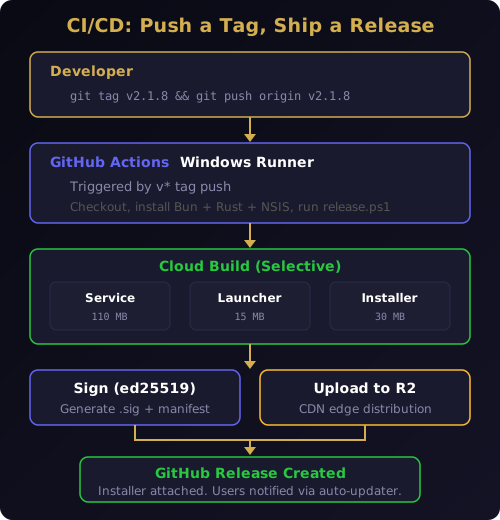
The workflow provisions a Windows runner (required for NSIS compilation), installs Bun and the Rust toolchain, checks out the repository, and runs release.ps1 with the version extracted from the tag name. The signing key is stored as a GitHub Actions secret. R2 credentials are stored as secrets. Nothing sensitive touches the repository or the developer's machine.
When the pipeline finishes, three things happen simultaneously:
- The signed installer and
update.jsonmanifest land on Cloudflare R2 - A GitHub Release is created with the installer attached
- Every running CodePulse instance that checks for updates sees the new version
Zero local resources consumed. Zero manual steps after the tag push. The developer's involvement ends at git push origin v2.1.8.
This CI/CD pipeline builds on the same local-first architecture philosophy that guides the product. The build runs in isolation, the artifacts are signed and verified, and the distribution uses edge infrastructure that does not depend on a single server.
What this means for you as a user
If you are running CodePulse v2.1.7 or later, the practical impact is straightforward: you never think about updates again.
New features land on your machine when you click "Check for Updates" in the tray menu. Bug fixes arrive the same way. Security patches reach you without a blog post telling you to go download something. The Claude Code hooks that power the approval pipeline, AI commit review, and Genius Supervisor are always running the latest version.
This is particularly important for the hook system. Claude Code hooks are registered in the global settings.json file and point to scripts in your CodePulse installation directory. When those scripts are updated, the hooks automatically execute the new logic on the next Claude Code session. No re-registration, no path changes, no restart required.
For teams using CodePulse across multiple machines, automatic updates eliminate version drift. Everyone runs the same version. Everyone gets the same bug fixes. The silent installation mode that the auto-updater uses means updates happen without interrupting active work.
The version that made itself obsolete
There is a satisfying irony in v2.1.7. It is the most important release we have shipped -- and also the last one that requires manual effort from users. Every subsequent release rides on the infrastructure that v2.1.7 put in place.
The release pipeline runs with one command. The CI/CD builds in the cloud. The signed installer uploads to a global CDN. The auto-updater downloads, verifies, and installs it. The user sees a tray notification that a new version is available, clicks once, and continues working.
That is the level of polish we are building toward across every part of CodePulse. The getting started experience should be effortless. The approval flow should learn your patterns and stop asking. The commit review should catch bugs without slowing you down. And updates should happen without you noticing.
v2.1.7 is the last version you install manually. Everything after it arrives automatically, signed, verified, and silent.
Ready to make it your last manual install? Download CodePulse v2.1.7 and every future update handles itself. The free tier includes the auto-updater, full approval pipeline, and Telegram bridge -- upgrade to Premium to unlock AI commit review, Genius Supervisor, and voice input.