When you install CodePulse, five features work out of the box at no cost. Morning Briefing delivers overnight digests. The Pulse shows live file activity. Bidirectional Communication lets you chat with Claude from Telegram. The Approval Pipeline puts Allow, Deny, and Instruct buttons on every permission request. Replay and Cost Intelligence tracks what happened and what it cost.
These five free features cover the essentials. But there is a gap between monitoring what Claude does and actively shaping how it works. Three premium features close that gap — and each one solves a problem that free-tier users eventually run into.
The Problem: Supervision Scales, But Attention Does Not
As your Claude Code sessions grow longer and more autonomous, three things start to break. First, commits land without a second pair of eyes. Claude writes good code, but "good" and "production-ready" are not the same thing — a hardcoded API key, a leftover debugger statement, or a dropped database column can slip through unnoticed.
Second, Claude asks too many questions. Not all of them need your input — some are routine, some are informational, and only a few are genuinely strategic. Every unnecessary notification pulls your attention away from whatever you were doing.
Third, you are not always at your desk. The moment you step away from the keyboard, your ability to supervise disappears. Your phone can show you what is happening, but typing nuanced instructions on a small screen is slow and painful.
The approval pipeline handles permission requests. The live activity feed shows what is happening in real time. But neither one reviews code quality, filters question priority, or lets you work from your phone's microphone. That is where the three premium features come in.
Commit Gate + AI Review
Every git commit that Claude executes passes through a hook before it reaches your repository. CodePulse intercepts it, sends the staged diff to a fast AI model, and delivers a structured review card to your Telegram — all in under two seconds. You see the findings on your phone and tap Commit, Skip, or Details without opening your laptop.
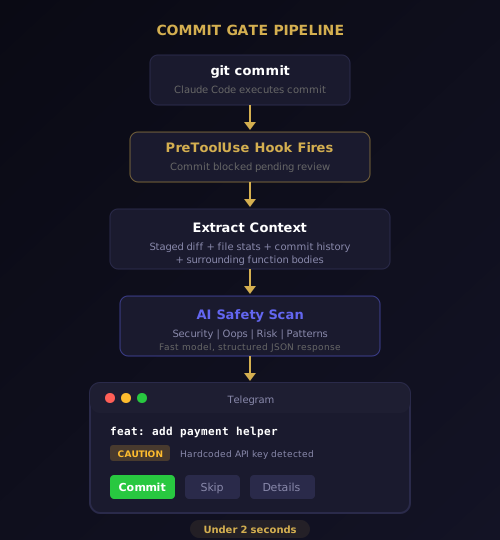
The review checks four categories. Security vulnerabilities like hardcoded secrets, SQL injection patterns, and unsanitized user input. Oops detection for leftover console.log statements, debugger calls, and .only in test files. Risk flags for deleted files without replacement, suspicious migration changes, and lock file mismatches. Pattern consistency for import style mismatches and naming convention violations within the diff.
Each finding is tagged with a severity level — SAFE, CAUTION, or CRITICAL — and a one-line explanation. The Telegram card shows the commit message, the file count, and up to three findings with action buttons.
Why This Is Not a Linter
Linters catch syntax problems. The AI commit review catches intent problems. It understands what the code is trying to do and flags when the implementation does not match the goal. A linter will not tell you that a migration drops a column that another service depends on. The AI model will.
The review is also designed to never block you. If the AI call times out or returns an error, you still get a standard commit card with Commit and Skip buttons. Review failure never prevents shipping. That principle — graceful degradation over hard stops — runs through every part of CodePulse's architecture.
What the Commit Card Looks Like
The commit card arrives in Telegram as a structured message with five elements:
- Commit message — the full message Claude wrote for the commit
- Files changed — count and names of every modified file in the diff
- AI verdict — SAFE, CAUTION, or CRITICAL with a one-line summary of findings
- Findings list — up to three issues, each tagged with a severity level and explanation
- Action buttons — Commit to approve, Skip to discard, or Details for the full diff view
One prevented production bug per month is worth more than the cost of a premium subscription. That is the math behind Commit Gate. Read the full technical deep dive for implementation details.
Genius Supervisor
Claude asks questions. A lot of questions. During a complex refactoring session, Claude might ask for clarification on naming conventions, confirm a database schema change, request permission to install a dependency, and ask whether to use tabs or spaces — all within twenty minutes. Every question generates a Telegram notification. Every notification demands context-switching.
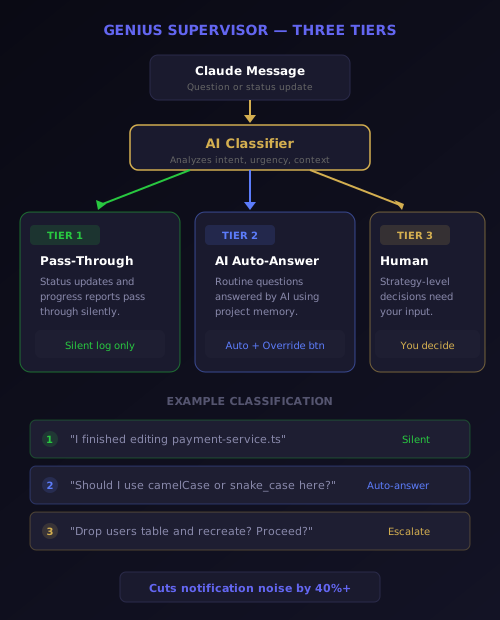
Not all of those questions deserve your attention. Genius Supervisor classifies every incoming Claude message into three tiers and handles each one differently.
Tier 1: Rule-Based Pass-Through
Informational messages — status updates, progress reports, "I finished editing file X" — pass through silently. They are logged in your activity feed but do not generate a Telegram notification. This alone cuts notification noise by roughly 40 percent for most sessions. You can review these messages later in the activity timeline, but they never interrupt you in the moment.
Tier 2: AI Auto-Answer
Routine technical questions are classified and answered by a fast AI model. If Claude asks "Should I use camelCase or snake_case for this variable?" and your project conventions are already documented in the project memory, Genius Supervisor answers on your behalf. The auto-answer appears in your chat with an Override button — tap it if you disagree, and your correction feeds back into project memory for next time.
Over time, Tier 2 handles an increasing share of the workload. As CodePulse learns your preferences across sessions, the number of questions that require your direct input shrinks. The system gets smarter without you doing anything extra.
Tier 3: Human Escalation
Strategy-level decisions are the ones that genuinely need a human. "Should I refactor this module or patch the existing code?" "This migration will delete the users table — proceed?" These questions are escalated to you with full context, a summary of what Claude has done so far, and response buttons.
The result is that your Telegram stays clean. You receive the questions that matter and skip the ones that do not. Read the full deep dive on Genius Supervisor for architecture details and configuration options.
Voice Input
You are on a walk. Your phone buzzes — Claude is asking whether to split a large component into smaller files or keep it monolithic. You have the answer in your head, but typing a thoughtful response on a phone keyboard while walking is slow, error-prone, and frustrating.
Voice Input solves this. Record a Telegram voice message, and CodePulse transcribes it into a text instruction using OpenAI Whisper. The transcription handles technical terminology — function names, framework jargon, file paths — with surprising accuracy. Your spoken answer becomes a typed instruction that Claude can execute immediately.
How Transcription Works
When you send a voice message to the CodePulse bot, three things happen in sequence:
- Audio extraction — The voice note is downloaded from Telegram's servers in OGG format
- Whisper transcription — The audio is sent to OpenAI's Whisper API, which returns punctuated text optimized for technical content
- Command routing — The transcribed text is processed exactly like a typed message — it can be an instruction, an approval response, or a natural language query
There is a ten-second auto-confirm window. If you record a voice message and do nothing for ten seconds, CodePulse sends the transcription to Claude automatically. This prevents the "did I send that?" hesitation that slows down mobile workflows.
When Voice Changes Everything
Voice Input is not just a convenience feature. It fundamentally changes when and where you can supervise Claude Code. Consider these scenarios:
- During commutes — approve commits and answer questions without touching the screen
- In meetings — a quick whispered instruction keeps Claude moving while you stay present
- While thinking — speaking your intent often produces clearer instructions than typing on a small keyboard
- Away from your desk — the kitchen, the couch, the park — wherever you are, Claude keeps working
Combined with bidirectional communication, Voice Input means your supervision never has a gap. You can issue complex, multi-sentence instructions in seconds instead of minutes. Learn more about the voice experience in the voice input guide.
How the Three Features Work Together
Each premium feature is useful on its own. Together, they create a supervision loop that is qualitatively different from what the free tier offers. The loop has no gaps — code quality is reviewed automatically, routine questions are handled without your input, and your voice bridges the last mile between thought and action.
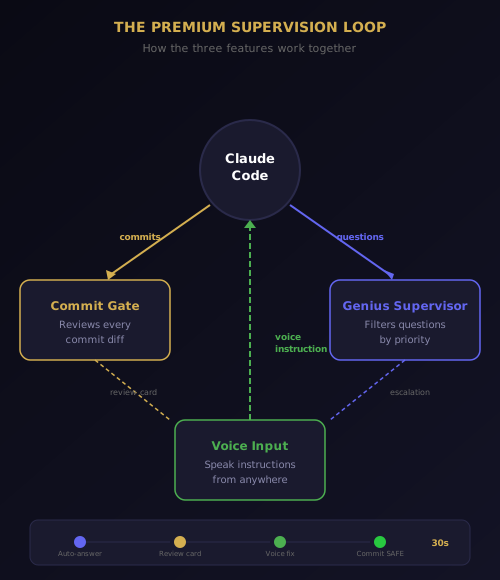
Here is a typical afternoon scenario. You leave your desk at 3 PM to run errands. Claude is refactoring a payment module.
- Claude asks whether to extract a helper function. Genius Supervisor classifies this as a routine question and auto-answers based on your project conventions. You are not interrupted.
- Claude finishes the refactor and commits. Commit Gate intercepts the commit, scans the diff, and sends you a review card with a CAUTION finding — a hardcoded test API key in the new helper.
- Your phone buzzes with the finding. You see the issue, tap Details for context, and record a Voice message: "Remove the hardcoded key and pull it from the environment config instead. Then recommit."
- Claude receives your transcribed instruction, makes the fix, and recommits. Commit Gate reviews the new diff — SAFE. You tap Commit from the grocery store parking lot.
Total time spent: thirty seconds. Without these three features, you would either need to be at your desk or tell Claude to stop working until you return. The premium features do not just add convenience — they eliminate downtime entirely.
What Premium Costs — and What It Saves
Premium is $9.99 per month. That covers all three features described here, plus structured plan cards, automated git workflow, persistent project memory, adaptive approval learning, notification intelligence, proactive intelligence, and API model selection — across unlimited projects.
The math is straightforward. If Commit Gate catches one bug per month that would have taken an hour to debug in production, that is an hour saved. If Genius Supervisor handles twenty routine questions per day that would have each taken thirty seconds to read and respond to, that is ten minutes saved daily — over five hours per month. If Voice Input lets you keep Claude working during a thirty-minute commute instead of pausing, that is thirty minutes of developer productivity recovered every day.
Visit the features page for a complete free vs. premium comparison, or check pricing for plan details.
Getting Started With Premium
If you are already running CodePulse on the free tier, upgrading takes one step. Open the CodePulse config panel and enter your license key. All three premium features activate immediately — no restart, no reconfiguration, no downtime.
# Premium features activate with a license key
LICENSE_KEY: "your-key-here"
# No other configuration needed — all features auto-enable
If you are new to CodePulse, start with the installation guide. The free tier gives you five features to evaluate whether CodePulse fits your workflow. When you are ready for Commit Gate, Genius Supervisor, and Voice Input, premium unlocks all three instantly.
The license validates against a lightweight Cloudflare Worker. If the worker is unreachable, a three-day grace period ensures you are never locked out. All features continue working offline — CodePulse is local-first by design.
Ready to unlock Commit Gate, Genius Supervisor, and Voice Input? Download CodePulse and activate your premium key in under a minute. The free tier includes Morning Briefing, Approval Pipeline, and Live Activity — upgrade to Premium to unlock AI commit review, Genius Supervisor auto-answers, and voice input.