If you have used Claude Code hooks for more than a week, you have hit the noise problem. The PreToolUse hook is the most powerful integration point in the CLI, and it fires on every single tool call — every Bash, every Edit, every Read, every MCP tool. If your hook routes approval cards to Telegram, every harmless Read lights up your phone. If your hook does something heavier — log, classify, or stage data for a dashboard — the cost adds up fast.
Claude Code v2.1.85 added a quiet but transformative field that lets you fix this without writing matcher logic in your hook script. The if field accepts a permission-rule string and scopes the hook to fire only on tool calls that match. CodePulse v2.1.121 exposes this via a new HOOK_IF_FILTERS env var. This is the field guide for using it well.
What if actually does
The CLI evaluates if against the same permission-rule syntax it uses for the permissions.allow and permissions.deny lists in settings.json. The rule is checked before the hook process spawns, so a non-matching tool call has zero overhead — no subprocess, no JSON serialisation, no IPC. From the CLI's perspective, the hook simply does not exist for tool calls that fail the rule.
Three details about the field shape are worth nailing down up front.
The if field belongs inside the inner hook object — alongside type, command, and timeout. It does not belong at the matcher-entry level alongside matcher and hooks. We documented why this matters in detail after we shipped a wire-format bug to our own dev branch and caught it in adversarial review. The CLI silently ignores misplaced fields on parent objects, so a wrong-level if is a runtime no-op. CodePulse handles the placement for you when you use HOOK_IF_FILTERS, so this matters mainly when you are hand-editing settings.json or writing your own hook tooling.
The if field is honored only on tool-related events: PreToolUse, PostToolUse, PostToolUseFailure, PermissionRequest, and PermissionDenied. Other events — SessionStart, Notification, UserPromptSubmit — ignore the field. CodePulse drops filters targeted at non-tool events at parse time with a clear warning in the startup log.
The if field accepts exactly one permission rule per entry. There is no boolean composition (no AND, no OR, no NOT), no list of rules. If you need more than one rule, you register the same hook command in multiple matcher entries — one per rule. This is intentional on the CLI side: each matcher entry is independent, so the hook configuration stays declarative and easy to audit by reading top to bottom.
The permission-rule syntax in 90 seconds
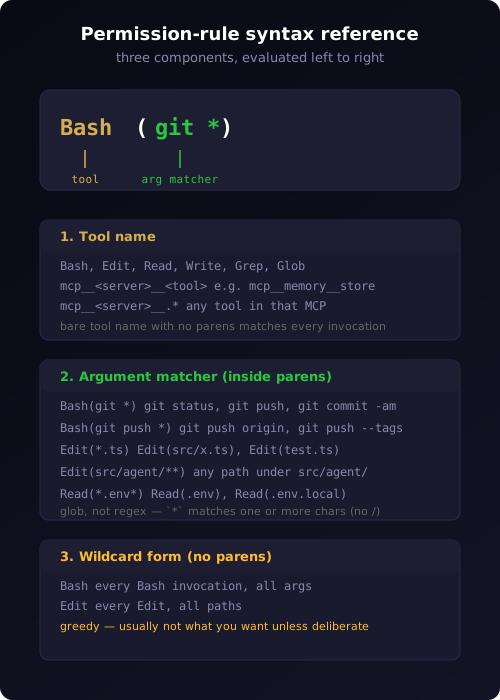
Permission rules are the same shape as the strings you already use in your permissions.allow and permissions.deny lists. Three layers govern what they match.
The tool name is the prefix before the optional parenthesis. Bash, Edit, Read, Write, Grep, Glob cover the local tools. MCP tools follow the convention mcp__<server>__<tool> — for example mcp__memory__store for the memory MCP server's store tool, or mcp__github__search_repositories for the GitHub MCP server.
The argument matcher lives inside the parentheses. Bash(git *) matches any Bash command starting with git (with the trailing space; gitignore does not match). Edit(*.ts) matches Edit calls on TypeScript files. The * is a glob wildcard — it matches one or more characters, but does not cross path separators. The match is anchored to the start of the argument by default.
The wildcard form without parens matches any invocation of that tool. Bash matches every Bash call regardless of command. mcp__memory__.* matches every memory-server tool call regardless of which specific tool. (The .* is a regex-style escape for matching any tool name within an MCP server.)
A few examples that show the syntax in real use:
Bash(git *)               # only git Bash commands
Bash(git push *)          # only git push commands
Edit(*.ts)                # only Edit calls on .ts files
Edit(src/agent/**)        # only Edit calls under src/agent/
Read(*.env*)              # only Read calls on env-named files
mcp__memory__store        # only the memory store tool
mcp__github__.*           # any GitHub MCP tool
The full grammar is documented in the Claude Code permissions reference. For most use cases, the seven examples above are enough.
The CodePulse interface: HOOK_IF_FILTERS
In your CodePulse .env, add a single line:
HOOK_IF_FILTERS={"PreToolUse":"Bash(git *)","PermissionDenied":"Edit(*.ts)"}
The value is a JSON object. Keys are tool-event names. Values are permission-rule strings. CodePulse handles the rest: parsing, validation, plumbing through to settings.json, emitting the if field at the correct nesting level, and surfacing diagnostic warnings if you supply something invalid.
The validation is opinionated. Empty / whitespace-only values are dropped with a value is empty warning. Values longer than 256 characters are dropped with a length warning. Non-string values are dropped with a type warning. Filters targeting non-tool events (e.g. SessionStart) are dropped with a non-tool event warning. JSON that fails to parse logs a parseError line. Case-insensitive duplicate keys (e.g. pretooluse and PreToolUse) trigger a duplicate key warning so you can see which entry actually won.
If you set HOOK_IF_FILTERS and every entry is dropped during validation — for instance, if you accidentally only filtered non-tool events — CodePulse logs a single summary warn line: HOOK_IF_FILTERS was set but no filters are active after validation. This is the line that surfaces a misconfiguration that would otherwise leave you thinking your filter was active when it was not.
When everything validates, you see one info-log line at startup listing the active filters:
TAB-591: hook `if` filters active
  filters: { PreToolUse: 'Bash(git *)', PermissionDenied: 'Edit(*.ts)' }
That line plus a curl against localhost:18321/health is enough to confirm the filter is active without leaving your terminal.
Five recipes that pay for themselves
The recipes below are the ones we use ourselves or have heard from CodePulse users. Each one is a single line in .env. All of them assume you have CodePulse v2.1.121 or newer.
Recipe 1: Approve only git writes from Telegram
The most common reason to install CodePulse is to supervise git operations from your phone. Reads and edits are usually fine; commits, pushes, and merges sometimes need review. With this filter, the approval pipeline only fires on git-write Bash commands. Everything else flows through silently.
HOOK_IF_FILTERS={"PreToolUse":"Bash(git *)"}
You can tighten this further to specifically the destructive verbs:
HOOK_IF_FILTERS={"PreToolUse":"Bash(git push *)"}
Recipe 2: Notify on all Edits, ignore Reads
If you use CodePulse for activity awareness — keeping a Telegram log of what your agent is doing — you usually care about writes and not reads. This pair of filters scopes both PreToolUse and PermissionRequest to Edit / Write calls only.
HOOK_IF_FILTERS={"PreToolUse":"Edit","PermissionRequest":"Edit"}
Note that Edit without parentheses matches any Edit invocation regardless of file path. If you want to scope to a specific area of your codebase, use the path matcher form:
HOOK_IF_FILTERS={"PreToolUse":"Edit(src/auth/**)"}
Recipe 3: Auto-retry only network operations
CodePulse's PermissionDenied auto-retry classifier (shipped in v2.3.119) classifies denial reasons as transient or persistent. If you want to scope retry attention to a specific tool — for example, only Bash commands that hit the network and are likely to be transient — use a filter on PermissionDenied.
HOOK_IF_FILTERS={"PermissionDenied":"Bash(curl *)"}
This combines well with the existing PERMISSION_DENIED_MAX_RETRIES and PERMISSION_DENIED_SESSION_CAP env vars, which act as the secondary cap regardless of which tool calls are scoped.
Recipe 4: Scope to a specific MCP server
If you use multiple MCP servers and only want supervision on one of them, the MCP wildcard form is what you want.
HOOK_IF_FILTERS={"PreToolUse":"mcp__github__.*"}
This filter matches any tool call into the GitHub MCP server — mcp__github__create_pull_request, mcp__github__merge_pull_request, mcp__github__push_files, and so on — while leaving every other MCP server (memory, supabase, stripe, your custom ones) unfiltered. Useful when you trust some MCPs more than others, or when one MCP has destructive operations you want eyes on.
Recipe 5: Dry-run a hook before broad deployment
If you have written a new hook and want to verify it works in production without enabling it for every tool call, scope it to a tool you rarely use:
HOOK_IF_FILTERS={"PreToolUse":"Bash(echo *)"}
This makes the hook fire only on Bash calls starting with echo , which you can trigger manually for testing. Once you have validated the hook end-to-end, remove the filter to let it fire broadly.
This is the same idea as a feature flag, implemented with two characters of config.
What CodePulse does for you
A walkthrough of what happens between your .env line and the running CLI helps explain why the validation is opinionated. Most of it is invisible if everything is right.
When the CodePulse service starts, parseHookIfFilters() reads HOOK_IF_FILTERS from the environment. Each entry runs through five checks: JSON validity, key recognition (against the canonical list of hook event names), value type (must be a string), value length (must be 1–256 characters after trim), and tool-event eligibility (must be a tool event). Failures are accumulated into a diagnostic structure, not thrown — the service starts even when filters are misconfigured, but every dropped entry shows up as a startup log line.
Validated filters are passed through to installHooks(), which is the function that materialises .claude/settings.json for every project directory CodePulse manages. installHooks does one more layer of filtering: any filter targeting an event that is not in the user's HOOK_EVENTS selection is silently dropped. The reasoning is that emitting an if for an event you have not registered would be wasted JSON. The dropped filter is logged so you can see what happened.
The final settings.json has the if field at the correct nesting level — inside the inner hook object, sibling of type / command / timeout — even though the HOOK_IF_FILTERS JSON shape was a flat key-to-value map. We do the indirection so you do not have to think about the wire format at all.
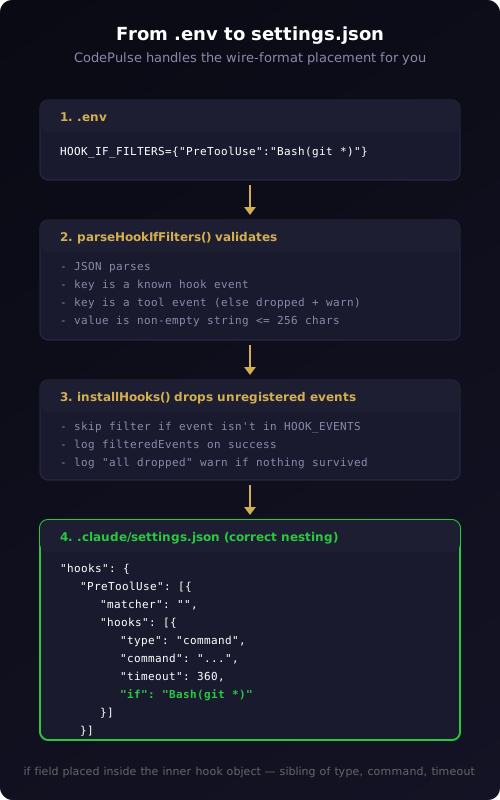
If something is wrong, the diagnostics tell you. We have invested in startup observability for this exact feature precisely because the failure mode of "filter silently drops" is user-hostile. Every entry that does not survive validation gets its own warn line.
Things to watch out for
Three pitfalls catch most people once.
The argument matcher is a glob, not a regex. Bash(git *) matches git push origin main and git status, but does not match gitlab-cli, because the space is part of the literal match. Bash(*.ts) will not do what you expect — it tries to match a Bash command starting with anything ending in .ts, which is rarely what people want. For Bash, the argument matcher is the entire command line, so anchor your patterns to the verbs you care about.
The wildcard form without parens is greedy. Bash (with no parens) matches every Bash invocation. If you wrote Bash thinking it would only match bash-the-shell, you are now firing your hook on every Bash tool call regardless of command — exactly the opposite of what most people want when they write a filter.
The CLI's if evaluation runs before the hook spawns, but it does not affect what shows up in the agent's reasoning. The model still sees that the tool is being called; the hook simply does not run. If your hook adds context or modifies behavior that the model relies on, scoping it can quietly change the agent's experience without showing up in the logs. Keep this in mind especially when the hook is part of an approval pipeline or otherwise gates behavior — the filter changes what the user sees in Telegram, but the model sees the same tool call regardless.
When to use it, when to skip it
The if field is the right answer when you have a per-tool concern that is otherwise expressed as a runtime check inside your hook script. Move that check into the if filter, save the spawn cost, and shorten the diagnostic surface.
It is the wrong answer when your scoping logic depends on data the CLI does not have at filter time — for example, the user's current directory, the contents of a previous tool result, or a database lookup. The if field evaluates against the tool name and arguments only. Anything richer needs to live inside your hook script and run after the hook spawns.
It is also the wrong answer when you want a hook to run for all tool calls but route differently based on the tool. In that case, you keep the hook unfiltered and do the routing inside the hook process. The if field gates execution; it does not branch behavior.
For the common cases — git supervision, MCP-server scoping, file-type targeting — the if field is a one-line config change that pays back the noise reduction immediately. Add it to your .env, restart the service, watch the startup log for the filters active line, and confirm with a curl to the bridge /health endpoint that the filter is in place.
If you are not yet running CodePulse, download it and try the free tier — HOOK_IF_FILTERS is included from v2.1.121 onward and works without a license key. If you are running an older version, the auto-updater will pull the new build the next time you click the tray menu's Check for Updates item.
Ready to cut hook noise without writing matcher logic in your scripts? Download CodePulse and add a single line to your .env. The free tier includes HOOK_IF_FILTERS and the zero-config installer — upgrade to Premium to unlock AI commit review, the Genius Supervisor, and voice input.