You tap Reply on a Telegram card. You type your answer. You see the confirmation: "Reply sent to Claude." You put your phone down and wait for Claude to continue working.
Nothing happens. A minute passes. Five minutes. Ten. You open the terminal and Claude is frozen -- cursor blinking, no output, no progress. Your reply was sent. The confirmation said so. But Claude never received it.
This is the ghost reply problem. It haunted CodePulse for weeks before we caught it, and killing it required rethinking how we trace, log, and secure the entire stop hook pipeline. This post is the story of that investigation and the five fixes it produced across versions 2.2.0 through 2.3.1.
The investigation: a function with zero logging
The first clue came from the service logs. A stop event was held at 23:24:14 -- Claude asked a question, the QUESTION_CARD went to Telegram, and the bridge held the HTTP connection open for a reply. The user replied. The bridge confirmed delivery. Then... silence. No resolution log. No timeout log. Nothing until a new tool call appeared ten minutes later.
We stared at the gap for a long time before realizing the problem was not what was in the logs but what was missing from them. The resolveStop() function -- the single most important function in the stop reply pipeline -- had exactly zero logging.
// Before: the function that delivered replies to Claude
resolveStop(stopId, response) {
  const pending = this.pendingStops.get(stopId);
  if (!pending) return false;
  this.pendingStops.delete(stopId);
  pending.resolve(response);  // sends HTTP response to hook
  return true;
}
Five lines. No log when a stop was resolved. No log when resolution failed. No record of how long the connection was held, what decision was made, or whether the HTTP response actually reached the hook process. The function returned true, the user saw "Reply sent to Claude," and that was the end of the observable trail.
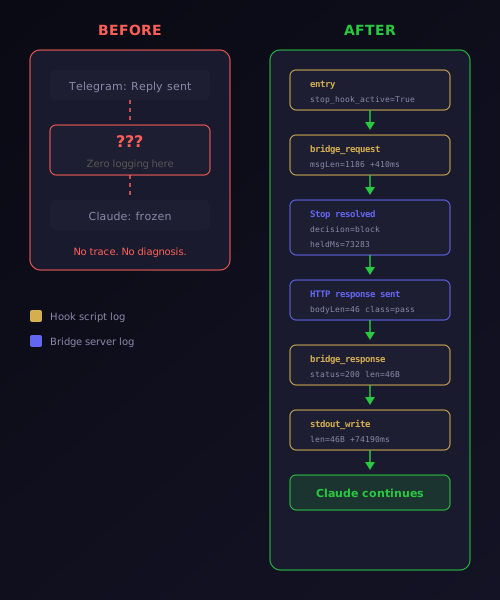
The fix was two lines of logging -- but those two lines changed everything. Now every resolution records the stop ID, the decision (block or release), a preview of the reason text, and the hold duration in milliseconds. When a resolution fails because the stop already expired, that gets logged too. The ghost reply can no longer hide.
The card that would not stop coming back
While investigating the ghost reply, we discovered a second bug hiding in the same pipeline. The [Wait Quietly] button on status cards was supposed to put Claude into a quiet waiting state -- no more cards, session stays alive, send a message whenever you are ready. Instead, it created an infinite loop.
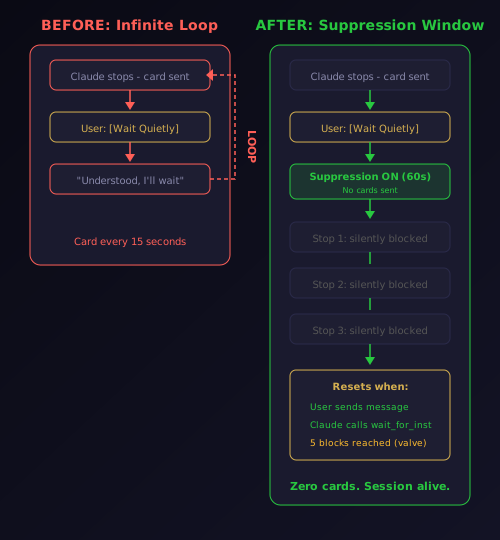
The mechanism was elegant in its brokenness. When you tap [Wait Quietly], the bridge sends { decision: "block", reason: "Call the wait_for_instructions tool..." } back to Claude Code. Claude receives this as a new prompt, generates a response -- usually "Understood, I'll wait for your instructions" -- and that response triggers another Stop hook. The classifier sees a new message, sends a new card to Telegram, and the cycle repeats every fifteen seconds.
We confirmed this through GitHub research: Claude Code's Stop hook reason field is injected as a user-turn message. There is no way to force Claude to call a specific tool -- the reason is persuasion, not a command. Claude might comply and call wait_for_instructions, or it might just acknowledge the instruction and generate text, which fires the hook again.
The fix is a sixty-second rolling suppression window. When you tap [Wait Quietly], the bridge activates suppression. Every subsequent stop event during the window is silently auto-resolved with the same block reason -- no card sent to Telegram. This gives Claude multiple silent chances to call wait_for_instructions without spamming your phone.
Three reset conditions prevent the suppression from lasting forever. If you send a new message, suppression ends because you want to interact. If Claude calls wait_for_instructions, suppression ends because the goal was achieved. If five silent blocks accumulate without either condition, a card reappears as a safety valve.
The first version of this fix only suppressed pass classified stops (status cards). A production test revealed that Claude's response to the wait instruction was sometimes classified as hold (a question), which bypassed the suppression entirely. The fix was moved before all classification branches -- now it catches pass, hold, and auto equally.
Every stop event, traced end-to-end
The ghost reply investigation revealed a deeper problem: the stop hook pipeline had no end-to-end tracing. The service logged when a stop was classified and when it timed out, but the PowerShell hook script -- the process that actually receives Claude's message and bridges it to the service -- logged nothing at all. If the hook never fired, we could not tell. If it fired but the HTTP request failed, we could not tell. If it wrote to stdout but Claude Code never read it, we could not tell.
We added a dedicated diagnostic log at %APPDATA%/CodePulse/diagnostics/hook-events.jsonl. Every hook invocation writes timestamped entries at each stage: entry, bridge request, bridge response, stdout write, and exit. The log rotates at 500 lines to keep disk usage under control.
Here is what a real production trace looks like -- captured during our testing session:
{"event":"Stop","action":"entry","detail":"stop_hook_active=True","elapsedMs":259}
{"event":"Stop","action":"bridge_request","detail":"msgLen=1186","elapsedMs":410}
{"event":"Stop","action":"bridge_response","detail":"status=200 len=112B","elapsedMs":6510}
{"event":"Stop","action":"stdout_write","detail":"len=112B","elapsedMs":6526}
Four lines that tell the complete story: the hook fired, it sent a 1,186-byte message to the bridge, the bridge responded after 6.5 seconds with 112 bytes (a block decision), and the hook wrote those 112 bytes to stdout for Claude Code to read. If any of these steps had failed, the trace would show exactly where.
The service side mirrors this with response-level logging inside the resolve callbacks. When the bridge sends the HTTP response back to the hook, it records the body size and the classification type. Combined with the resolveStop() logging, we now have three layers of tracing: hook script, bridge resolution, and HTTP delivery.
This is the kind of infrastructure you build not because you need it today, but because the next ghost reply will take five minutes to diagnose instead of five hours. And because the feature set that CodePulse offers -- approval intelligence, commit review, session management -- is only as reliable as the tracing behind it. Users do not trust features they cannot verify. Showing them the trace is how you earn that trust.
The diagnostic log also captures PreToolUse and PermissionRequest events with lightweight entry/exit timing. This means the full hook activity timeline is visible -- not just stops, but every interaction between Claude Code and the approval bridge. When something goes wrong, you do not need to guess which layer failed. The log tells you.
The secret that was not a secret
During the traceability work, we audited the house API authentication flow and found a security flaw that had been there since day one. The Cloudflare Worker at api.codepulse.at -- which proxies Haiku calls for premium users -- required two credentials: a per-user license key and a shared API secret.
The shared secret was the same value for every client. It was hardcoded as a default in the source code. It was stored in every user's .env file. It was visible to anyone who opened the config panel. A secret that everyone knows is not a secret.
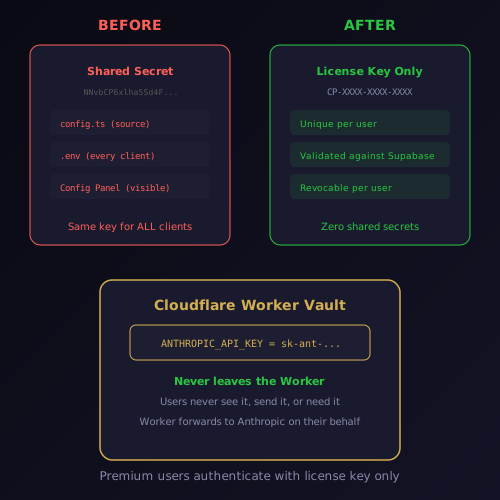
The important thing to understand is what was never at risk: the Anthropic API key that powers the Genius Supervisor and AI commit review is stored exclusively in the Cloudflare Worker's environment secrets. No client ever sees it, sends it, or needs it. Premium users send their license key, the Worker validates it against the database, checks the monthly token budget, and forwards the request to Anthropic using a key that exists only inside the Worker.
The shared secret was a redundant authentication layer that added complexity without adding security. We removed it from every route that did not strictly need it. The Worker now authenticates AI proxy requests using the license key alone -- the same unique key that was already being validated. The source code no longer contains any hardcoded secrets.
For premium users, nothing changes in the experience. The Genius Supervisor still classifies stop messages through three tiers of intelligence. The AI commit review still scans every staged diff for nine exploit classes. The monthly Haiku token budget still tracks usage per license key. The only difference is that the authentication is cleaner, simpler, and actually secure.
Updates that install themselves
The last piece of the v2.3 release is an in-app auto-updater that replaces the old "Check for Updates" button -- which, embarrassingly, just opened the changelog page in your browser. The new implementation uses the Tauri updater plugin to check, download, verify, and install updates without ever leaving the application.
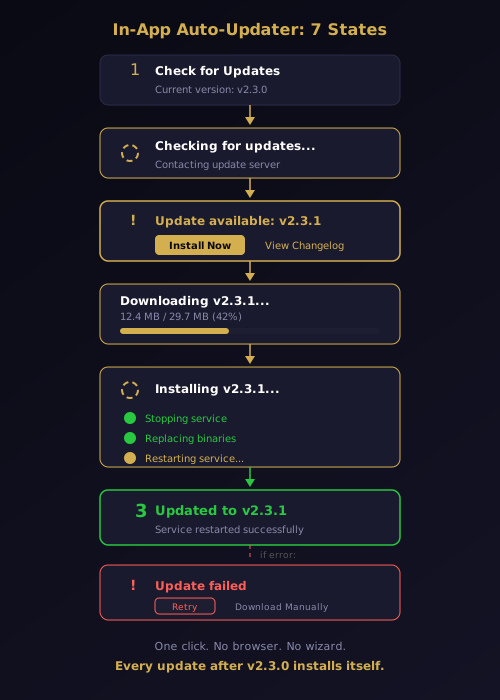
The update flow has seven states, each with its own visual treatment. A gold spinning circle during the check phase. A progress bar with real-time byte counters during download. Step-by-step indicators during installation showing service stop, binary replacement, and service restart. A green checkmark animation on completion. Error states with retry and manual download fallback.
The NSIS installer handles the service lifecycle automatically in silent mode. It detects the running service, stops it, replaces the binaries, and restarts it. Your .env configuration, hook registrations, and Telegram bot connection survive every update. The entire process takes about thirty seconds and requires exactly one click.
This builds on the auto-updater infrastructure we shipped in v2.1.7 -- the ed25519 signing, the Cloudflare R2 hosting, the update manifest. What was missing was the UI button that actually invokes it. Every version after v2.3.0 is one click away.
What five versions in two days tells you about a release pipeline
Versions 2.2.0 through 2.3.1 shipped in under forty-eight hours. Each one contained a focused fix, went through the automated versioning pipeline, and deployed to Cloudflare R2 without manual intervention. The ghost reply fix, the suppression window, the diagnostic logging, the security audit, and the auto-updater -- each one its own commit, its own version, its own release.
This pace is only possible because the infrastructure supports it. Conventional commits determine the version number. Semantic-release bumps all six version files, generates the changelog, and tags the release. A workflow dispatch trigger fires the build pipeline. The NSIS installer compiles, the ed25519 signature is generated, and the binary lands on Cloudflare R2 with an updated manifest. From commit to downloadable installer in twenty minutes.
The result is a system where reliability issues get fixed and shipped the same day they are discovered. The ghost reply was found, investigated, traced, fixed, and released in a single session. The card loop was caught during production testing and patched within an hour. The security flaw was identified during a feature audit and removed before the next version shipped.
That is the engineering standard we hold ourselves to. Not because speed is the goal -- because the gap between finding a problem and fixing it is where user trust erodes. Every hour a ghost reply goes undiagnosed is an hour where a developer thinks their tool is broken. Every day a card loop persists is a day where someone turns off notifications. The fastest fix is the one that never becomes a pattern.
Download CodePulse to get v2.3.1 with full traceability, the suppression fix, and the in-app auto-updater. Check the feature overview to see everything CodePulse offers, or explore the pricing plans to unlock the Genius Supervisor and AI commit review.