You are walking to the office and remember the auth refactor branch still needs an adversarial review before standup. You open Telegram, type /agents start audit the auth refactor branch for bypass routes, and tap Send. By the time you reach your desk twelve minutes later, the AI worker has posted three review notes and opened a follow-up question. You answer the question in one tap, sit down to coffee, and watch the worker finish on the pinned status bar at the top of the chat.
That is the new capability shipping in CodePulse v2.3.170. Claude Code already had background sessions — long-running AI workers that go off, edit files, run MCP servers, and open PRs while you do something else. What it did not have until today was a way to drive them from a phone. CodePulse now wraps the entire Agent View fleet in ten Telegram subcommands, plus a pinned status bar that updates live as workers progress. No terminal. No SSH. No "let me get back to my laptop."
The terminal does not follow you
If you have run a Claude Code background session, you know the shape. claude --bg "do the thing" returns an eight-hex-character session id, the worker starts up in your shell, and from then on you watch its state via claude agents list, claude logs <id>, and claude stop <id>. It is a clean primitive. It is also stuck on whichever machine has the open terminal.
The instant you walk away from that machine, you lose visibility. You cannot see whether the worker finished, whether it asked a question you should answer, whether something crashed. You can VPN in, you can SSH from your phone, but neither of those is what you want at 7am when you are getting ready for the day. You want a glance.
CodePulse's older releases had partial answers — the delegate mode for one-shot dispatch, the genius supervisor for proactive notifications, the approval pipeline for permission decisions. What was missing was a unified surface for the fleet: every running Claude Code session, all at once, on your phone, with a one-tap path into any of them.
What landed in v2.3.170
Ten subcommands under one prefix. They split into four families.

View — what is currently running?
/agents— list every background session, sorted by last activity, with a state emoji (🟢 working · 🟡 needs input · ✅ done · ❌ failed) and a one-line summary/agents working— filter to the ones still going/agents blocked— filter to the ones stuck on you (needs input) or failed/agents completed— filter to the ones finished
Inspect — what is one specific worker doing?
/agents peek <id>— detail card with state, working directory, last summary, the question it is waiting on, and any PRs it has opened/agents log <id>— last 500 lines of the worker's output, inlined if small, attached as a.logfile if large
Act — change the fleet.
/agents start <prompt>— dispatch a fresh background session right now (aliasesdispatch,run)/agents stop <id>— kill a session, with a two-step "Are you sure?" confirm so a misplaced tap cannot terminate a session you wanted
Recovery — fix the pin.
/agents refresh— re-fetch a snapshot, re-render the pinned status bar, and re-pin it/agents pin— re-pin the existing status message without fetching anything (cheapest possible "fix my pin")
All ten are listed in /help under a new Agents (Claude Code fleet) section so users discover them without reading release notes.
The pinned status bar — your fleet at a glance
Open the CodePulse chat and the first thing you see is a pinned message at the top:
🟢 2 running · 🟡 1 needs input · ✅ 3 done
Last: auth-refactor → wired hooks for PreToolUse on Bash(git…) (12s)
That line updates live as workers progress. It does not push a notification — the pin uses disable_notification: true so it never wakes your phone. It is just there, at the top, every time you open the chat. Three running, one waiting on you, three finished. Glance. Move on.
The bar also surfaces the most recently active worker's last summary, so you can tell at a glance which agent moved most recently and what it was doing. When the count of running workers changes, the line re-renders. When a worker finishes, the count of done bumps. When a worker asks a question, the needs-input count goes up and you can scroll down for the actual question.
Under the hood the pinned message edits in place rather than getting unpinned and re-sent. Every edit is throttled (one update per four seconds per chat) and deduplicated against the previous content (identical HTML skips the API call entirely). After every successful edit, the bot calls pinChatMessage again with disable_notification: true — silently — so if you manually unpinned the message, the next edit restores the pin without nagging you.
This is the part v2.3.169 had a gap on. In that release, if the bridge had no new content to push, the pinned message could be dropped without recovery — you had to bounce out to a terminal and run claude --bg to force activity. v2.3.170 closes that gap with /agents refresh and /agents pin, both of which call into a new forcePin path that re-pins the cached message unconditionally and reports the outcome to you ("Pin restored." or "Re-pin failed — check can_pin_messages permission.").
Dispatch from anywhere — /agents start <prompt>
This is the verb that changes the workflow. Type it anywhere you have Telegram. The bot validates the prompt (the bridge enforces ≥4 characters and uses the -- argument separator so a prompt that begins with --dangerously-skip-permissions cannot be misinterpreted as a flag), resolves the working directory, and spawns claude --bg -- "<prompt>" in the background.
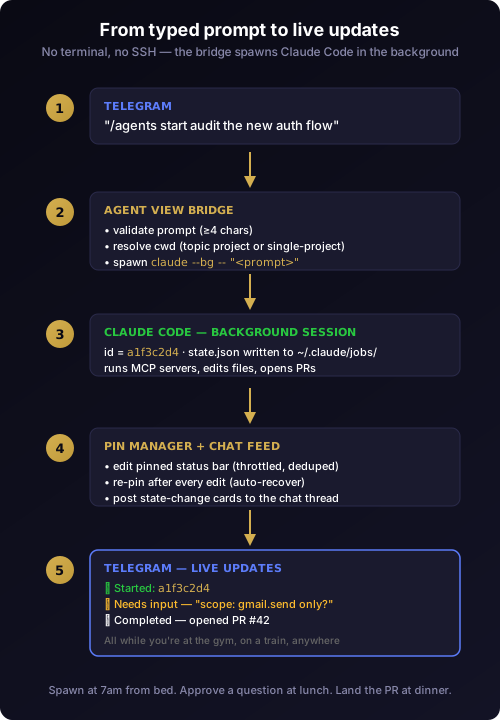
Working-directory resolution is the part most likely to bite, so v2.3.170 is explicit about it. In a multi-project forum-topic supergroup, the topic's project root is used. In single-project mode (the common case), the spawn runs in your configured CLAUDE_WORKING_DIR — never falls through to process.cwd(), which on a Windows service is the install dir and would dispatch sessions into the wrong tree. This is the kind of silent footgun we hunted in test before mass change and refused to leave latent.
The reply comes back inside the same chat thread, with the new session's id, a 200-character preview of the prompt, and quick-tap commands to inspect or stop it:
🟢 Dispatched: a1f3c2d4

Prompt: audit the auth refactor branch for bypass routes
Project: /repo/codepulse

Live updates will arrive in this chat as the session progresses.
Use /agents peek a1f3c2d4 or /agents log a1f3c2d4 for details,
/agents stop a1f3c2d4 to terminate.
Hostile prompts are not a concern at this layer. The Telegram side escapes user input with escapeHtml before placing it into reply HTML (so a <script> paste cannot break the card), and the bridge's -- separator blocks flag smuggling. The same defenses that protect the approval pipeline cards protect this dispatch surface.
Peek and log — operate without a desktop
Once a worker is running, /agents peek <id> is your detail view. It shows:
- The worker's name and current state (with the same emoji legend as the list view)
- Working directory
- Last activity timestamp
- A summary of the most recent step
- The question it is waiting on, if any
- Any PR URLs it has opened
When the summary is long, it truncates at 800 characters with an ellipsis so the card never blows past Telegram's 4096-character message limit. Pull request links are rendered as plain text so you can copy them on long-press, and the card layout discipline keeps the whole thing under one screen height.
/agents log <id> is the deeper inspection. It pulls the last 500 lines of the worker's output. If the output fits under 3,500 characters it inlines as a <pre> block; if it overflows, the bot attaches it as agent-<id>.log so you can save it to your phone, share it to a coworker on Slack, or just open it in a Telegram preview. Either way, no shell required.
The stop verb has a two-step confirm. /agents stop a1f3c2d4 does not immediately kill the worker — it replies with a card containing ✅ Yes, stop and ❌ Cancel buttons. Tap Yes to terminate. The confirmation is bound to a random short token so a stale tap on an older confirmation cannot accidentally stop a session you queued a fresh confirm for, a detail surfaced in the defer-not-hold approval architecture work — the same pattern reappears here because the failure mode is the same.
The pitch, in one paragraph
CodePulse Agents turns your phone into a developer command center. Spawn AI workers from a Telegram message. Walk away. Come back to results. No terminal. No SSH. No "let me get back to my laptop." Just type /agents start review the auth refactor branch and flag any security issues from the grocery store line, and Claude Code is already on it before you reach the checkout. A pinned status bar at the top of your chat shows your whole fleet at a glance — what is running, what needs you, what is done. Tap once to peek at any worker. Tap once to stop a runaway. Tap once to see the logs. One developer, a fleet of AI agents, all driven from the device already in your pocket. From idea to dispatched AI worker in 4 seconds.
What lives where, and why that boundary matters
The implementation splits cleanly into two layers and that split is load-bearing. The interface layer (AgentsCommands + PinStatusManager) owns the Telegram surface: parsing slash commands, rendering HTML cards, managing the pinned message lifecycle, escaping user input, handling Telegram's 429 rate limits with one retry then drop. The orchestrator layer (AgentViewBridge) owns CLI access: spawning claude with the right arguments, reading the ~/.claude/jobs/*/state.json files, parsing the eight-hex-character session id from the dispatch output, polling for fleet snapshots.
Neither layer reaches across the boundary. The interface never spawns a CLI; the bridge never speaks Telegram. That is why a CLI version mismatch surfaces as a friendly "update claude" card in Telegram instead of a raw spawn ENOENT error — the bridge tells the interface "I cannot do this, the CLI is too old," and the interface translates that into a card the user can act on.
The same separation made the Genius Supervisor pulse easy to wire and made the release pipeline verifiable across both layers. It is the same discipline that lets v2.3.170 ship without regressions in the seven subcommands originally shipped in v2.3.165 — the interface change is additive, not surgical.
A real morning, with /agents
Here is what an actual half-day looks like with v2.3.170 in your chat.
7:02 AM, kitchen, making coffee. You remember the auth refactor branch needs an adversarial review before today's standup. You unlock your phone, open Telegram, type /agents start audit the auth refactor branch for bypass routes. Bot replies with 🟢 Dispatched: a1f3c2d4. You put your phone down and keep stirring.
7:18 AM, walking to the office. The pinned status bar updates: 🟢 1 running. You do not check it; you can see it because it is pinned.
7:34 AM, sitting down at your desk. You glance at your phone. The bar now reads 🟡 1 needs input. You scroll up two messages and read the question: "Should I include the legacy /v1/auth endpoint, or skip it since it is deprecated?" You type "skip it" in the same chat. The bot routes your answer to the worker via the existing approval pipeline. The bar flips back to 🟢 1 running.
8:14 AM, in standup. Your phone buzzes once. You glance: ✅ Completed — opened PR #427. You demo the PR during standup. Nobody knows the AI did it while you were walking; the diff is solid and you have to engage with it the same way you would for a human PR.
This is the workflow. The terminal is not gone — when you are at your desk, you can still drive Claude Code from the shell. But the terminal is now an optional surface, not the only one.
Why we built this now
The honest answer is that v2.3.169 verification surfaced a single user complaint that we kept hearing in different words: "I need to see all and test all in Telegram — no other commands." The original v2.3.165 release shipped seven subcommands (list, working, blocked, completed, peek, log, stop, refresh), but it was missing two: a way to dispatch a new session, and a way to fix the pinned status bar if it broke.
Without start, "dispatch" still required a shell. Without pin, an accidentally unpinned status bar required a terminal-side claude --bg call to force activity and trigger a re-pin. Neither of those is a five-minute fix when you are on the move. v2.3.170 closes both gaps in a single release, brings /help up to date with the full command list, and lays the groundwork for the next pass — dispatching a specific custom agent by name (e.g. /agents start adversarial-reviewer "audit X"), which we are scoping next.
The same NASA-grade verification gate that produced the auto-updater pipeline covered v2.3.170: 3446 tests pass, 26 of them new, an adversarial review caught a race between the new forcePin call and the existing throttled-update chain, the fix drains pending work before reading cache and runs the pin call inside the same per-key serializer that protects every other write. The release shipped through the same signed-installer pipeline that has shipped every prior release.
What is next
Two enhancements are in scope for a follow-up release.
Listing custom agents. Today, /agents shows running sessions. It does not show the custom agent templates defined in your local agents directory (e.g. adversarial-reviewer, frontend-dev-expert). A future /agents templates subcommand would scan that directory, parse the frontmatter, and list every available custom agent. The tricky part is detecting the correct directory across installs — Claude Code can be configured to look in a project-local .claude/agents/, a user-level ~/.claude/agents/, or a CLAUDE_CONFIG_DIR-overridden path. We will document the precedence carefully before shipping.
Invoking a custom agent by name. Once listing works, /agents start adversarial-reviewer "audit the new auth flow" becomes a one-liner. The CLI already accepts --agent <name> and the bridge already accepts an agent field; we just have not surfaced it in the Telegram parser yet.
Both land in a single combined commit, with the same adversarial-review-then-ship discipline.
Try it
If you are already running CodePulse, the auto-updater will land v2.3.170 within the next poll cycle. Open Telegram, send /help, scroll to the new Agents (Claude Code fleet) section, and pick the first subcommand that matches what you want to do. If you have never used Claude Code background sessions, start with /agents to see what is running (it will say "No active agents"), then dispatch your first one with /agents start <prompt>.
If you are not running CodePulse yet, the download page has the signed Windows installer. The Telegram bot setup guide walks through bot creation, and the Windows installer guide covers the zero-config first run.
Ready to dispatch Claude Code without opening a terminal? Download CodePulse and your phone becomes the fleet controller. The free tier includes the full /agents command set — upgrade to Premium to unlock AI commit review, voice input, and the Genius Supervisor for proactive pulse notifications.