You are three versions behind on Claude Code. You know this because the CLI told you last week. You planned to update "after this sprint." The sprint ended. You did not update. Another version dropped. Now you are four versions behind and the changelog mentions a bug fix for something that has been annoying you for days.
This is the update gap — the distance between knowing an update exists and actually installing it. For Claude Code, closing that gap means opening a terminal, running an npm command, verifying nothing broke, and hoping your hook integrations survived. For CodePulse, closing it means clicking one button in the system tray. The difference is not just convenience. It is the difference between a tool you keep current and a tool you let drift.
How to check your current Claude Code version
Before updating anything, you need to know what you are running. Open a terminal and run:
claude --version
This prints the installed version number. Compare it to the latest release on the official Claude Code documentation page or check npm directly:
npm view @anthropic-ai/claude-code version
If the numbers do not match, you are behind. The question is how far behind — and whether the changes matter for your workflow. Claude Code does not auto-update. It sits at whatever version you last installed until you explicitly tell it to move forward.
This is by design. Anthropic treats Claude Code as a developer tool that you control, not a service that updates behind your back. That approach has merit — you never wake up to a breaking change you did not opt into. But it also means updates only happen when you remember to do them, and developers are notoriously bad at remembering maintenance tasks that do not break anything visibly.
Three ways to update Claude Code manually
Claude Code installs through npm, so updating follows npm conventions. There are three approaches, each with tradeoffs.
Global npm update
The simplest path. If you installed Claude Code globally:
npm update -g @anthropic-ai/claude-code
This pulls the latest version from the npm registry and replaces the installed binary. On most machines, this takes about thirty seconds. If you used sudo during installation on Linux or macOS, you will need sudo again for the update.
Explicit version install
If you want a specific version — perhaps to skip a known problematic release or to match a teammate's setup:
npm install -g @anthropic-ai/[email protected]
This pins you to an exact version. Useful for teams that want everyone on the same release, but it means you need to actively track which version to target.
Using the built-in update command
Claude Code also offers its own update mechanism:
claude update
This checks for newer versions and installs them. It is a convenience wrapper around the npm update flow, but it runs the same underlying process. On some systems, permission issues or PATH conflicts can cause this command to fail silently — check the version number after running it to confirm the update actually applied.
All three methods share the same limitation: they require you to be at a terminal, remember to run the command, and verify the result. Nothing reminds you. Nothing automates it. Nothing verifies that your integrations still work after the binary changes.
What can break when you update Claude Code
A clean Claude Code update — run the command, get the new version — works most of the time. The problems surface when the update touches something adjacent to the binary itself.
Hook registrations can become stale. If you use Claude Code hooks for approval and monitoring, those hooks are registered in Claude Code's settings.json file. The hooks themselves are external scripts that Claude Code calls at lifecycle events. A Claude Code update does not modify settings.json, so your hooks survive — but if a new version changes the hook API, adds new lifecycle events, or modifies the invocation contract, your existing hooks may behave unexpectedly until you update the corresponding hook scripts.
PATH conflicts on systems with multiple Node versions. If you use nvm, volta, or any Node version manager, a Claude Code update may install into a different Node prefix than the original installation. You end up with the old version still on your PATH while the new version sits in a different directory. Running claude --version shows the old version, and you spend twenty minutes debugging a non-problem.
Global config changes between versions. Claude Code stores settings in ~/.claude/settings.json. Major version updates occasionally change the schema — adding new required fields or deprecating old ones. The CLI handles this gracefully in most cases, but third-party tools that read settings.json directly need to account for schema evolution.
Silent failures after npm conflicts. If your global npm prefix has accumulated conflicting packages over months of installs, npm update -g can fail without clear error messages. The command exits with code 0, the version number does not change, and you assume you are on the latest until a bug report tells you otherwise.
None of these issues are catastrophic. They are the kind of low-grade friction that makes developers postpone updates indefinitely. Each individual problem takes five minutes to fix. But five minutes of debugging after every update adds up to hours per year — hours spent maintaining a tool instead of using it.
How CodePulse eliminates update friction entirely
CodePulse takes the opposite approach. Instead of requiring you to remember, run commands, and verify results, it ships with a built-in auto-updater with ed25519 signing that handles everything from detection through installation.
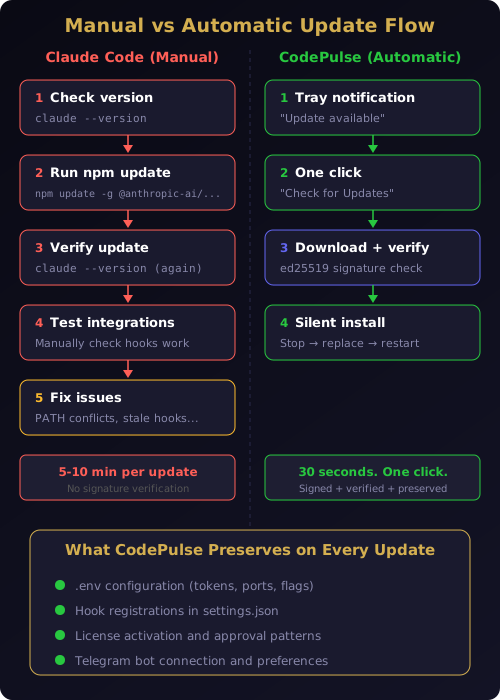
The update flow is three steps from your perspective:
- A notification appears in your system tray: "CodePulse update available"
- You click "Check for Updates" in the tray menu
- The updater downloads, verifies, and installs the new version silently
Behind that single click, the updater performs a full security pipeline. It downloads the signed installer from Cloudflare's edge CDN. It verifies the ed25519 signature against a public key embedded in the launcher binary — if the signature does not match, the update is rejected and you see a warning. Once verified, it runs the installer in silent mode, which stops the running service, replaces the binaries, restarts the service, and leaves your configuration untouched.
The entire process takes about thirty seconds. Your .env file, hook registrations, Telegram bot connection, and license activation survive every update. The approval pipeline that learns your patterns keeps its learned rules. The intelligent AI secretary for routine questions keeps its classification history. Nothing resets.
This is possible because CodePulse was designed from day one with a local-first architecture that keeps data on your machine and separates configuration from binaries. The binary is a self-contained compiled executable with zero runtime dependencies. The configuration lives in a .env file in a separate directory. Updating the binary is a clean swap — no migration scripts, no config merges, no post-install fixups.
What survives a CodePulse update — and what does not
Every CodePulse update preserves:
- Your
.envconfiguration — Telegram tokens, API keys, port settings, feature flags - Hook registrations — all seven lifecycle events stay registered in Claude Code's
settings.json - License activation — your Premium tier, key, and expiration date
- Approval patterns — the rules the automatic approval pipeline has learned from your behavior
- System tray preferences — the launcher remembers its position and startup settings
What changes:
- The service binary — the compiled executable that runs the approval server, hook processor, and Telegram bridge
- The launcher binary — the Tauri desktop application that manages the system tray and settings panel
- Hook scripts — the PowerShell scripts in your
.claude/hooks/directory that connect Claude Code to CodePulse
The hook scripts are intentionally overwritten on every update. This ensures you always run the latest hook logic — if a new version of CodePulse adds support for a new Claude Code lifecycle event or fixes a bug in the stop message classifier, the updated hooks deliver that improvement immediately. The hooks are stateless scripts that read CODEPULSE_HOME at runtime, so replacing them has zero side effects.
Side-by-side: Manual CLI updates versus automatic updates
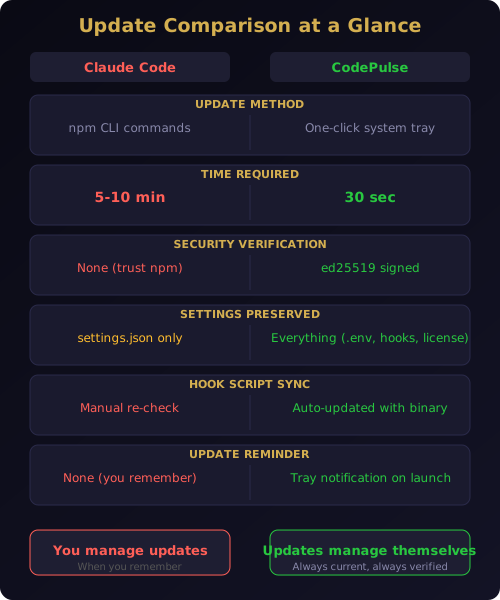
Here is how the two update experiences compare across the dimensions that actually matter to your daily workflow.
Update frequency. Claude Code releases roughly every one to two weeks. Without automation, most developers update every month or two — when they remember or when a bug forces the issue. CodePulse checks for updates on every launch and offers one-click installation. You stay current without effort.
Verification. After updating Claude Code via npm, you run claude --version and hope the number changed. After a CodePulse update, the system tray tooltip shows the new version number and the service is already running. The ed25519 signature verification happens before installation — if the binary was tampered with in transit, it never executes on your machine.
Rollback. Rolling back a Claude Code update means installing a specific older version via npm install -g @anthropic-ai/[email protected]. Rolling back CodePulse means downloading a previous installer from the GitHub releases page and running it — the installer handles the downgrade the same way it handles an upgrade. Both approaches work, but CodePulse's installer-based approach preserves your configuration regardless of direction.
Integration safety. Claude Code updates do not touch your hooks or settings, but they may change the hook API contract. CodePulse updates explicitly update the hook scripts to match the new service version, ensuring the hooks and service are always in sync. You never end up with a version mismatch between the scripts Claude Code calls and the service those scripts communicate with.
Team consistency. Getting a team of five developers on the same Claude Code version requires a message in Slack and trust. Getting them on the same CodePulse version requires nothing — the auto-updater delivers the same version to everyone, at the same time, with the same cryptographic verification. The silent installation mode that the auto-updater uses means updates happen without interrupting active work.
Keeping Claude Code and CodePulse in sync
CodePulse wraps around Claude Code — it does not replace it. You still need Claude Code installed and updated independently. The two tools update on different schedules, and that is by design.
Claude Code is the AI coding engine. It receives model updates, prompt improvements, and new tool capabilities from Anthropic. These updates change how Claude writes code, which files it can edit, and what commands it can run. You should update Claude Code when Anthropic ships features or fixes that matter for your workflow.
CodePulse is the control layer. It receives updates to the approval pipeline, commit review engine, Telegram bridge, and Genius Supervisor classification system. These updates change how you interact with Claude Code remotely — not how Claude Code itself behaves.
The practical workflow is straightforward:
- CodePulse updates automatically. Click the tray notification when you see it, or let it check on launch. Done.
- Claude Code updates manually. Run
claude updateornpm update -g @anthropic-ai/claude-codewhen you see a new version. CodePulse's hooks are forward-compatible — they work with any Claude Code version that supports the standard hook API.
If a Claude Code update introduces a new lifecycle event that CodePulse can leverage, a corresponding CodePulse update will ship shortly after with updated hooks. The auto-updater ensures you receive it without additional action on your part.
Why automatic updates matter more than you think
The argument for manual updates is control. You choose when to update. You test before deploying. You never wake up to a surprise.
The argument against manual updates is human nature. You do not update. Weeks pass. Versions pile up. Bug fixes sit on npm while you debug the same issue they already solved. Security patches wait while your hooks run older code. Eventually the gap becomes so large that updating feels risky — what if three versions of accumulated changes break something? — and you postpone it further.
Automatic updates break this cycle. They keep you current by default. They deliver AI-powered commit review improvements, approval pipeline refinements, and security fixes as soon as they ship. The ed25519 signing ensures that "automatic" does not mean "unverified" — every update is cryptographically authenticated before it touches your machine.
CodePulse was built from the ground up to be a tool that maintains itself so you can focus on your code. The step-by-step Windows installation guide covers the initial setup, and after that first install, the auto-updater takes over. You never download another installer. You never run another update command. You never wonder if you are on the latest version.
This is the approach that every modern browser, operating system, and mobile app has adopted. The question is not whether developer tools should auto-update. It is why so few of them do.
Ready to stop manually tracking updates? Download CodePulse and let the auto-updater keep you current. The zero-config Windows installer gets you running in under two minutes. The free tier includes the auto-updater and full approval pipeline — upgrade to Premium to unlock the Genius Supervisor, AI commit review, and voice input.