You are on the train home and a text lands: "are those noise-cancelling headphones you wanted still on sale?" You open Telegram, ask your CodePulse bot, and it checks the retailer, reads the product page, and replies with the current price and a link before your stop. No laptop. No pinching at a browser on a cramped phone screen. The same assistant that reads your Gmail and checks your Calendar just answered a question that lived entirely on the open web.
That is the capability now live for premium users: reliable web search from Telegram, built into Real-Life mode. Your assistant no longer stops at the edge of your inbox - it can reach the open web, on the first try, and bring back a sourced answer.
The half of your questions that live outside your inbox
Real-Life mode was built to drive the tools you already live in - Gmail, Calendar, Drive, and the rest of your connected toolkit - from a Telegram chat. We told that story in Real-Life mode beyond the codebase. It made the bot genuinely useful for the part of your day that is not code: checking a meeting, finding a file, drafting a reply.
But a large share of away-from-desk questions have nothing to do with your private data. "What is the current price of this?" "Did that release actually ship?" "Who makes a reputable version of that part, and where can I buy it?" Those answers live on the open web, not in your Drive, and they are exactly the kind of quick lookup you would normally pull out a laptop for.
For everything that lives inside your accounts, the assistant was already strong. It could even take action - we covered one-tap, one-approval sending in send Gmail from Telegram. The gap was the open web. Ask the bot to look something up and the result was a coin flip: sometimes a clean answer, sometimes a flat refusal. Half of the questions you would actually ask a pocket assistant were unreliable. Closing that gap is what this release is about.
Why "search the web" used to refuse, then work
The tell was the inconsistency. Ask the bot to look something up and the first attempt would often refuse - "I can only answer from your connected Workspace" - while an immediate retry of the very same question worked. That pattern matters more than it looks. A genuinely missing capability fails every single time. A request that fails every other time is not a missing tool. It is two instructions quietly fighting each other.
That is exactly what was happening, and finding it took reading the prompt the worker actually receives rather than trusting what we assumed it said. One per-turn instruction told the worker to answer only from your Google Workspace and take no other actions. A separate, broader instruction already permitted open-web lookups. With both present, the worker resolved the contradiction differently from one run to the next, so the identical question refused or succeeded at random.
A tool block would have been the wrong diagnosis - the web tools were already allowed and already approved. The bug lived in the wording, not the wiring. So the fix was not new plumbing. We removed the over-narrow "Workspace only" mandate and made the web-search permission explicit on every Real-Life turn, typed or spoken. Workspace questions still route to your private data, read-only. Web questions now go to the web on the first attempt. The behavior is deterministic instead of lucky - the same lesson we keep relearning, that an honest read of the system beats a confident guess about it.
WebSearch finds, WebFetch reads
Two built-in tools do the work, and they are deliberately paired.
- WebSearch runs a server-side search and returns the pages that match - titles and URLs. It is the finding step.
- WebFetch opens a specific page - one WebSearch surfaced, or a URL already in your message - and answers from its real content. It is the reading step.
Enabling only one gives you thin results. Search alone returns a list of links and leaves you to open them. Fetch alone cannot discover anything you did not already name. Together, the assistant finds the right page and then reads it, so the answer is grounded in an actual source rather than a confident paraphrase of a search snippet. In practice the two chain naturally: a current-price question becomes a search that locates the product page, then a fetch that reads the price off that page, then a one-line reply with the link - three steps the worker runs on its own and surfaces to you as a single answer.
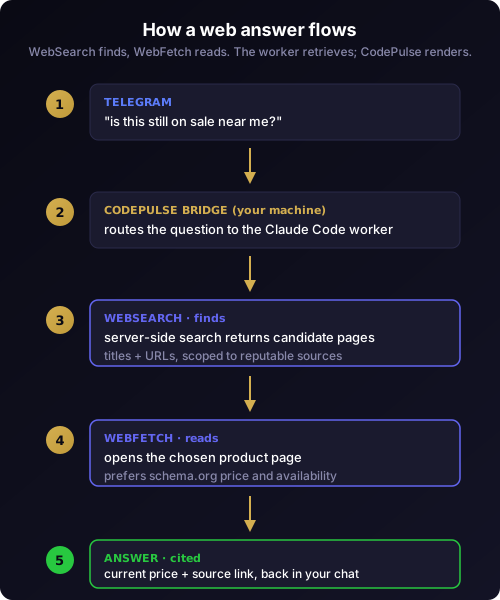
Just as important is what does not happen. CodePulse does not run a search engine of its own. Your question is handed to the Claude Code worker - the same engine behind every Real-Life turn - which holds the web tools and does the retrieval. CodePulse stays the messenger that carries your question and renders the answer, exactly the division of labor that keeps the local-first architecture intact. There is no separate scraper, index, or cache of your searches sitting on our servers, because there is no server-side retrieval engine to build one.
A day of questions it can now answer
The capability is easiest to understand as the questions it unblocks. None of these touch your private data, and all of them used to be a laptop-or-nothing situation.
- "Is the standing desk I looked at last week back in stock anywhere near me?" - a scoped product lookup that returns a retailer, a price, and a link.
- "Did the framework I depend on ship its 2.0 release yet?" - a current-status question answered from the project's own release page, not stale training data.
- "What time does the hardware store on the north side close today?" - a live local-hours lookup while you decide whether it is worth the detour.
- "Find a reputable supplier for this exact part, and tell me roughly what it costs." - research that the assistant scopes to real vendors instead of content farms.
- "What is the carry-on size limit for the airline I fly tomorrow?" - a live policy lookup the night before, instead of digging back through a booking confirmation.
Each of these is a question you would naturally speak into your phone, and each now comes back with a source you can tap to verify. Paired with the rest of Real-Life mode, the bot fields "what does my calendar look like Thursday" and "what is the going rate for this online" in the same conversation, choosing the right place to look for each.
Precision for shopping and product research
General web search is noisy, and shopping questions are the noisiest of all. Precision here does not come from a different search engine - it comes from scoping the one you have.
The assistant prefers reputable retailer and brand sources over content farms, factors in your approximate location so prices and availability are local, then fetches the actual product page rather than trusting a summary snippet. Where a page publishes structured product data - price, availability, SKU - it reads that in preference to marketing prose, and it cites the source so you can confirm the number yourself instead of taking the model's word for it.
One limit is worth stating plainly, because the why we built CodePulse habit is to be straight about what a tool cannot do. The built-in fetch is not a production scraper. Prices rendered by heavy client-side JavaScript, and catalog-scale extraction across hundreds of pages, are out of its reach. For a single "is this still on sale and where" question it is excellent; for live inventory feeds across a whole catalog, that is a heavier, different system we have deliberately not bolted on. When the answer is a number sitting on a normal product page, you will get it - and when it is not, the assistant tells you rather than inventing one.
It runs without a tap, and why that is safe
Sending an email is irreversible, so send Gmail from Telegram makes every send an always-ASK approval. Web search is the opposite kind of action - it is read-only - so it runs without an approval card at all. That is intentional: when you are away from your desk, you should not be blocked on a tap just to look something up.
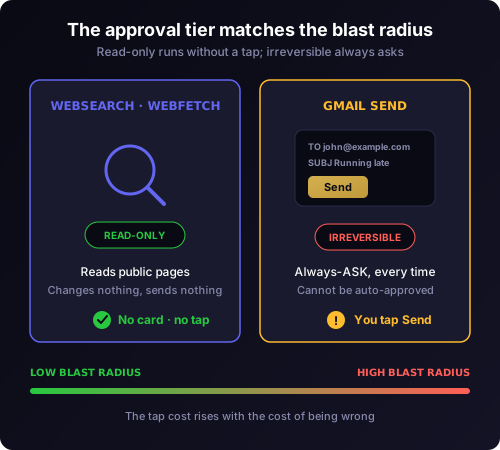
Read-only is what makes no-tap safe. A web lookup cannot change anything, send anything, or touch your accounts - the worst case is "the assistant read a public page." That risk profile maps to the no-prompt tier in the same approval pipeline that holds higher-blast actions behind a card. The approval tier matches the blast radius, every time.
The guardrails underneath are real, not assumed. Web content is untrusted input, so the assistant summarizes before it renders, keeping the surface bounded. The fetch step can only open URLs that appeared in your message or in prior search results - it cannot follow a link the model invented, which closes the obvious data-exfiltration path. Secret redaction runs on the output before anything reaches your chat, the same discipline behind ghost reply traceability. And because Real-Life learning stays in its own lane through per-topic isolation, nothing about web search bleeds into how Code mode approves a Bash command.
What it costs, and who counts it
Web search is metered. Each search carries a per-query cost on top of the tokens it spends, and fetching pages adds token cost. We mention the meter for the same reason we publish our security-review costs: when a tool reaches outside your machine, you should know there is a cost running and who is watching it.
Every web search and fetch is routed through the same cost accounting as the rest of the platform, so it shows up in your usage rather than disappearing into a flat fee. That visibility is the point - a remote AI agent that quietly racks up spend is exactly the failure CodePulse exists to prevent. The per-search cost is also why web search sits behind Premium rather than the free tier: an unmetered web tool in every hand is a billing problem waiting to happen, so it ships where the spend is already accounted for, alongside the rest of the three premium features that justify the upgrade. The free tier keeps the full approval pipeline and Real-Life mode for your own connected tools; reaching the open web is part of what Premium adds.
Where web search fits in Real-Life mode
The result is a Real-Life mode that is finally balanced. Your own data - Gmail, Calendar, Drive - stays read-only and private, routed to your connected tools. The open web - current events, general knowledge, prices - is one explicit permission away on every turn. The assistant picks the right source instead of forcing everything through one: it does not waste a web search when the answer is already in your Drive, and it no longer refuses when the answer is plainly on the web.
It works by voice, too. Paired with Telegram voice input, you can speak a question on the move and hear a sourced answer back - the away-from-desk loop Real-Life mode was always meant to close. The bot in your pocket now reads your inbox, sends your mail with one approval, and answers the rest of your questions from the web, each with the right safeguard for what it is doing. That is the shape Real-Life mode has been building toward - one calm chat that reaches both your private tools and the public web, with the friction set deliberately at each step rather than left to chance.
Ready to ask the web from your pocket? Download CodePulse and open Real-Life mode in Telegram. The free tier includes Real-Life mode and the full approval pipeline - upgrade to Premium to unlock web search, AI commit review, and voice input.