Automated versioning and the Wait Quietly fix: shipping faster without breaking sessions
CodePulse v2.1.31-v2.1.36 ships an automated release pipeline using semantic-release and fixes the infinite card loop when tapping Wait Quietly on status cards.
Your AI coding assistant is powerful — but who watches it while you are away from your desk? We write about the architecture, the trade-offs, and the hard-won lessons behind building an intelligent layer between Claude Code and your phone. From three-tier classification pipelines that auto-answer routine questions to approval engines that learn your patterns after three taps — every article is a deep dive into the systems that let you ship code from a park bench without losing sleep.
CodePulse v2.1.31-v2.1.36 ships an automated release pipeline using semantic-release and fixes the infinite card loop when tapping Wait Quietly on status cards.
CodePulse v2.1.7 ships a built-in auto-updater with ed25519 signing and a one-command release pipeline. The last version you install manually.
Chrome blocks unsigned downloads by default. Here's why you see the warning, why CodePulse is safe, and how to download it in three clicks.
A step-by-step visual guide to creating your Telegram bot with BotFather, getting your Chat ID, and connecting it to CodePulse for remote AI agent control.
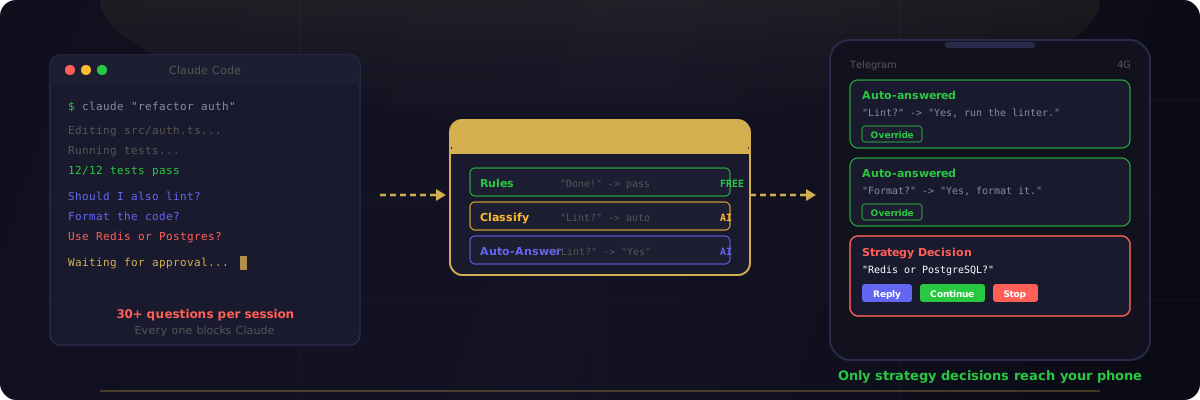
Claude Code asks 30+ questions per session. Most are routine. CodePulse's three-tier classification system handles the obvious ones automatically — only strategy decisions reach your phone. Here's how the intelligence layer works.
Every Claude Code action passes through a 7-step approval engine that adapts to your workflow. It starts by asking permission for everything — then learns your patterns and stops asking. Here's how the pipeline works, step by step.
Every git commit is intercepted, scanned by AI for security issues, forgotten debug code, and risky patterns — then surfaced in Telegram before the code reaches your repo. Here's how it works.
The new CodePulse installer eliminates manual configuration. Download, click Next, and start controlling Claude Code from Telegram — no terminal commands, no path editing, no config files.
Why we chose Telegram over a web dashboard for remote Claude Code control, and how the bidirectional stream-json architecture makes it work.
A comprehensive reference to every Claude Code hook event, from SessionStart to SessionEnd. Learn what each hook does, when it fires, and how to use them with practical examples.